Key Takeaways:
Telegram widgets connect your website with Telegram, giving visitors an easy way to chat, share content, view posts, or join discussions.
t.me link provides a simple entry point for visitors to contact your business: find your Telegram username → create a t.me link (https://t.me/username) → add it to a website button or text.
Telegram chat widget with SaleWisely offers a more visible and customizable chat experience: find Website Plugin → click Connect → customize the widget → enable Telegram and add the URL → connect it to your website.
As customer conversations grow across Telegram, website chat, WhatsApp, TikTok, and other channels, managing messages and follow-ups can become more complicated.
SaleWisely brings conversations from different channels into one shared inbox, with AI Agent, CRM, and real-time translation to simplify customer communication and boost sales.
What is a Telegram Widget?
A Telegram Widget is a website integration that allows you to bring certain Telegram features directly to your website. Telegram officially provides several types of widgets, including the Sharing Button, Post Widget, Login Widget, and Discussion Widget. These widgets can let website visitors share content to Telegram, view posts from public Telegram channels or groups, log in with Telegram, or view Telegram discussions without leaving your website.
For businesses, Telegram can also be connected to a website as a customer communication channel. For example, a website can include a Telegram button or link that takes visitors to a business account or bot, or use a third-party chat solution to connect Telegram with website chat.
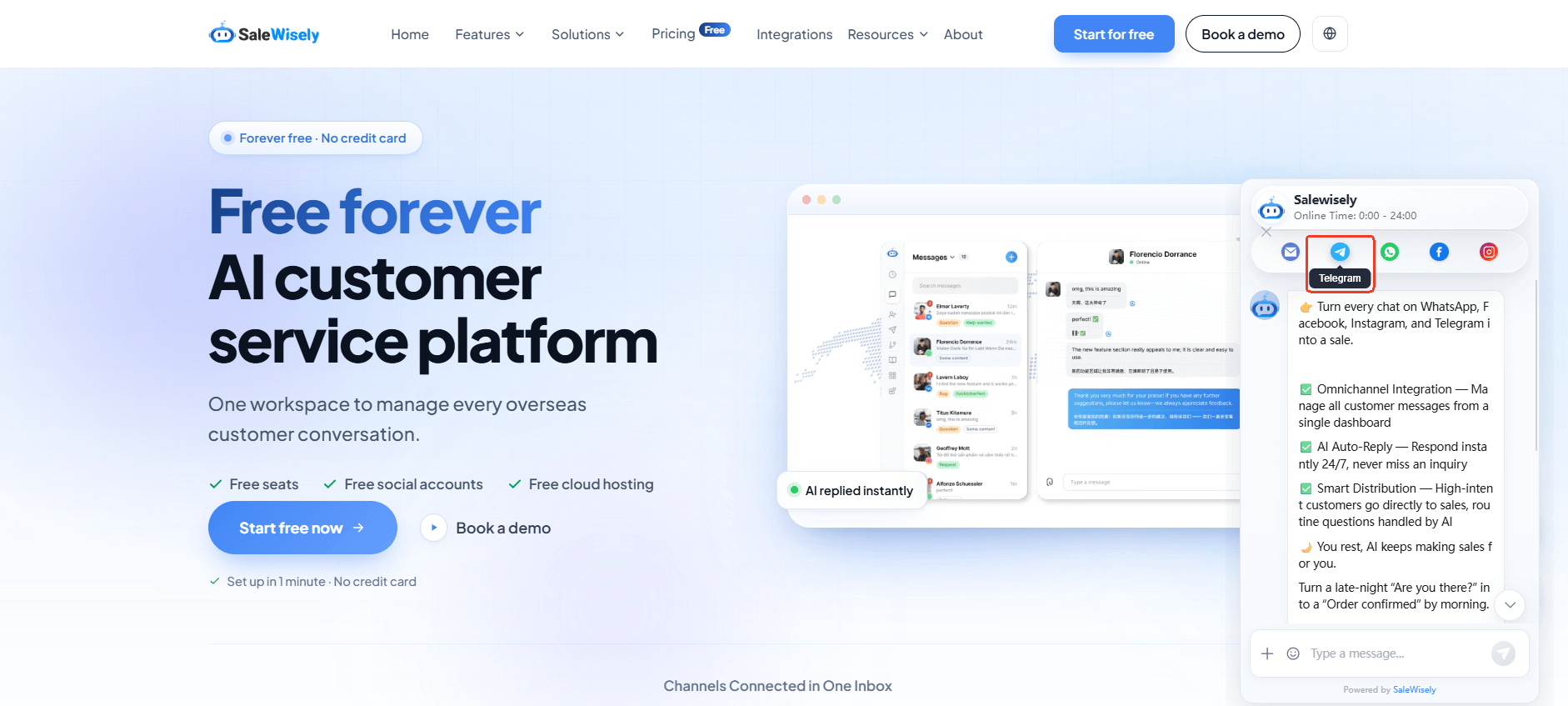
What can a Telegram widget do?
Connect customers: Give visitors a direct way to contact your business through Telegram for questions, support, or sales inquiries.
Share website content: Telegram's Sharing Button allows visitors to share webpages and other content directly to Telegram.
Display Telegram content: The Post Widget lets you embed posts from public Telegram channels or groups on your website.
Enable Telegram login: The Login Widget allows users to sign in to your website using their Telegram account.
Show discussions: The Discussion Widget lets you display Telegram discussions on your website.
Why Should Business Add Telegram to Website?
Telegram is no longer a niche messaging app. In 2025, Telegram surpassed 1 billion monthly active users, making it one of the world's largest messaging platforms. Telegram also ranks among the top five most-downloaded apps globally, giving businesses access to a large and diverse user base.
For businesses that already have customers or communities on Telegram, adding Telegram to your website can create a more direct path from website visitors to conversations. Instead of relying only on contact forms, email, or phone calls, you can give visitors the option to connect through a messaging platform they already use.
Here are some reasons to consider adding Telegram to your website:
Make it easier to start a conversation
A Telegram button or chat widget lets visitors contact your business directly without searching for your account or filling out a contact form.Capture potential leads
Visitors who are interested in your products or services can start a conversation while they are browsing your website, giving your team an opportunity to follow up.Provide customer support
Telegram gives customers another way to ask questions, get assistance, and continue support conversations after they leave your website.Keep customers engaged
Moving conversations to Telegram allows businesses to stay connected with customers beyond the initial website visit and continue follow-ups through the messaging app.Streamline customer communication
When Telegram is connected to an omnichannel customer conversation management software, teams can manage Telegram conversations alongside website chat and other messaging channels from a shared inbox.
How to Embed a Telegram Chat Widget on Your Website?
A Telegram button tucked away on your contact page is easy to miss. A chat option that appears right when a visitor has a question is much harder to overlook.
The setup you need depends on the experience you want to create. If all you need is a quick way for visitors to reach your Telegram account, a simple t.me link or button will do the job. If you want Telegram to feel more like part of your website's customer service experience, a chat widget or an omnichannel platform can take things further.
Solution 1: t.me link from Telegram
If you only need a simple way for website visitors to reach you on Telegram, a t.me link is the easiest place to start. You can turn it into a text link or a CTA button and place it wherever visitors are most likely to need help.
Step 1: Find your Telegram username
Open Telegram and go to your profile or the account you want visitors to contact. Your public username will appear with an @ symbol, such as @yourbusiness.
If you're using a Telegram bot, use the bot's username instead.
Step 2: Create your Telegram link
Turn your username into a t.me link by adding it after https://t.me/.
For example:
https://t.me/yourbusiness
When someone clicks this link, Telegram will open the corresponding account or bot.
Step 3: Add the link to your website
You can add the link to any text, image, or button on your website. If you're using a website builder such as WordPress, Wix, or Shopify, you can usually add the same URL to a button without touching the code.
Step 4: Choose a visible location
Don't make visitors hunt for your Telegram link. Good places include your homepage, contact page, pricing page, product pages, and landing pages. A CTA such as "Chat with us on Telegram" or "Message us on Telegram" makes the next step clear.
Step 5: Test the link
That's it. Don't forget to open your website in a browser and click the button yourself to make sure it can be redirected to the correct Telegram account or bot on both desktop and mobile.
Solution 2: Set up a chat widget with SaleWisely
Want more than a plain Telegram button? SaleWisely lets you create a customizable website plugin and add Telegram as one of the ways visitors can reach your business.
Step 1: Go to SaleWisely
Sign in to your SaleWisely account and find Website Plugin from the dashboard, click Connect to create a new website widget.
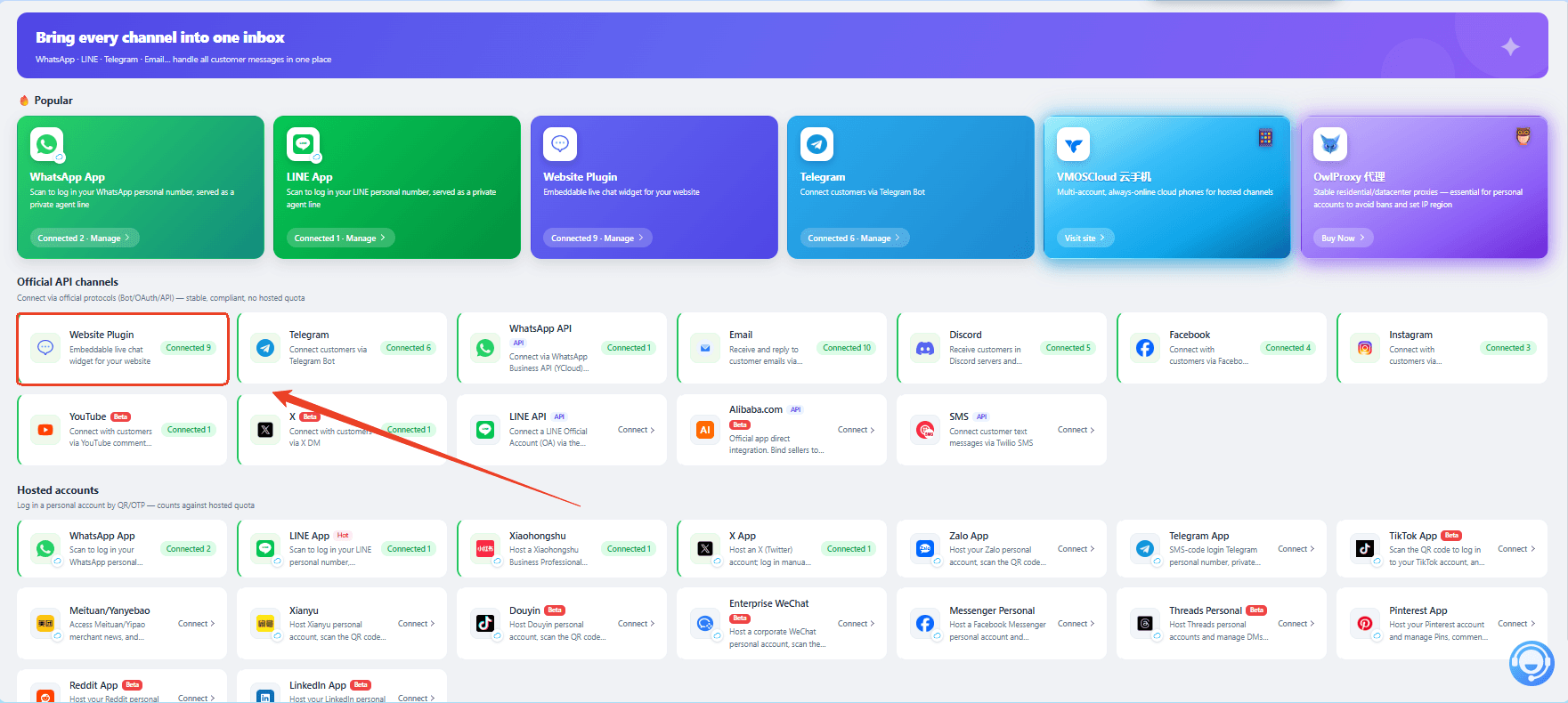
Step 2: Customize your widget style
Give your website plugin a look that fits your brand. Under Style Setting, you can customize details such as: widget name, avatar, theme color, welcome message.
Take a moment to make the widget feel like part of your website rather than a button that was simply dropped onto the page.
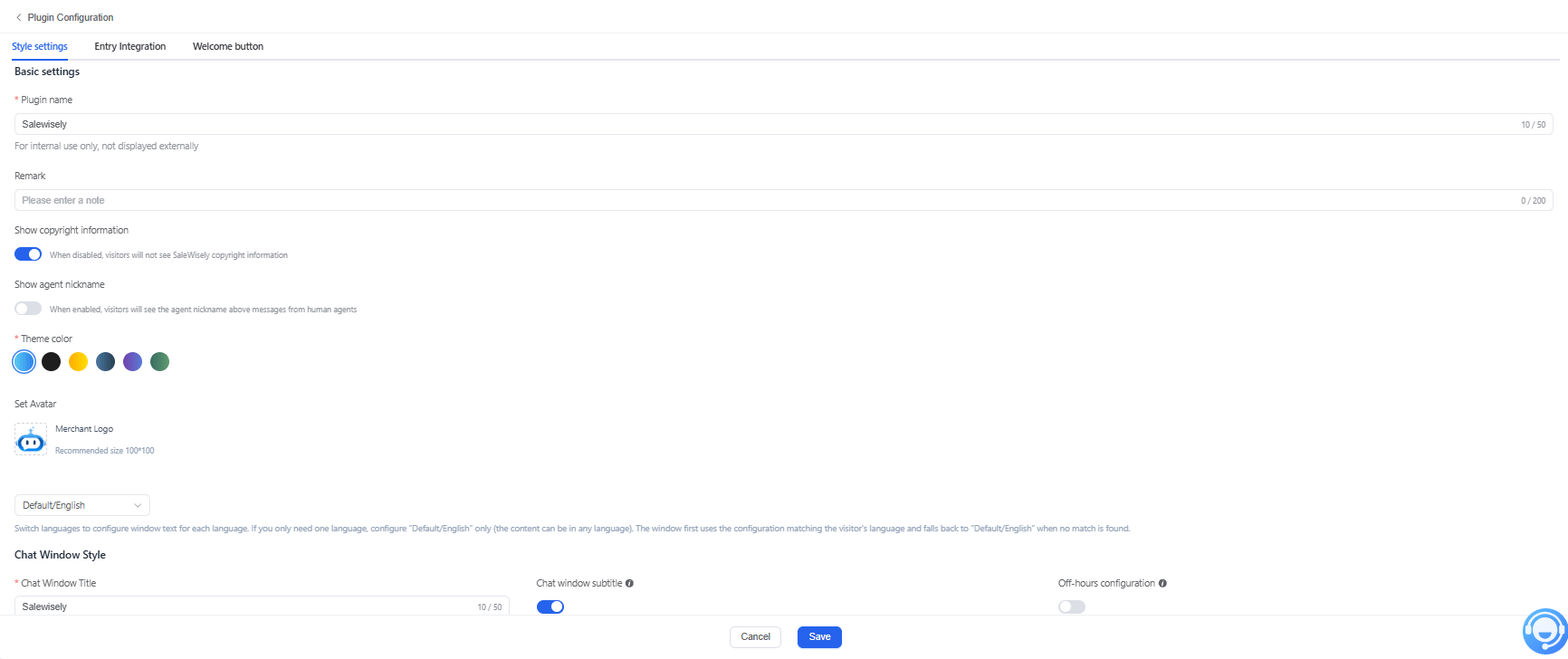
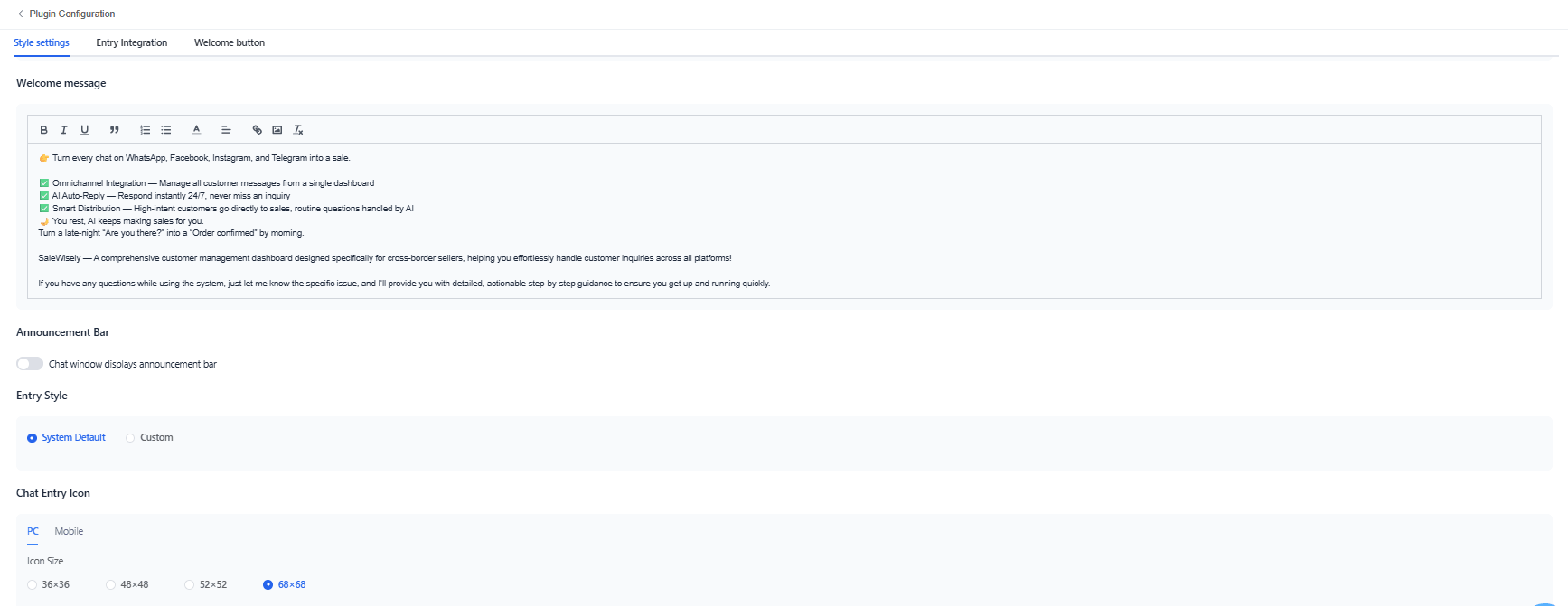
Step 3: Enable Telegram for the widget
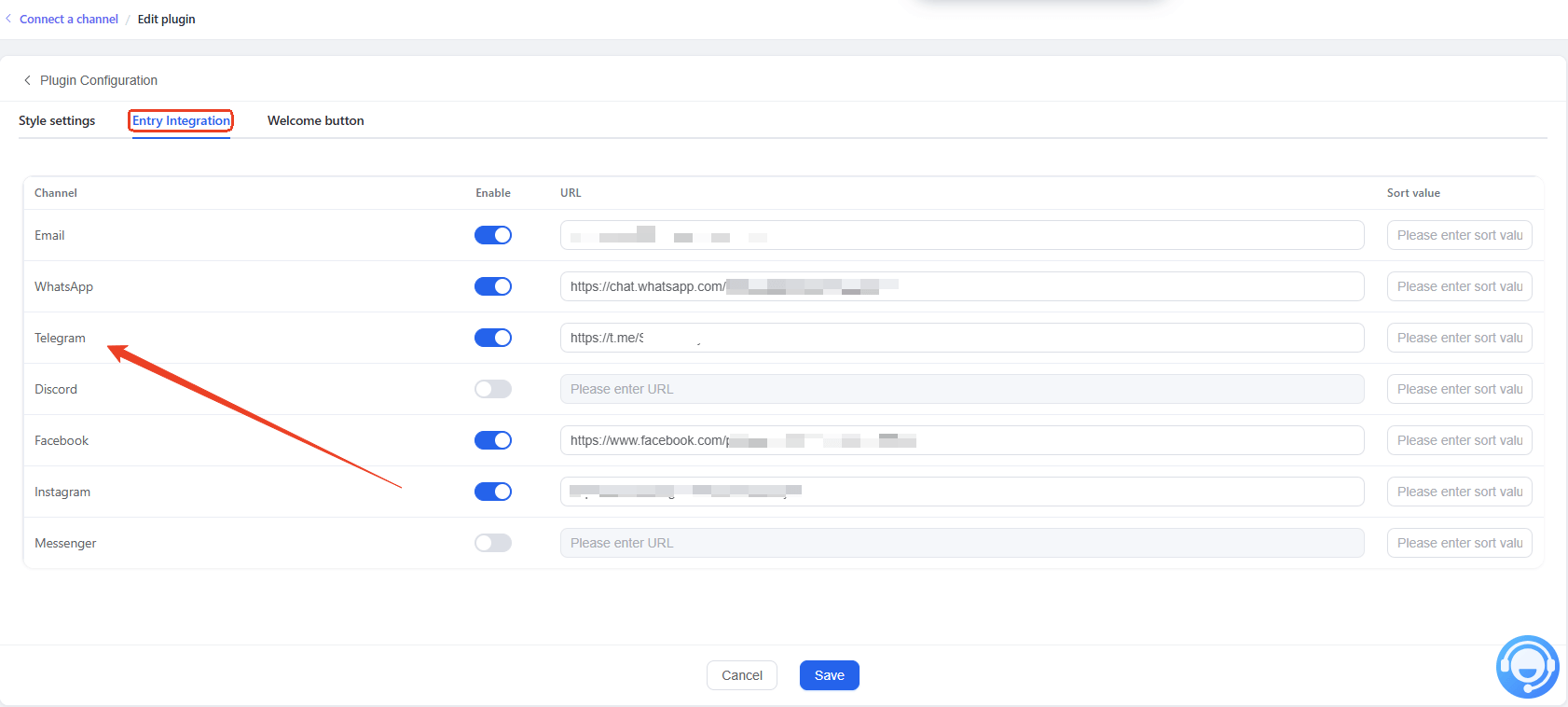
Move to Entry Integration, find Telegram, enable it, and enter the URL of the Telegram account, bot, or destination you want visitors to reach. Once you've completed required information, click Save. Your Telegram widget is now ready.
Step 4: Connect the widget to your website
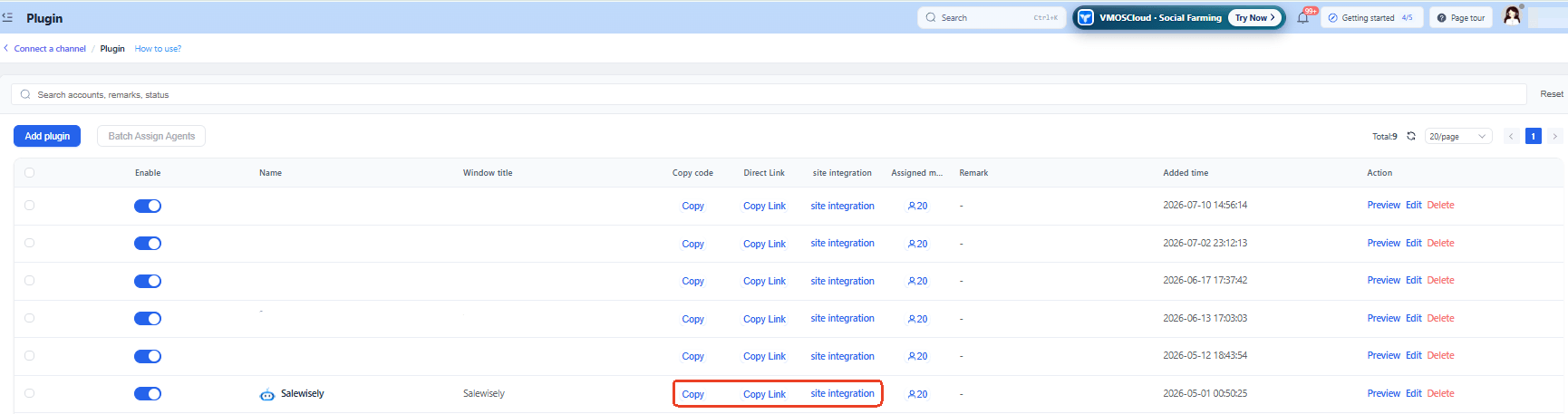
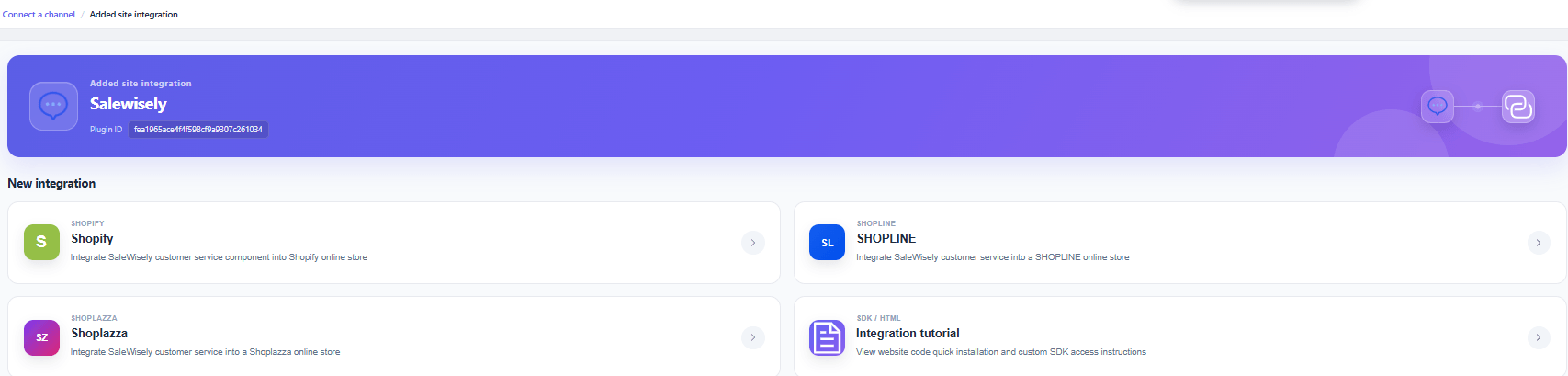
Now it's time to put the widget where your visitors can actually see it. Click Site Integration and then Add New Integration. Follow the instructions shown on the page to connect the plugin to your website.
SaleWisely also provides quick integration options for popular online stores, including Shopify, Shopline, and Shoplazza, so you can add the plugin to your store without setting up the integration from scratch.
How Can SaleWisely Simplify Customer Communication and Help Grow Sales?
Adding Telegram to your website is a good starting point, but customer conversations rarely stay on one channel. A visitor might discover your brand through TikTok, ask a question on your website, continue the conversation on Telegram, and come back later with a purchase question. Instead of managing each conversation separately, SaleWisely brings customer conversations from different channels into a unified inbox. You can connect Telegram with your website chat, WhatsApp, TikTok, LINE, and other supported channels, so your team can keep track of conversations without constantly switching between platforms.
Unified multi-agent inbox: Keep conversations in one workspace instead of jumping between multiple channels. Your team can quickly see customer questions, previous messages, and ongoing conversations.
Use AI to handle routine conversations: SaleWisely's AI Agent can answer common questions, understand customer intent, and handle conversations based on your business knowledge. More complex questions can be handed over to a human agent when needed.
Keep conversations moving across the customer journey: From first-time inquiries and product questions to after-sales support, businesses can manage different stages of the customer journey within the same communication workflow.
Turn conversations into sales opportunities: Customer messages often come with strong buying intent. By bringing these conversations into one place, your team can respond to product questions, recommend relevant products, follow up with leads, and move conversations toward a purchase.While CRM provides valuable customer insights to go beyond one-time purchase and build long-term customer relationships.
Work across languages: Real-time translation can help teams communicate with customers in different languages, which is especially useful for businesses serving international markets.
Whether Telegram is your main customer channel or just one part of your communication strategy, SaleWisely gives you a way to connect different touchpoints and manage them from a single platform. Instead of simply adding another chat button to your website, you can build a more connected customer communication workflow and drive sales on Telegram.
FAQs
What is a Telegram widget?
A Telegram widget is a website integration that brings Telegram features or communication options to your website.
How do I add a widget to my website?
You can add a t.me link or button directly to your website or use SaleWisely to create a chat widget and embed it on your website.
How to create a custom Telegram chat widget?
SaleWisely supports creating a customizable website widget with Telegram. You can adjust elements such as the widget name, avatar, theme color, and welcome message, then enable Telegram and connect the plugin to your website.