Key Takeaways
WhatsApp Catalog is a built-in digital storefront that allows businesses to showcase products and services directly inside chats, without external websites or apps.
WhatsApp Catalog improves sales by more convenient product browsing, less repetitive inquiries, increased conversion potential, more organized and professional product presence.
In WhatsApp Business App, businesses can go to business tools, find the catalog tab and enter details to create a catalog.
For WhatsApp API, businesses can create and manage catalogs in Meta Commerce Manager, then connect the catalog to WhatsApp Manager. Or connect WhatsApp catalog API to conversational cx platform for more advanced automation and large-scale operations.
What Is a WhatsApp Catalog?
A WhatsApp Catalog is a structured inventory of products or services that businesses upload to Meta and connect to WhatsApp Business Account (WABA). Think of it as a digital storefront, WhatsApp catalog allows businesses to showcase products and services directly inside WhatsApp conversations. Instead of redirecting customers to an external website or app, it can bring the entire browsing experience into the chat — allowing customers to explore products, compare options, ask questions, and even place orders without leaving WhatsApp.This aligns with WhatsApp's vision of closing deals seamlessly inside the chat.
1. Detailed product and service listings
Products: goods with details such as item name, images, description, price, link and item code.
Services include consultations, appointments, subscriptions, or other bookable offerings that customers can inquire about directly through chat.
2. Collection
Organizing products is just as important as listing them, especially for businesses with larger inventories. WhatsApp Catalog allows businesses to group products into different collections, making it easier for customers to browse items based on categories, themes, or shopping intent. Instead of scrolling through a long product list, customers can quickly find what they're looking for through a more structured shopping experience. In short, Collections make your WhatsApp Catalog feel more organized, easier to explore, and more conversion-friendly.
3. Multiple sharing formats
By offering multiple sharing formats based on different use cases, WhatsApp catalog makes it easier for businesses to present products naturally and effectively within conversations.
When a shopping cart is enabled, WhatsApp Catalog becomes more than just a product showcase but a lightweight ordering experience inside chat. This makes the purchase process more organized and convenient without redirecting customers outside WhatsApp.
Here are a few key things to know about how the shopping cart works:
One cart per customer conversation
Each cart is tied to a specific customer-business chat thread on a single device, creating a personalized shopping experience within that conversation.No expiration while browsing
The cart remains active in the chat until the customer sends it as an order request, giving users flexibility to browse, compare and add items at their own pace before checking out.Multiple quantities supported
Customers can add multiple units of the same item(up to 99)and limitless different items, making it easier to place bulk or repeat orders.Easy to start a new order
Once an order is submitted, the cart is cleared. If customers want to make changes or purchase additional products, they can simply start a new cart.
How WhatsApp Catalog Boosts Sales on WhatsApp?
Faster and more convenient product discovery
Customers can browse products directly inside WhatsApp without switching between apps or websites. This reduces friction and helps them find what they need faster, especially during active conversations.Reduced repetitive customer inquiries
Instead of repeatedly answering questions like “What's the price?” or “Can you send more photos?”, businesses can simply share a catalog. This saves time and allows teams to focus on higher-value conversations.Higher conversion potential
By keeping product discovery and communication in the same chat, WhatsApp Catalog shortens the path from interest to purchase. Customers can ask questions and make decisions in real time, which often leads to faster conversions.More organized and professional product presentation
A structured catalog makes your business look more professional compared to sending random product images in chat. Customers can clearly see product details, pricing, and options in a clean format.
Why Should Medium/Large-size Businesses Consider WhatsApp Catalog API?
For many small businesses, the WhatsApp Business App is a great starting point for creating and sharing a catalog. It's easy to set up, simple to manage, and works well for handling a limited number of products and customer conversations. However, as a business grows, managing a catalog manually inside the app can become increasingly challenging. This is where WhatsApp Catalog API becomes valuable.
Businesses can centralize product data through Meta Commerce Manager or connect catalogs in unified inbox on conversational cx platforms.
Automate product sharing and customer journeys
Businesses can integrate WhatsApp Catalog API with SaleWisely which supports AI agents powered by advanced models such as ChatGPT, Gemini, Coze. Instead of manually sharing products one by one in every conversation, businesses can automate catalogs sharing and guide customers through the purchase journey more efficiently — reducing manual effort while improving response speed.
Integration with CRM system
As conversations scale, customer data often becomes fragmented across windows and teams. By integrating WhatsApp with CRM systems on SaleWisely, businesses can centralize conversations in a unified inbox. This creates a more seamless shopping experience while helping sales teams follow up with leads, manage orders, and personalize customer interactions more effectively.
Scalable operations
WhatsApp allows businesses to list up to 500 products or services per catalog. However, WhatsApp can help to remove the restriction and scale the operation. It ensures updates, product sharing, and customer interactions remain seamless and efficient whether managing dozens or hundreds of catalog items.
How to Create a Catalog in WhatsApp?
There are two main ways to create and manage a catalog: through the WhatsApp Business App or the WhatsApp Business API. The WhatsApp Business App allows small businesses to create and manage catalogs directly from their mobile device and WhatsApp Web (click here to check details and video tutorial). In contrast, the WhatsApp Business API is designed for medium or large-scale businesses, where catalogs are created and managed in Meta Commerce Manager before being used through conversational cx platforms or integrations.
Let's break down both approaches step by step.
1. Creating a WhatsApp catalog in the WhatsApp Business App
For Android:
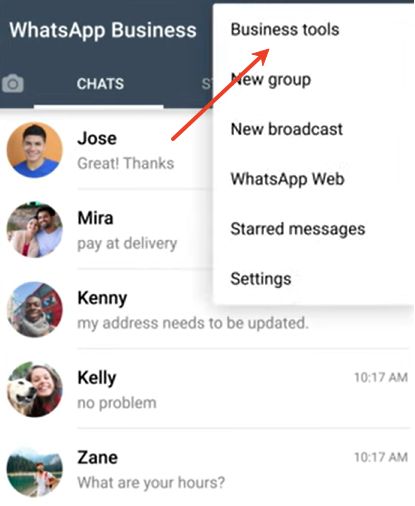
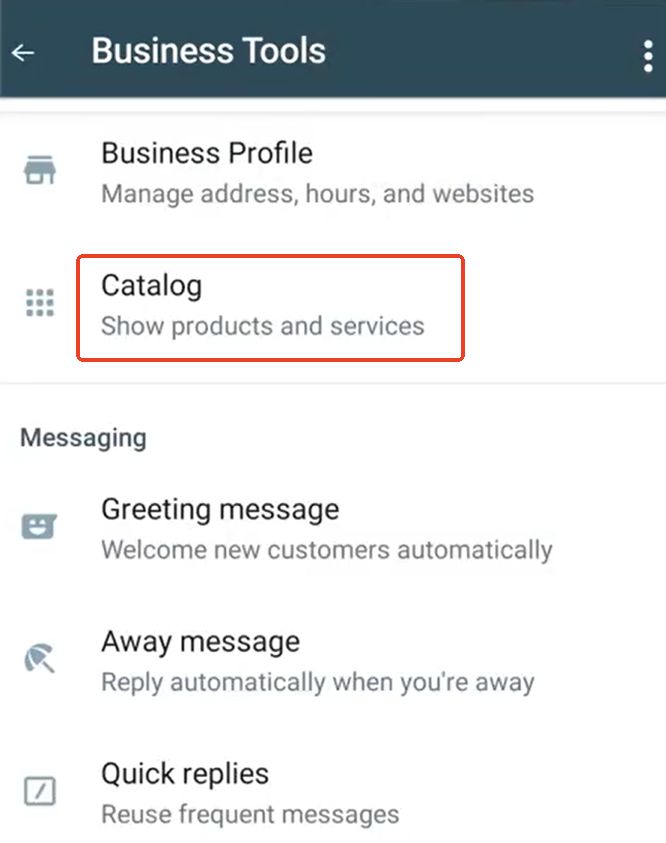
Open WhatsApp Business APP and find Catalog after tapping Business tools
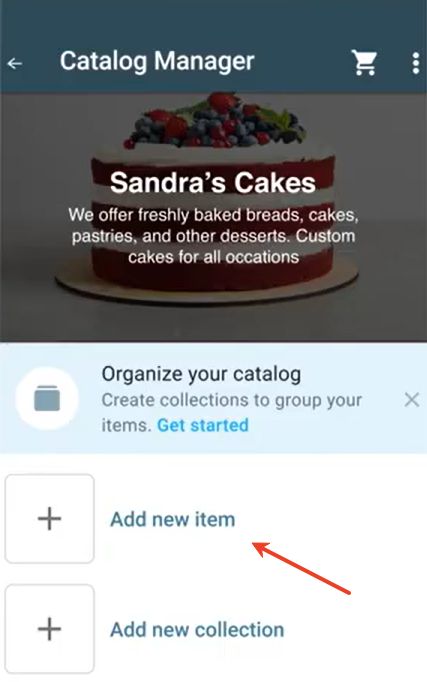
Tap Add new item → Add images or videos → Choose images/videos from Gallery or take new ones with your Camera. (You can upload up to 10 images or videos. Limit of size for a video: 50 MB. Thumbnails are auto-generated and cannot be edited.)

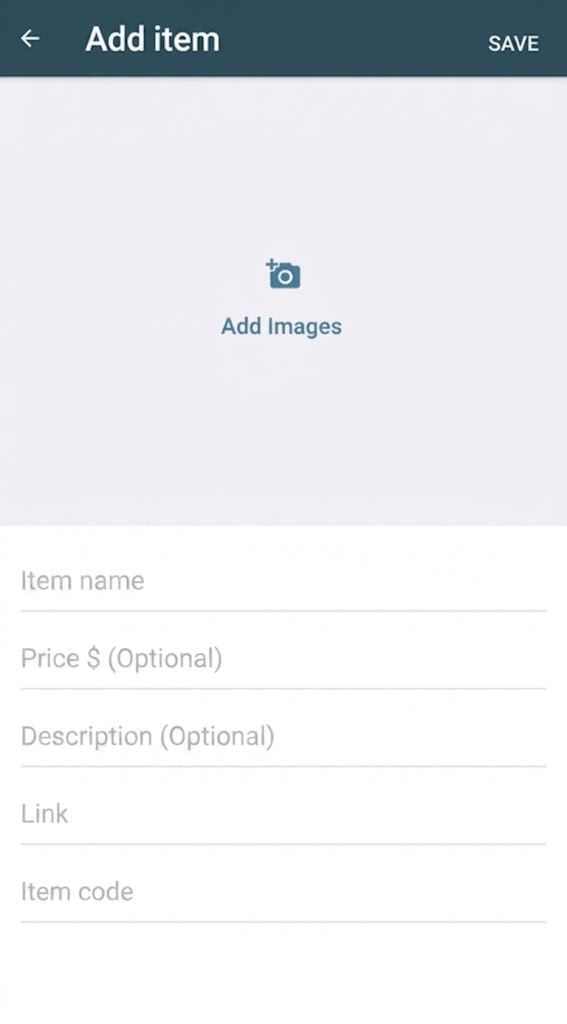
Enter details: item name, price, description, link, item code→ Save.
For iOS:
WhatsApp Business App → Business tools → Catalog
Tap Add new item → Add images and videos. (Select from Photo & video library or capture new ones)
Upload up to 10 images or videos. Max video size is 50 MB; thumbnails are auto-generated.
Enter product or service details: name, price, description, link, and item code.
Tap Save to add the item.
For web/desktop:
Click More(⋮) → Catalog
Add new item
Add Images → upload up to 10 images from your files.
Enter item details.
Add the product to your catalog by clicking Add to catalog.
2. WhatsApp Catalog API: Creating WhatsApp catalogs in Meta Commerce Manager
Access Commerce Manager and click “Get Started”

Tap the Create a catalog tab
Choose the right catalog type for your business
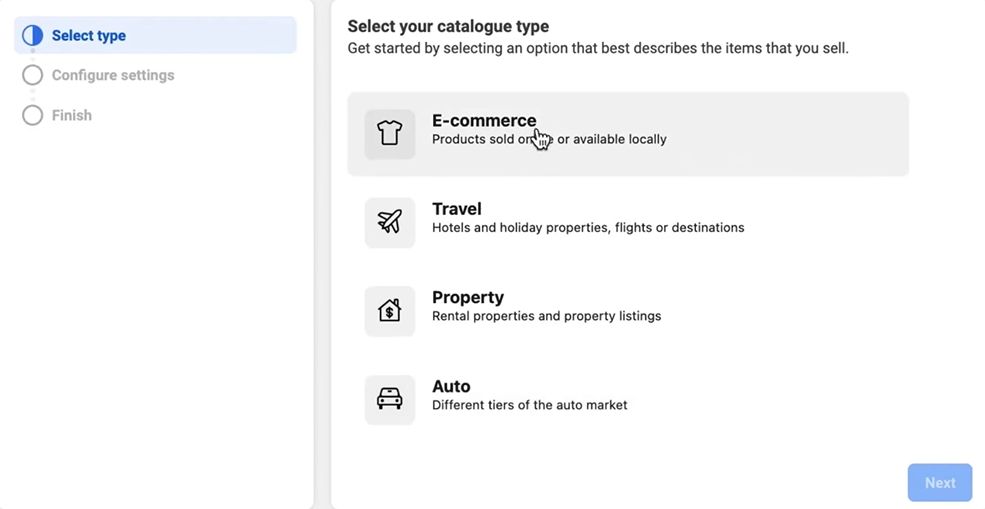
Add details to configure your catalog's settings
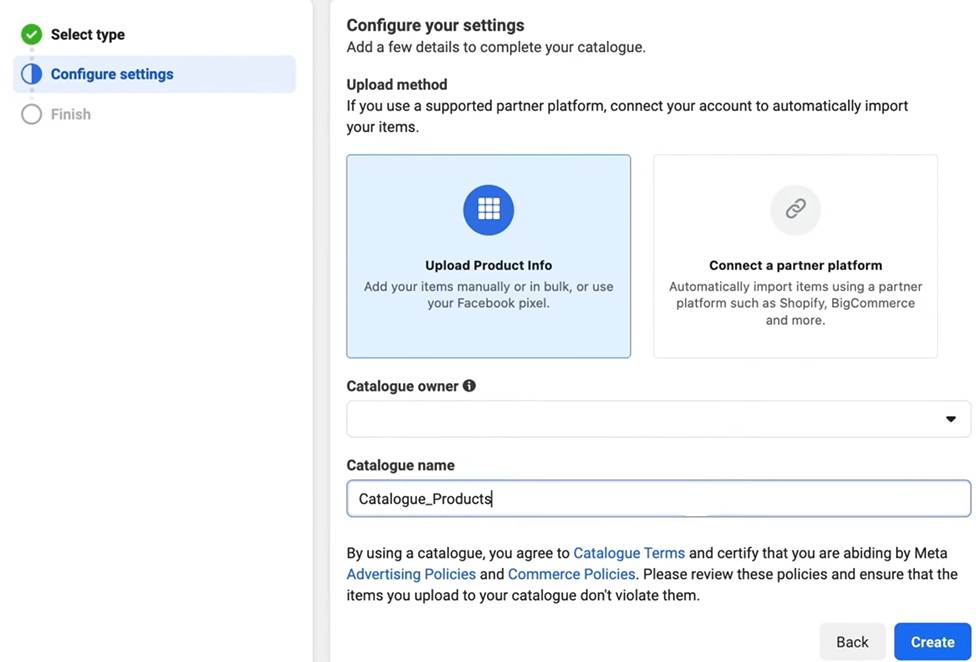
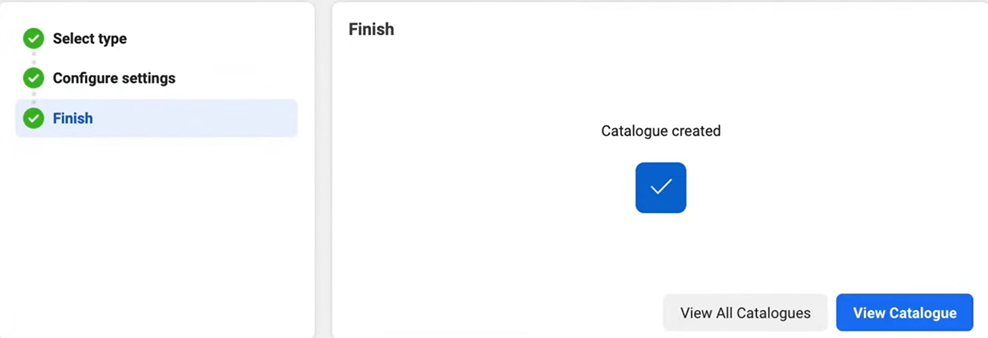
Click Create to complete the process
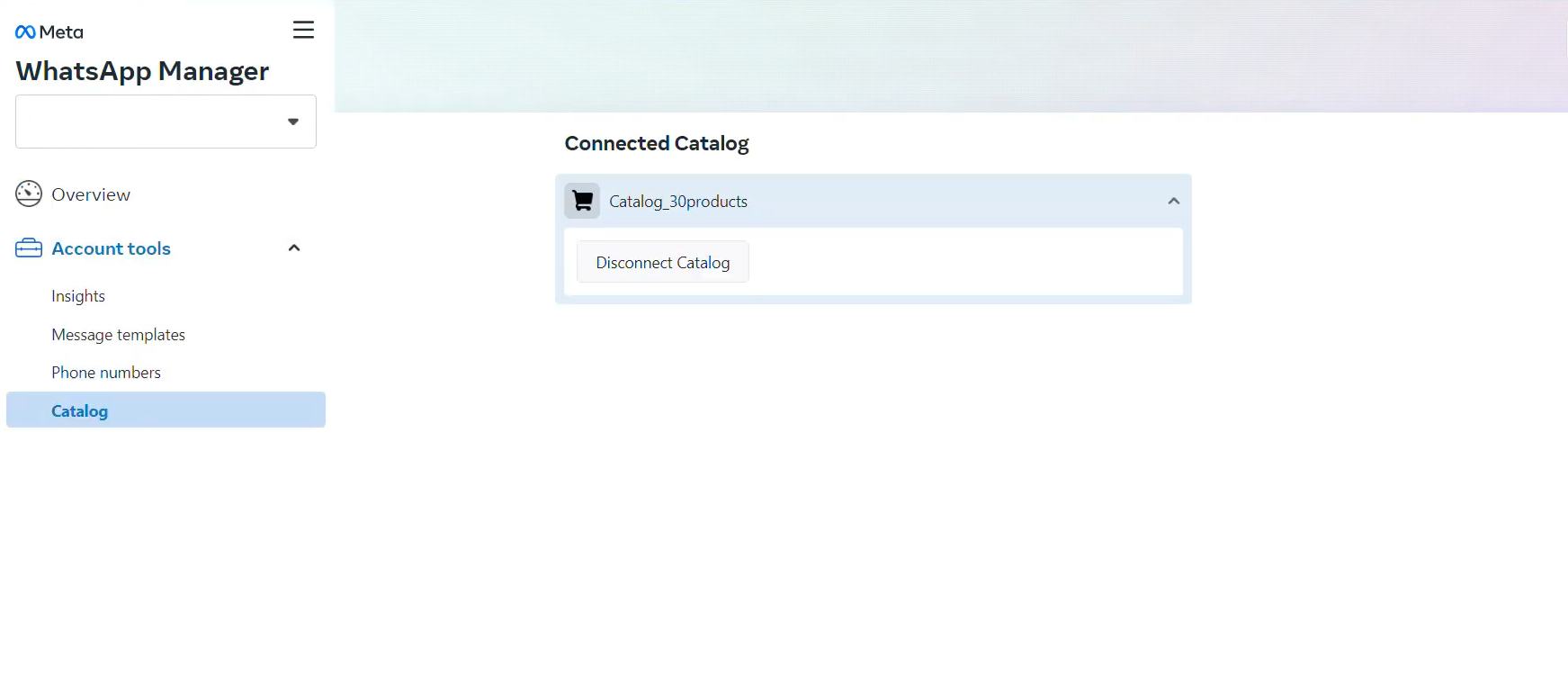
Go to WhatsApp Manager → tap Catalog in the navigate bar
Click “Choose a Catalog” tab to connect a catalog
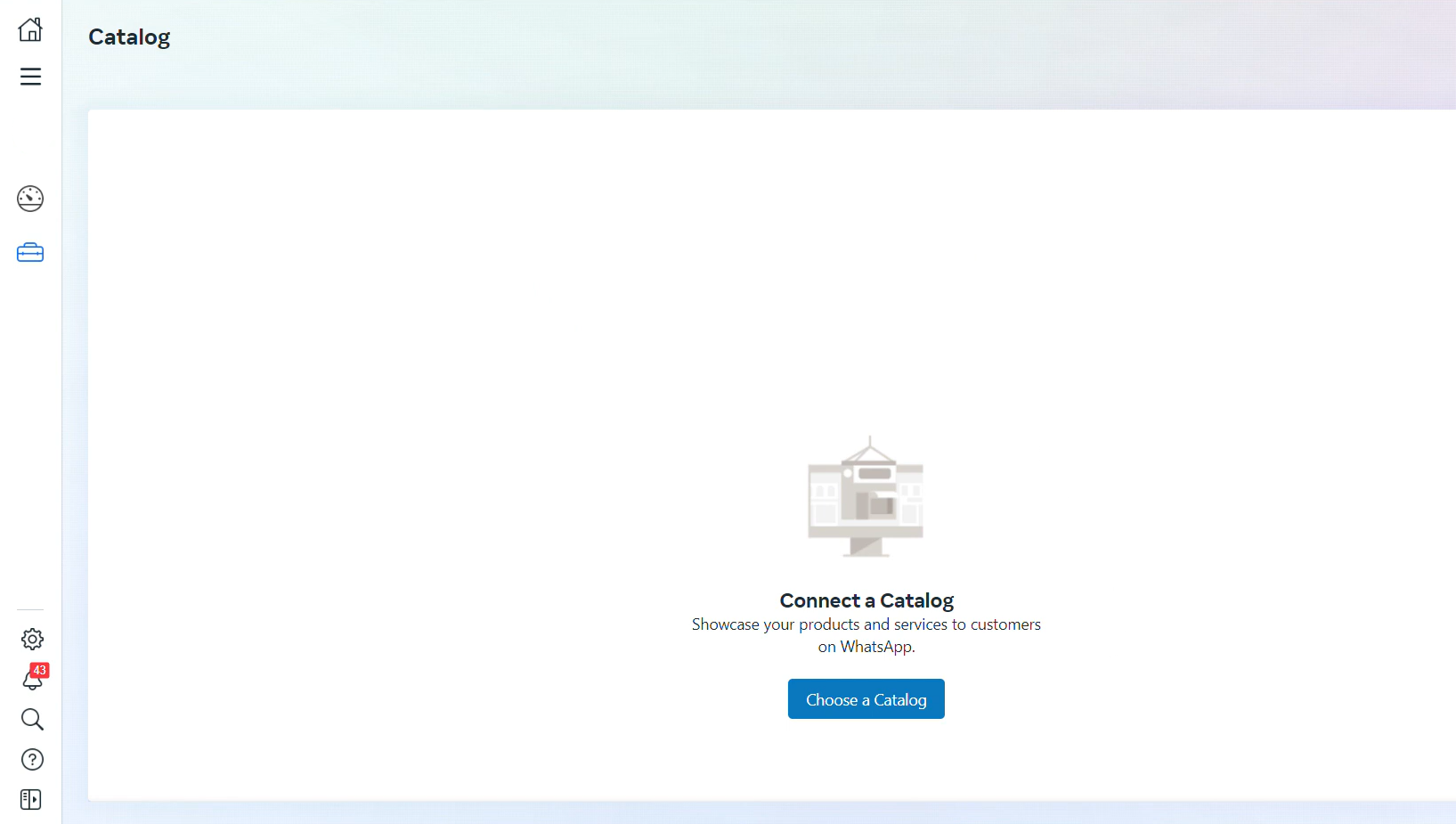
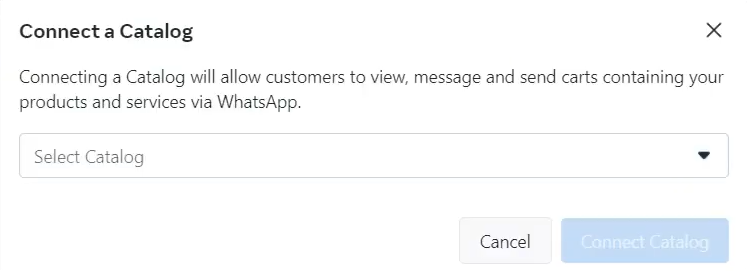
Tap “Connect Catalog” and complete the process
How to Optimize Your WhatsApp Catalog for Better Conversions?
Creating a WhatsApp Catalog is only the first step. Simply uploading products is not enough to drive meaningful engagement or sales. To turn your catalog into a high-converting sales channel, you need to think beyond setup. Let's look at a few strategic optimizations on WhatsApp Catalog for better conversions.
1. Use high-quality images/videos
Upload clear, well-lit images showing your items from multiple angles. Include short videos for items that benefit from demonstration. Make sure images are optimized for mobile, as most customers browse WhatsApp on their phones.
Note: Every image and video uploaded to the catalog is subject to a review. Always confirm that the image, video, product, or service meets the WhatsApp Business Messaging Policy
2. Write clear and concise descriptions
Use simple, customer-friendly language to describe key details such as size, color, materials, or features. Add relevant keywords to improve exposure.
3. Organize products into collections
Group items by category, theme, or shopping intent (e.g., Best Sellers, New Arrivals, Seasonal Offers). Helps customers find what they need without scrolling endlessly, making browsing faster and more intuitive, reducing decision fatigue.
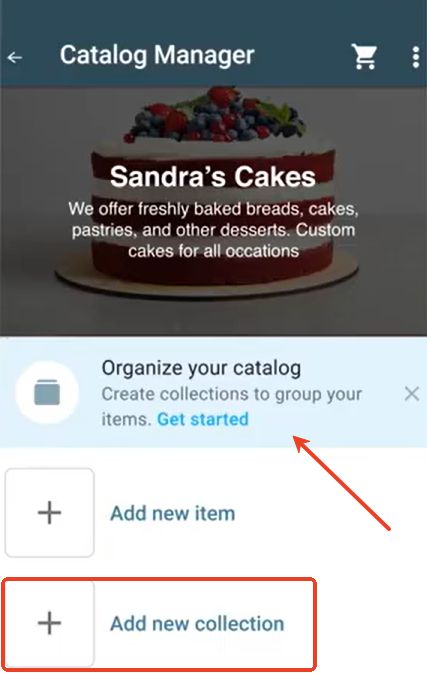
Tap Business tools → Catalog → click Add new collection in Catalog Manager → enter the name for your collection → select items/services and add them into the collection
4. Enable shopping cart for easy orders
Activate the shopping cart so customers can add multiple items and submit a single order. The cart makes buying convenient, reducing the risk of abandoned orders.
5. Keep your catalog up-to-date
Regularly add new products, update prices, and hide/remove out-of-stock items. An outdated catalog can frustrate customers and hurt your credibility.
Long press the image of item/service → tap ⋮ icon → click Delete to remove the item/service from your catalog
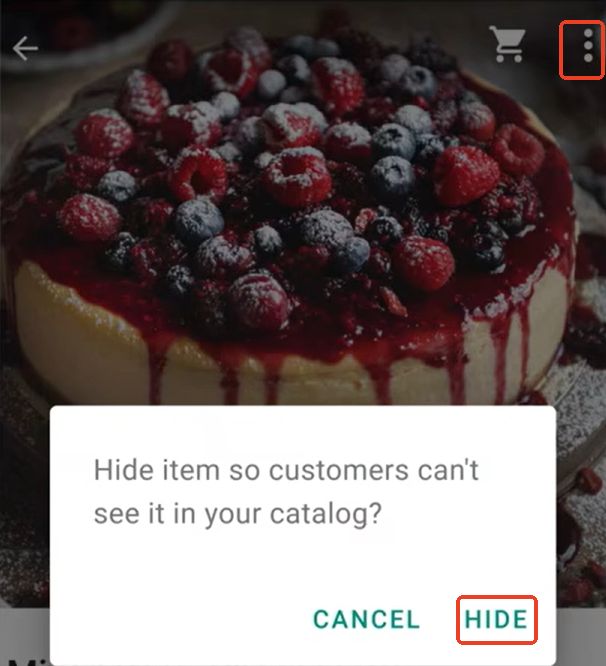
Tap the item you want to hide → tap “Hide” after clicking ⋮ icon → Customer can’t see the item in your catalog
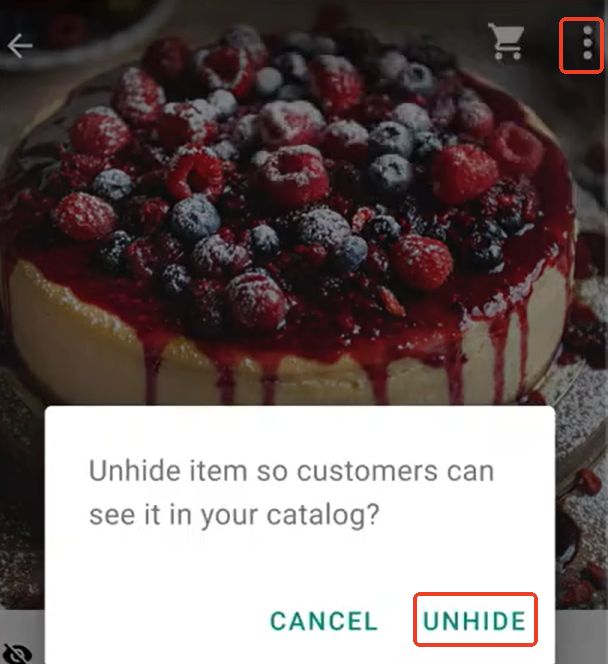
To unhide the item, simply click the target item → tap “Unhide” tab after clicking ⋮ icon → Customers can see the item in your catalog
FAQs
What is a catalog on WhatsApp?
WhatsApp catalog is a digital storefront that allows businesses to showcase products or services directly inside chats, so customers can browse, ask questions, and buy without leaving WhatsApp.
Is the WhatsApp catalog free?
Yes, the catalog feature in WhatsApp Business is free to use. Businesses can create and manage product listings at no cost.
Does WhatsApp Catalog have a limit?
Yes. There are limits on the number of products/services (500), images per product (up to 10) and video size (50 MB)
How to create product catalogs on WhatsApp Business?
Go to WhatsApp Business → Business Tools → Catalog → Add New Item, then upload images/videos, fill in product details (name, price, description), and save the item to your catalog.