Key Takeaways
Unlike WhatsApp groups, WhatsApp communities allow businesses to organize multiple related groups under a single hub for better structure and communication
SMEs can often rely on communities for organizing multiple groups and boosting engagement.
WhatsApp API helps large-scale businesses break limitations of communities: only available on WhatsApp app, up to 2000 members and limited in advanced features (e.g. automation)
SaleWisely enables efficient customer communication and scalable sales on WhatsApp by allowing access to official WhatsApp accounts/ WhatsApp API, advanced automation and CRM integration.
What is a WhatsApp Community?
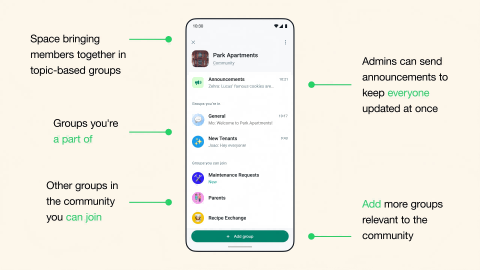
WhatsApp Community is a feature that allows users to organize multiple related WhatsApp groups under one unified structure. Instead of managing separate groups independently, a Community acts as an "umbrella hub" where admins can bring together different groups based on topics, teams, interests, or organizations.
Key features: How does the Community work on WhatsApp?
Roles and privacy
WhatsApp Communities distinguish between admins and members. Communities are private, and users can only join via invitation. Community admins act as "super admins", while individual subgroups can also have their own admins to manage specific discussions and maintain structure. Phone numbers remain private and are only visible to members within the same subgroup, protecting member privacy.Subgroups
A Community can link up to 100 existing groups or create new ones.
The announcement group
When a Community is created, an announcement group is automatically generated. When new members join in, they will be added to an announcement group. Only admins can post here, and announcements are broadcast to every member across all subgroups, ensuring important updates reach everyone.Capacity
A community can host 2000 members across all subgroups.

WhatsApp Community vs. WhatsApp Group: what's the difference?
Why are WhatsApp Communities Important for Your Business?
Centralized communication at scale
Businesses can manage multiple departments, customer segments, or regions under one Community. This reduces fragmentation and ensures everyone stays aligned without switching between unrelated groups.Improved customer engagement
By organizing users into relevant sub-groups (e.g., product updates, support, onboarding), businesses can deliver more targeted and meaningful communication, increasing response rates and engagement.Better management efficiency
Admins no longer need to manage dozens of isolated groups. Communities allow centralized control over announcements, group structure, and member management, saving time and reducing manual work.Stronger brand presence
A well-structured WhatsApp Community creates a more professional communication environment. This helps build trust and reinforces brand consistency across different user touchpoints.Scalable customer support system
Businesses can separate support topics into different groups (e.g., billing, technical issues, general inquiries), making it easier to manage incoming requests and reduce response delays.Real-time updates and announcements
Communities allow businesses to broadcast important updates instantly to large audiences, ensuring critical information is delivered without relying on external channels.
How to Create a Community on WhatsApp?
Creating a WhatsApp Community is simple and doing it the right way ensures your community stays organized and engaging. Follow these steps to set up your own WhatsApp Community on WhatsApp via mobile or desktop.
Step 1: Go to the Chats tab
Launch WhatsApp and navigate to the Chats tab, then click the  or
or  icon in the bottom right corner.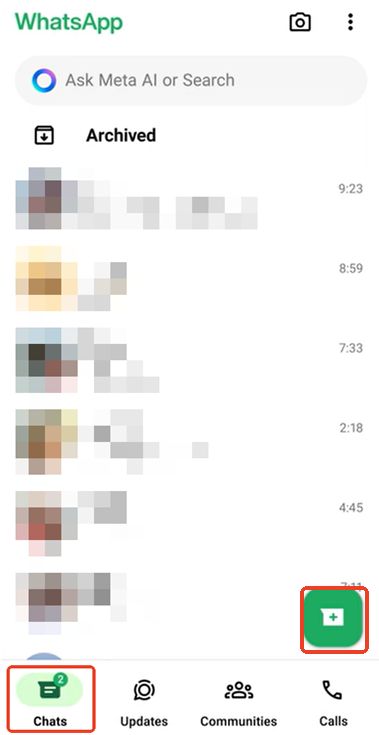
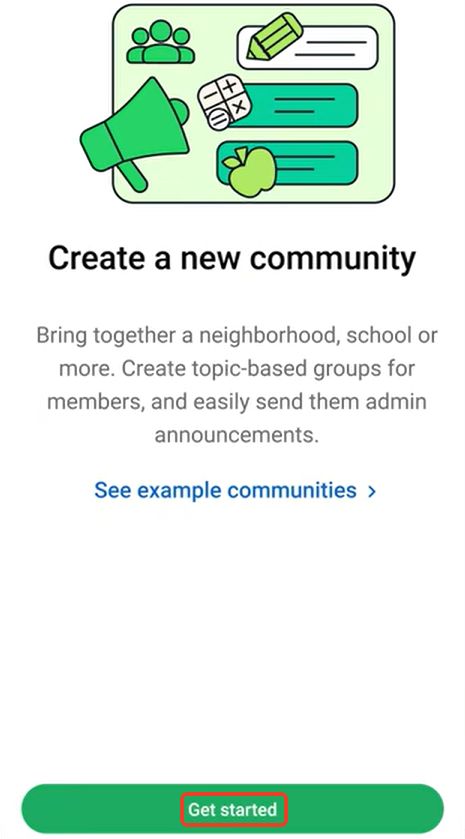
Step 2: Tap New community and "Get started"
Step 3: Complete community name(maximum 100 characters), icon and description and then click the "→" button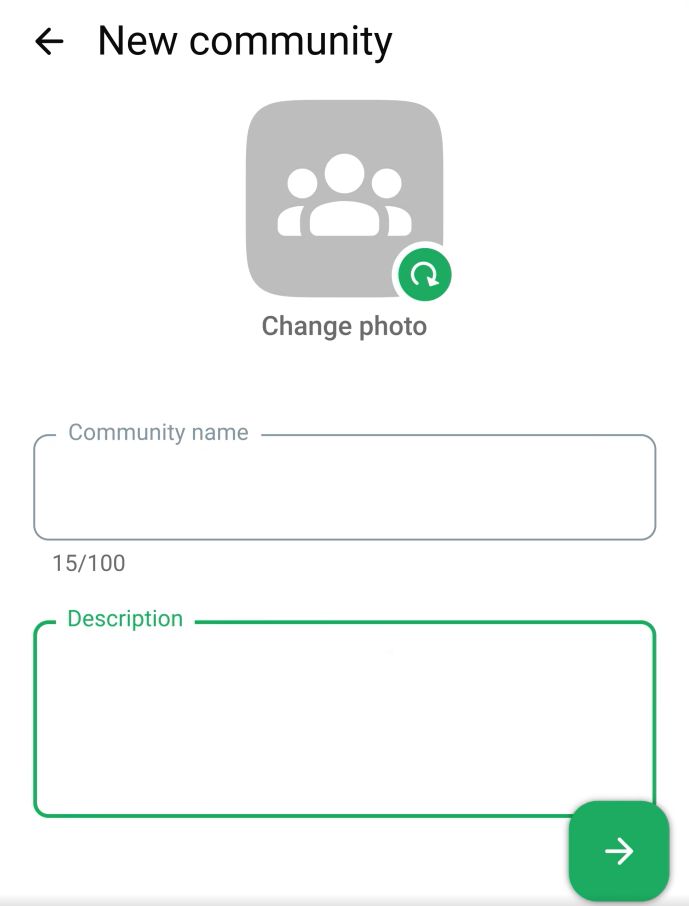
Step 4: Click "Invite members" to add members directly or share the link to target users. And tap "+ Add group"to manage groups for the community.
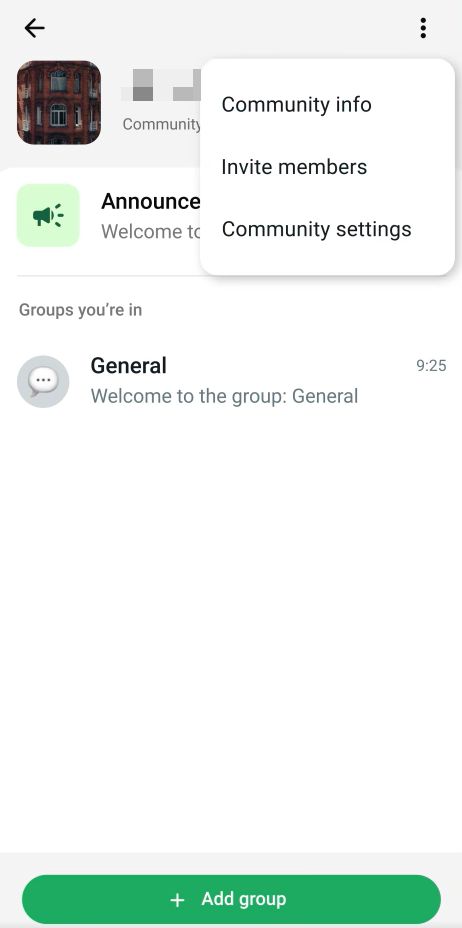
Step 5: Click  to finish this process.
How Should Businesses Choose the Right Tool for WhatsApp Sales?
WhatsApp Communities are a powerful tool for organizing multiple groups and fostering engagement. For small and medium businesses, they are often sufficient to manage communications, share updates, and interact with customers. However, large-scale businesses may encounter certain limitations when trying to scale communication and customer reach on WhatsApp. Additionally, managing multiple groups from the WhatsApp app alone is overwhelming, and the lack of advanced broadcast and automation features can make conversational marketing challenging.
Restricted to the WhatsApp App
Currently, WhatsApp Communities can only be accessed via the WhatsApp app. WhatsApp Business App and WhatsApp API have no access to this feature.
Member and group limits
Even though each Community supports up to 2,000 members across sub-groups, large-scale enterprises may exceed this threshold quickly This can become overwhelming for management.
Limited broadcast and automation options
WhatsApp Communities are primarily designed for conversation, not mass broadcasting. Sending structured promotional content to all members at scale is challenging without external tools.
So, how can large-scale businesses overcome these limitations? WhatsApp Business API can help businesses break through the management and marketing constraints of Communities and enable efficient, systematic customer communication. Conversational cx platforms like SaleWisely allow enterprises to integrate WhatsApp (Businesses) accounts and WhatsApp API into a unified inbox, businesses can broadcast bulk messages, segment audiences based on behavior, automate workflows, and integrate seamlessly with CRM systems. This transforms WhatsApp into a scalable conversational marketing platform that maintains engagement while supporting enterprise-level operations.
FAQs
What is a WhatsApp community?
It is a feature that allows you to bundle related group chats together under one umbrella.
What is the difference between WhatsApp group and community?
A WhatsApp group is a single chat for all members, while a Community is a hub that connects multiple related groups, making large-scale organization and communication much easier.
Can anyone join any group in a WhatsApp community?
No. Members can only join groups they are invited to or groups made available by community admins.
Can WhatsApp community members see each other?
Members can see other participants only within the groups they belong to, not the entire Community.