Key Takeaways
The WhatsApp Verified Badge (Blue Tick) confirms a business account is officially verified by Meta as authentic and trustworthy.
A verified account improves trust, reduces impersonation risk, and increases user engagement and conversion rates.
Users can apply for a verified badge through a paid Meta Verified subscription directly within the WhatsApp Business App, provided the region and eligibility requirements are met.
WhatsApp Business API users can submit requests for Official Business Account via Meta Business Suite free of charge, subject to Meta's eligibility and verification criteria for notable or established businesses.
SaleWisely helps businesses maximize the value of verified accounts by enabling centralized accounts management, automation, multilingual communication, and scalable WhatsApp sales operations.
What is a WhatsApp Verified Badge?
A WhatsApp Verified Badge is a small checkmark icon displayed next to a business account name, indicating that the account has been officially verified by Meta as authentic and trustworthy. According to information from WhatsApp's Help Center, the badge means that Meta has verified the account based on its activity across Meta technologies, or the information and documents provided by the business or organization. Once verified, the badge may appear in multiple places across WhatsApp, including call tabs, business profiles, context cards, and incoming calls from verified businesses, helping users clearly recognize trusted accounts before or during interactions.
Previously, WhatsApp used a green tick to mark verified business accounts. However, in later updates, the badge design was changed to a blue tick, aligning WhatsApp's verification identity more closely with Meta's unified verification system across its platforms.
Why did WhatsApp change the badge from green to blue?
The shift from a green verification badge to a blue checkmark is mainly part of Meta's broader effort to unify its verification system across all platforms:
Unified Meta verification system
Meta aims to standardize verification across WhatsApp, Facebook, and Instagram so users see a consistent trust signal everywhere.
Stronger brand consistency
The blue tick is already widely recognized as a verification symbol across Meta platforms. A unified verified badge strengthens the perception of authenticity and aligns WhatsApp with Meta's global verification standards, making it easier for users to instantly understand what it represents.
Platform integration with Meta Verified
The change also reflects WhatsApp's deeper integration into Meta's ecosystem, where verification is no longer platform-specific but account-level.
Green Tick vs. Blue Tick: What is the difference?
Why Do Verified WhatsApp Accounts Matter in 2026?
The WhatsApp Blue Tick is more than just a visual badge—it is a key trust and credibility signal that influences how users perceive and interact with your business.
Build trust and prevent impersonation
A blue tick confirms that your account is officially verified by Meta, helping users immediately recognize your business as authentic and reducing the risk of fraud or fake accounts.Higher visibility and engagement rates
The verified badge appears across WhatsApp touchpoints like business profiles, call tabs, context cards, and incoming calls, reinforcing recognition throughout the user journey. Leads are more likely to open conversations, reply to messages, and interact with verified accounts due to higher perceived trust.
Enhance brand authority and credibility
Verification positions your business as legitimate and established, strengthening overall brand reputation in competitive markets, naturally leads to better lead quality, stronger purchase intent, and improved conversion rates.
Supports long-term growth within the Meta ecosystem
As part of Meta's unified verification system, the blue tick helps businesses build consistent credibility across WhatsApp, Facebook, and Instagram.
Who is Eligible for WhatsApp Blue Tick?
To get a WhatsApp Verified Badge, both the applicant and the business account must meet Meta's eligibility requirements. These conditions ensure that verification is granted to real, active, and compliant businesses.
Applicant eligibility — The individual applying for verification must meet the following requirements
Be at least 18 years old
Use a phone number registered in a country where Meta Verified for Businesses is available
Agree to and comply with Meta Verified for Business Terms of Service
and WhatsApp Business Terms of Service
Business account eligibility — Your WhatsApp Business account must also meet specific activity and profile standards:
Have an active presence on the WhatsApp Business App for a minimum period of time
Have recently sent messages (showing real business activity)
Be located in a supported country where Meta Verified for WhatsApp Business is available (e.g. United States, India, Brazil, United Kingdom, Germany, Indonesia, Mexico, etc.)
Have a complete business profile, including profile name, picture
Must not already have an active Meta Verified subscription via Meta Business Suite
Important notes:
Eligibility requirements may change over time as Meta improves the product experience and verification system.
Certain business categories are not eligible for subscription-based verification, including government entities and political organizations.
Even after approval, verification status may be revoked if the account violates Meta policies or Terms of Service.
How to Get a Verified Badge on WhatsApp?
Meta Verified subscription (for WhatsApp Business App)
1.Things you should know before applying
Prepare your business information ready before you begin the application process.
Make sure the business name you'd like to use for your Meta Verified subscription matches the name reflected on any business documentation provided during the verification process.
If your WhatsApp Business account is connected to Facebook or Instagram, you may be asked to log in before continuing. In this case, your Facebook or Instagram account must have full admin control permissions.
2.How to apply for Meta Verified (Step-by-Step)
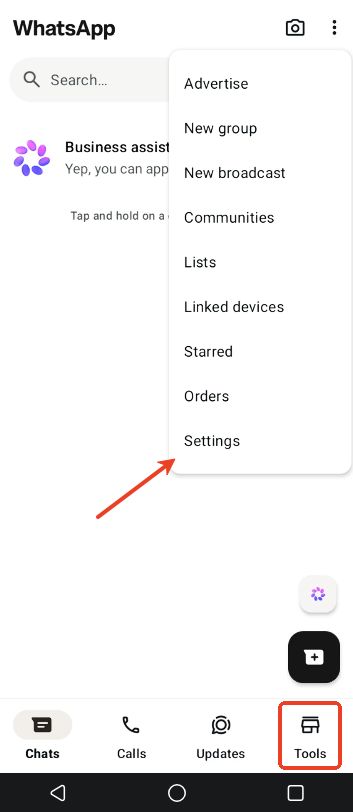
Step 1: Open WhatsApp Business app and tap Tools/Settings from the Chat List
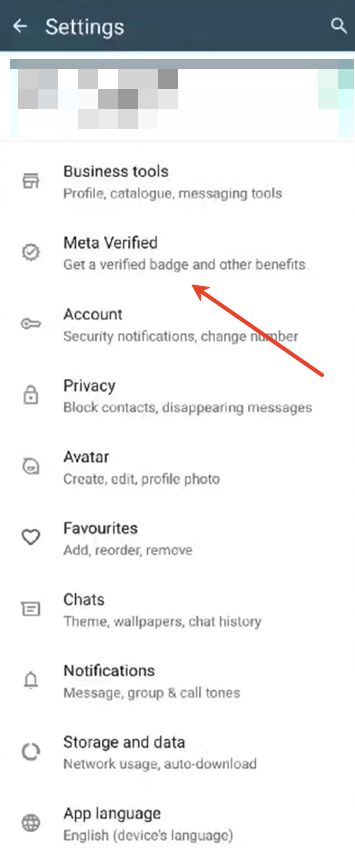
Step 2: Select Meta Verified (if available in your region) and Continue
Step 3: Check the recommended subscription package and choose the one you want
Step 4: Select the account(s) you want to verify
Step 5: Set up payment method and complete payment
Step 6: Select your business and click Next (If not listed, choose "None of these match my business")
Step 7: Choose a verification method and go Next
Step 8: Tap Submit or Next to provide required verification information
Step 9: Tap Done
3. What's going on after you apply for Meta Verified?
Once submitted, Meta will review your application. The review process typically takes up to 3 business days, but may take longer depending on application volume. If approved, the blue tick will automatically appear on your WhatsApp Business profile.
Important notes:
In some cases, subscription payment is refunded if Meta cannot verify your business
If your WhatsApp account is linked to Facebook or Instagram, the connected business may revoke your application.
Meta requires businesses to ensure compliance with WhatsApp policies and prepare proper business information. Accounts must follow the WhatsApp Business Policy and Meta Commerce & Messaging Policies to avoid rejection or future removal of verification.
Official Business Account (for WhatsApp Business API)
1.Requirements you should know before starting
Your WhatsApp Business API setup must be fully completed
Your Meta Business Account is verified
The business must pass Meta Business Verification with legally validated company information.Your display name is approved by Meta
The WhatsApp display name must follow Meta's naming guidelines and be officially approved.Two-step verification is enabled
Extra security must be activated to protect the business account from unauthorized access.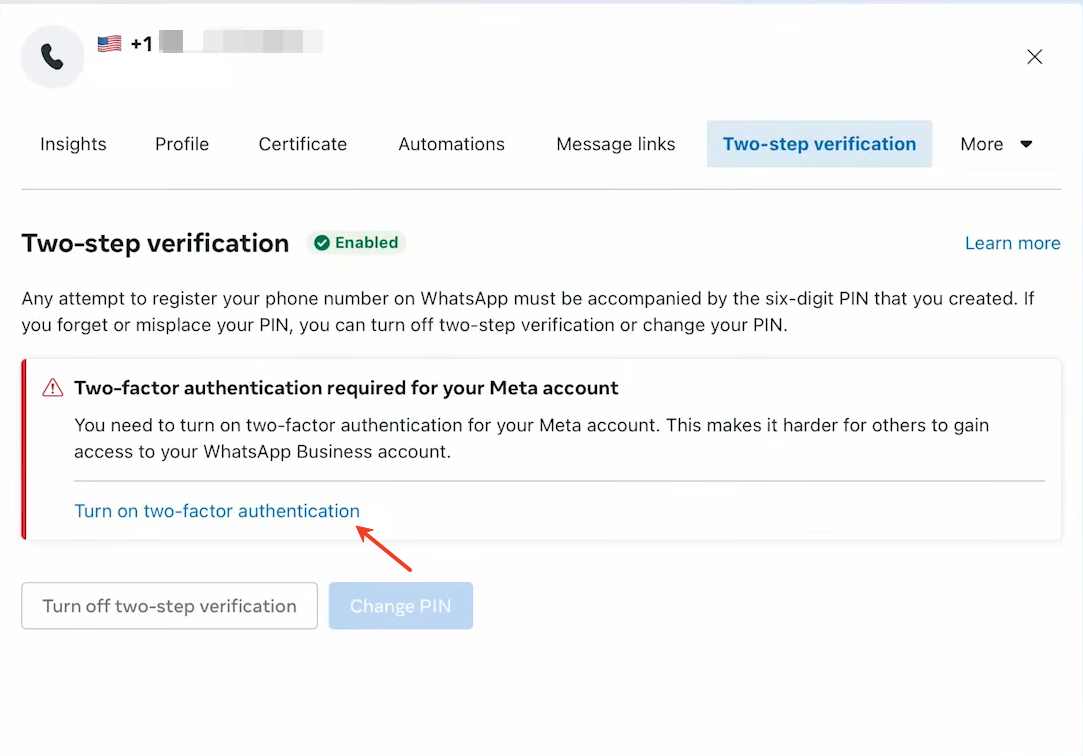
Your business has at least five pieces of organic media coverage
Your brand should have genuine external mentions (such as news articles, press features, or reputable online publications), demonstrating real-world notability.
2.Steps to get verified via WhatsApp Business API
Step 1: Access Meta Business
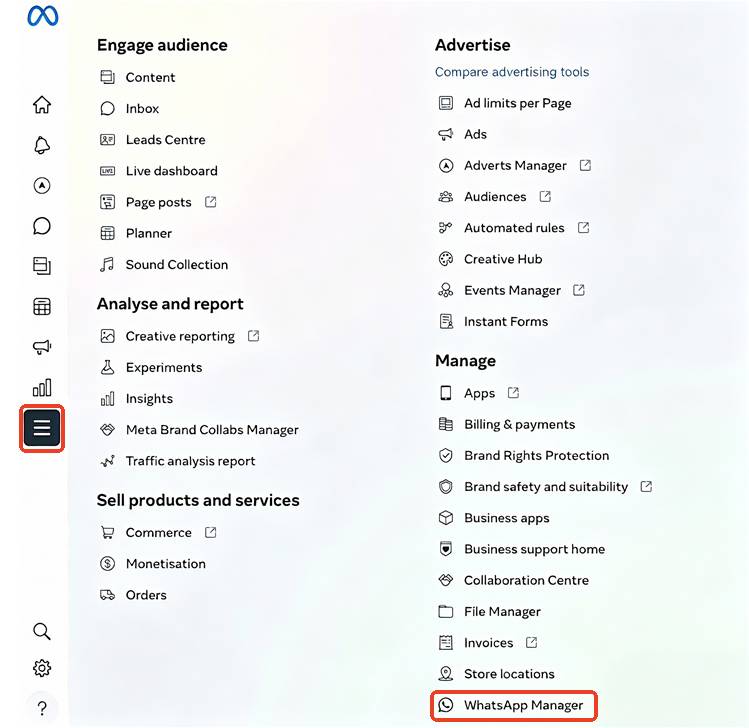
Step 2: Tap "All Tools" from the sidebar and go to WhatsApp Manager
Step 3: Click the phone number of business you want to verified
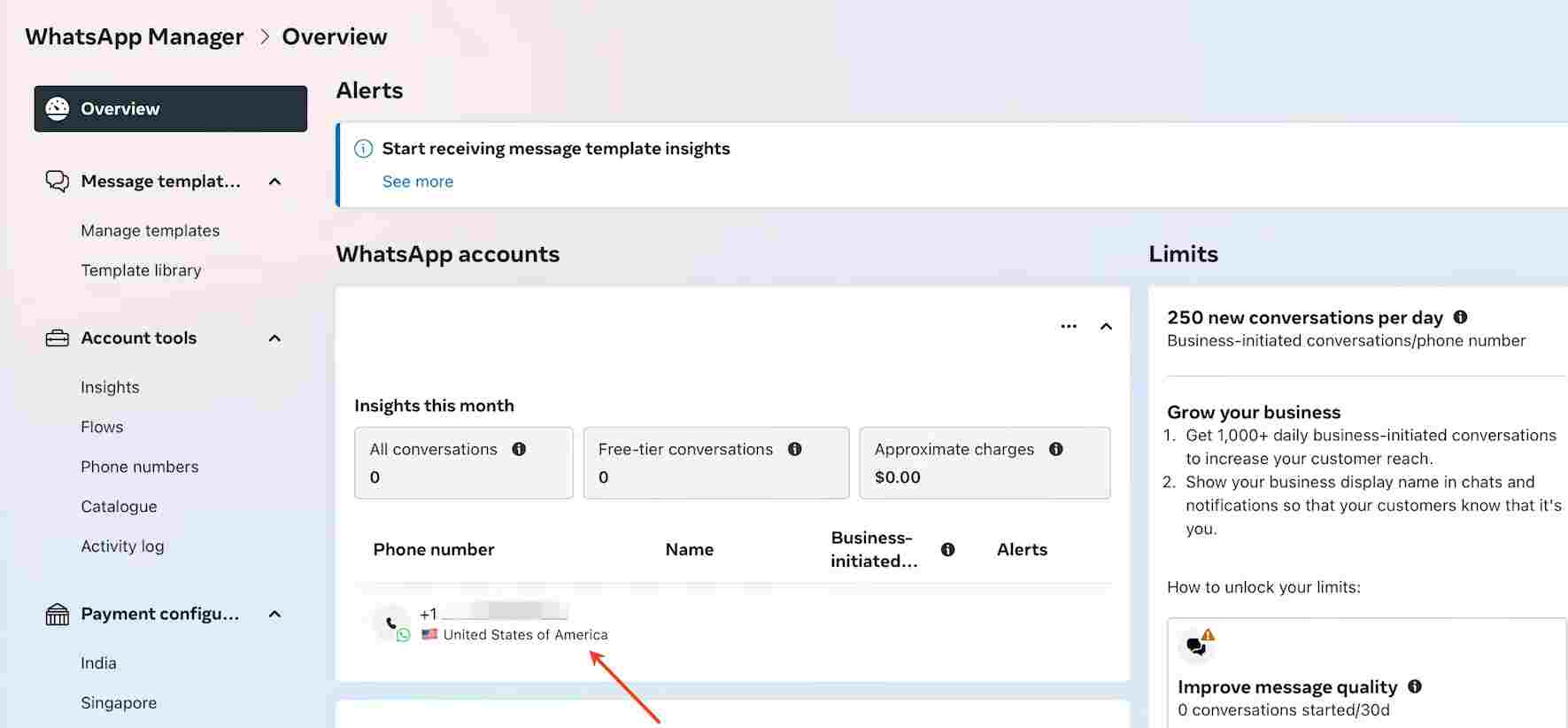
Step 4: Navigate to "Profile" and complete your business profile details.
Step 5: Tap the "Submit request" button under the Official business account.
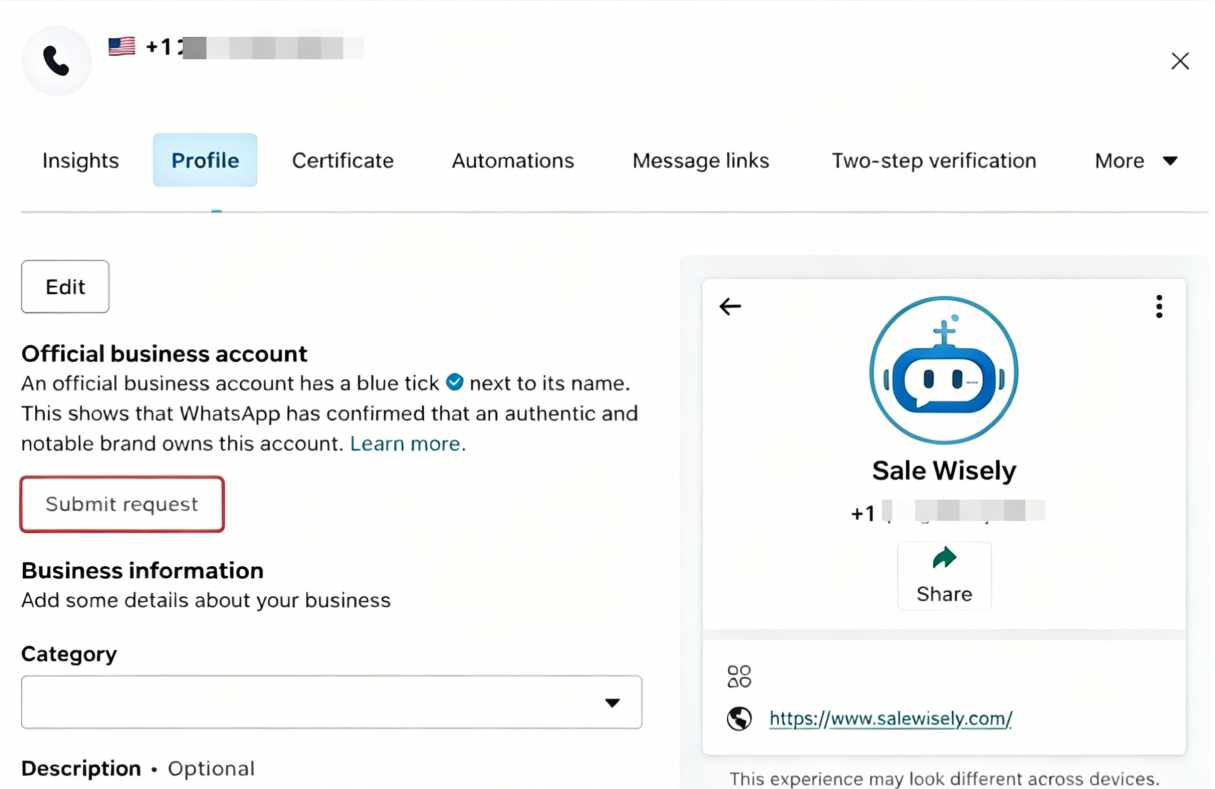
Step 6: After the pop-up appears, complete required information for the request.
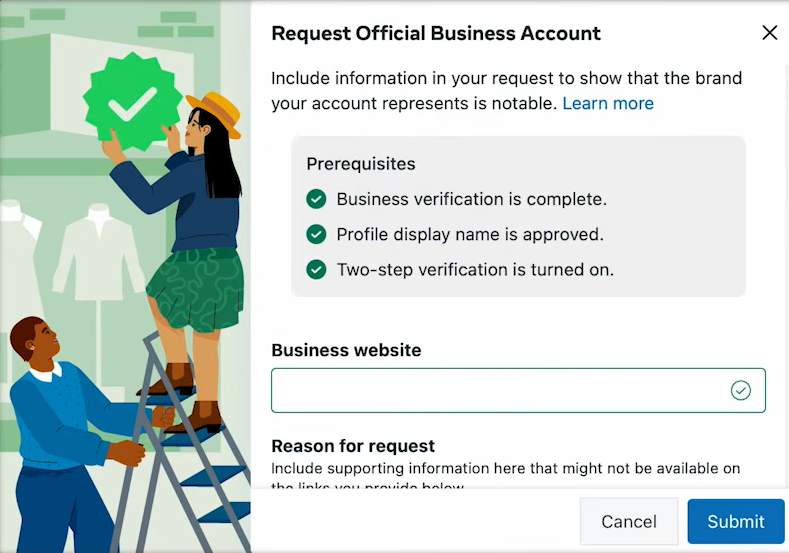
Step 7: Tap Submit and wait for Meta's review
Unlock the Full Value of WhatsApp Blue Tick with SaleWisely
Getting the WhatsApp Blue Tick is only the beginning. Once your business is verified, the real value comes from how effectively you manage customer conversations, scale operations, and maintain consistent service quality to boost marketing. Salewisely is designed to help business get more from verified accounts and optimize WhatsApp sales at scale:
Centralized multi-account management
Manage multiple WhatsApp accounts in a unified inbox, helping business handle large volumes of conversations more efficiently.
Real-time multilingual communication
Instantly translate messages across different languages, enabling smooth communication with global customers without delays or manual translation.
Smart automation for customer operations
Automate repetitive tasks such as replies, routing, and workflow handling to improve response speed and reduce operational workload.
FAQs
What does WhatsApp blue tick mean?
It means Meta has verified the account as an official and authentic business.
What is the difference between blue tick and green tick?
Green tick was the old WhatsApp verification system, while the blue tick is the updated Meta verification badge. Both mean the account is verified.
How do I get a verified badge on WhatsApp?
You can apply via Meta Verified in WhatsApp Business App or through WhatsApp Business API via Meta Business Suite.
How much does it cost to get verified on WhatsApp?
It can be free through WhatsApp Business API, or paid if you use Meta Verified subscription (depending on your plan and region).