
With over 3 billion monthly active users worldwide, WhatsApp becomes a crucial and personalized channel for businesses to communicate in real time, build trust, and drive higher engagement and conversions. Unlike traditional sales methods like email or phone calls, WhatsApp is cost-effective, scalable, and enables personalized customer experiences at scale, making it an essential tool for modern sales strategies in 2026.
Key Takeaways (How to start and boost chat marketing on WhatsApp):
Choose the right WhatsApp solution: Start by WhatsApp Business App if you manage small teams or the WhatsApp API for medium to large businesses that require automation, CRM integration, and multi-agent support.
Complete business profile and set up sales on WhatsApp: Complete profile helps to build credibility and trust. Aggregate multiple accounts in a unified inbox or integrate WhatsApp API with CRM systems to centralize communication and automate workflows.
Enhances WhatsApp sales engagement through an omnichannel CX platform integrated with AI-powered responses and CRM marketing automation.
Role-based team management, customer-data protection, and performance report ensure secure, compliant, and efficient team collaboration.
Multi-language support and template replies help businesses respond faster, maintain engagement, and scale personalized communication globally.
Instant Messaging vs. Traditional Sales: The Rise of Chat Marketing
The best business happens in the chat, and great connections drive great sales. Different from traditional sales channels such as email or phone calls, instant messaging allows businesses to communicate directly, personally, and in real time. Messages are more likely to be seen and responded to, enabling faster engagement, stronger relationships, and higher conversion rates. Chat marketing combines convenience, personalization, and immediacy, making it a cost-effective and scalable approach for businesses of all sizes looking to drive sales and enhance customer experience.
Why Should You Consider Chat Marketing on WhatsApp?
WhatsApp is not just a messaging app—it's a direct bridge for business sales. With over 3 billion monthly active users worldwide, WhatsApp offers businesses a personalized and efficient way to connect, engage, and sell.
Instant and high-converting customer communication
Unlike traditional sales such as email or phone calls, WhatsApp allows business and brands to communicate in real time, providing instant answers and building trust with customers. Since WhatsApp messages are more likely to be seen and replied to, businesses often experience higher engagement and conversion opportunities.
Cost-effective conversational marketing with better ROI
Compared to paid traditional sales, WhatsApp is a low-cost sales channel. Businesses can nurture leads, send product updates, and maintain customer relationships without spending heavily on marketing, making it especially useful for startups and SMEs.
Personalized customer experience at scale
Customers are more likely to engage when messages feel personal. WhatsApp allows businesses to provide tailored recommendations, personalized follow-ups, and one-on-one support. With automation tools, chatbots, and CRM integration, businesses can scale communication while still maintaining a personalized experience.
Global reach for local and international sales
Built for a global user base, WhatsApp is accessible anywhere, anytime, with no geo-blocks. This helps businesses connect with customers across regions and markets. Whether you run a local business or sell internationally, WhatsApp provides a familiar and accessible channel for customer communication.
How to Sell on WhatsApp: Step-by-Step Guide in 2026
Step 1: WhatsApp Business App vs. WhatsApp API
Before getting started, decide which WhatsApp solution fits your business model and needs. In general, businesses sell on WhatsApp through WhatsApp Business App and WhatsApp Business API. While both help businesses communicate with customers and generate sales, they work very differently and are designed for different business sizes and sales goals.
WhatsApp Business App: Ideal for startups, small businesses or solo entrepreneurs with a manageable number of customer chats. It offers product catalogs, labels, automated greetings, and quick replies—perfect for personalized sales.
Get started via its official website or download the application from Google Play Store (Android) or App Store (iOS)
WhatsApp private domain solution on SaleWisely: Aggregate multiple WhatsApp Business accounts in one dashboard
WhatsApp API: Designed for medium to large businesses(SMEs) needing scalable communication, multi-agent support, CRM integration, and automated workflows. Best for businesses with high message volumes or global customer bases.
Choose the API path with SaleWisely to get fully managed WhatsApp Business API
Step 2: Create a business profile
Add a professional business name, logo, description, contact info, website, and social media links. A complete profile builds credibility and ensures customers trust your brand.
Step 3: Setup WhatsApp on SaleWisely
Collect your WhatsApp accounts
Find WhatsApp on the “Integration” interface→ tapping “Add device” → input the IP region (you can choose to use proxy or not) → clicking “Detect and Enable”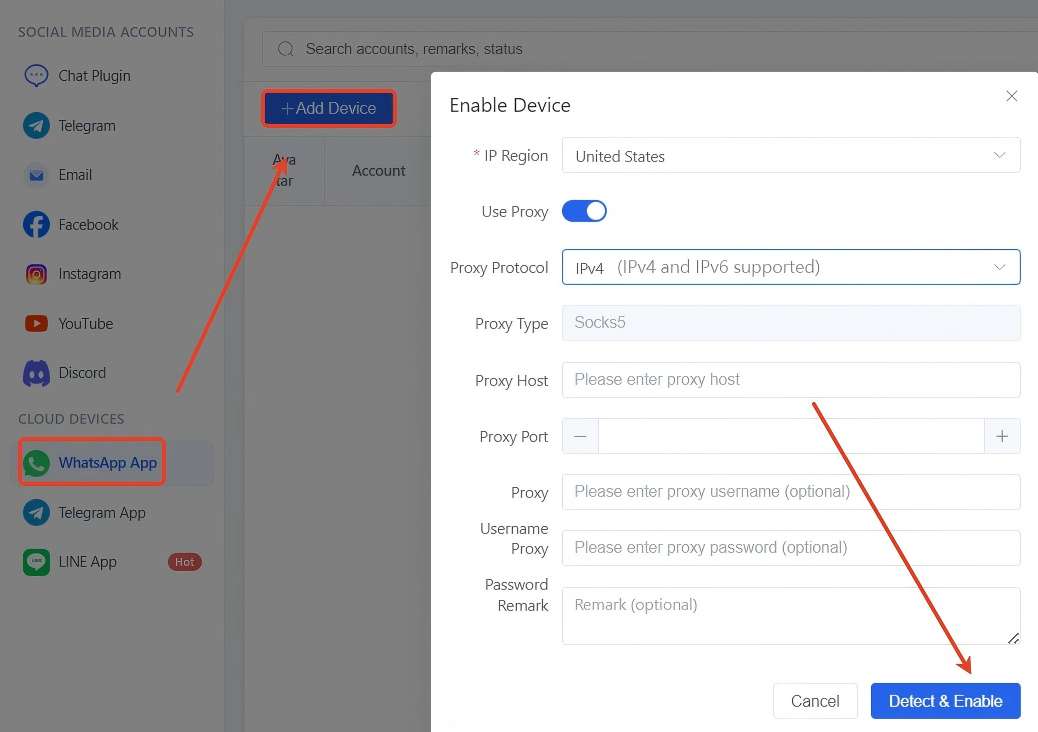
Follow the instructions to link your WhatsApp accounts with phone numbers or by scanning QR code.
Integrate WhatsApp API with CRM via chat plugin
Click Integration on the left-side bar → Find Chat Plugin and click “Add plugin” to set configuration
Fill in plugin name, remark, theme color, avatar and language in the Basic settings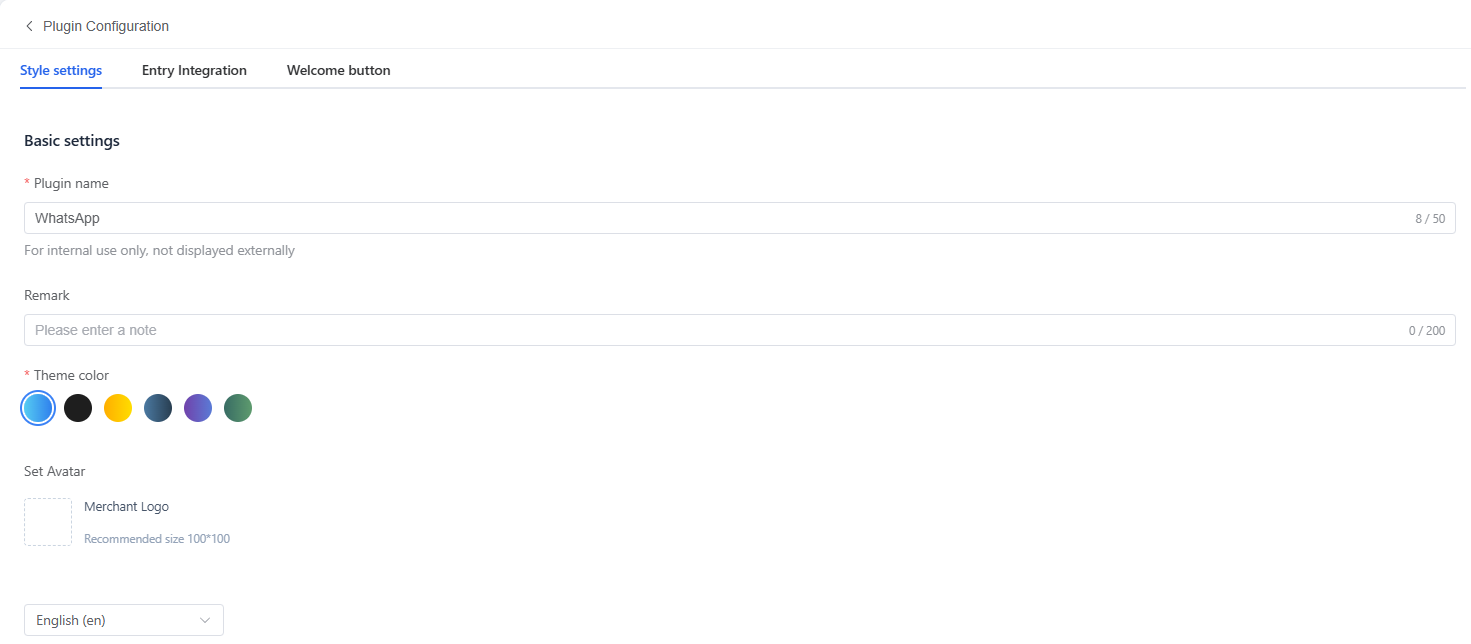
Add brand name (① displayed on following picture) → define the operating hours by clicking ③, enable welcome messages to greet new customers and away messages when offline. (If there is need to add subtitle, just tap ②) This automation ensures every customer receives timely acknowledgment.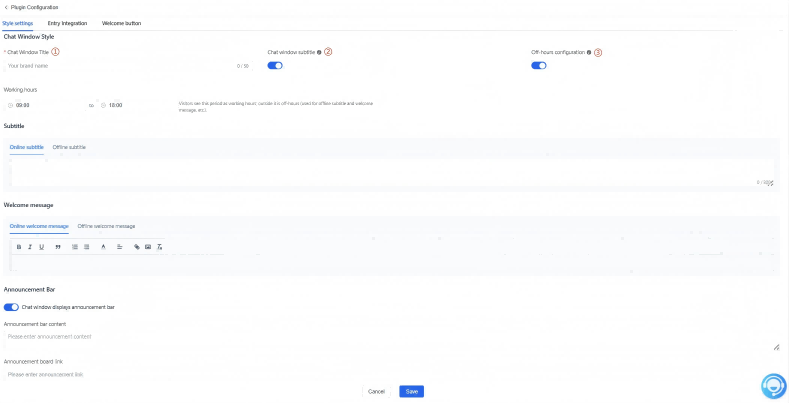
Go to “Entry Integration” → paste the Click-to-Chat link from WhatsApp in the column of URL and Enable it → add “Welcome button” as per need → click Save to complete the configuration Step 4: Manage incoming chats efficiently on a single dashboard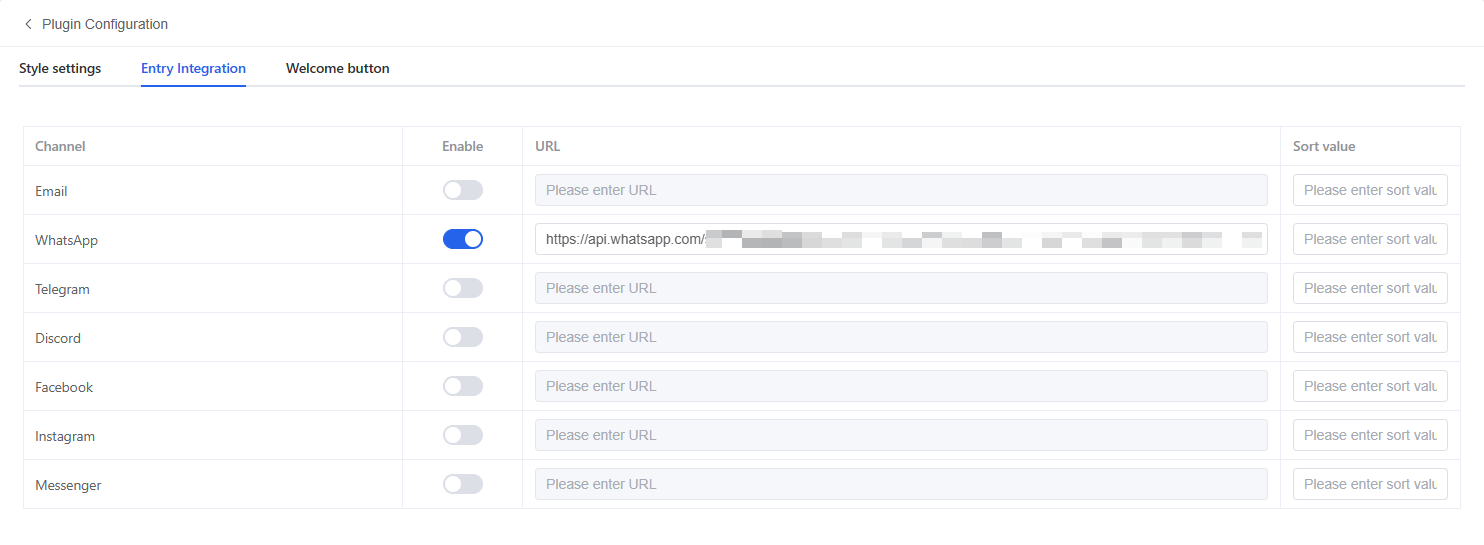
Step 4: Manage incoming chats efficiently on a single dashboard
Click “chat” in the left-side bar → “Create View” → Input View name and click to “Add filter condition”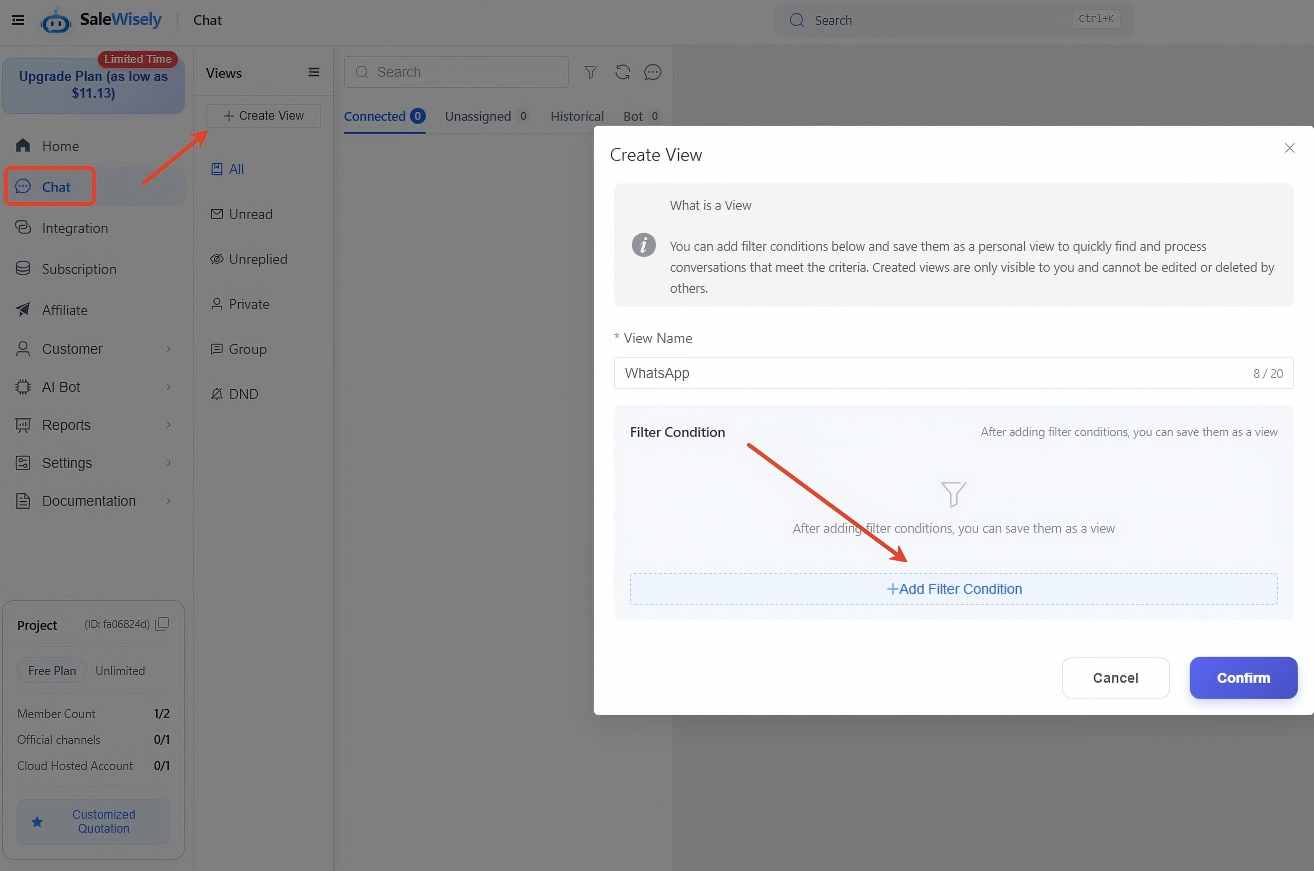
Add your WhatsApp accounts or saved chat plugins to gather and manage messages from WhatsApp in a centralized dashboard.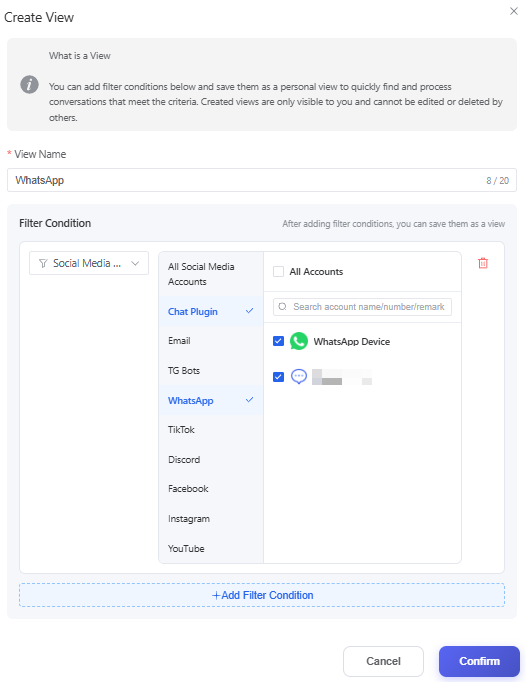
Useful Tool to Boost Chat Marketing on WhatsApp
SaleWisely is a full-chain, closed-loop social commerce solution designed to help businesses maximize sales across multi-channel messaging platforms, including WhatsApp. Whether you are a small team seeking efficient WhatsApp private-domain management or a large enterprise aiming to scale operations through the WhatsApp Business API, SaleWisely provides a comprehensive suite of tools to automate workflows, manage multi-agent teams, engage customers intelligently, and track the full sales funnel from first contact to closed deal. With SaleWisely, businesses can seamlessly combine personalized messaging, AI automation, and large-scale broadcast campaigns to optimize engagement, conversions, and revenue on WhatsApp.
Multi-account unified inbox
Aggregate multiple WhatsApp accounts into one dashboard. Teams can send and receive messages collectively—no more juggling phones or accounts.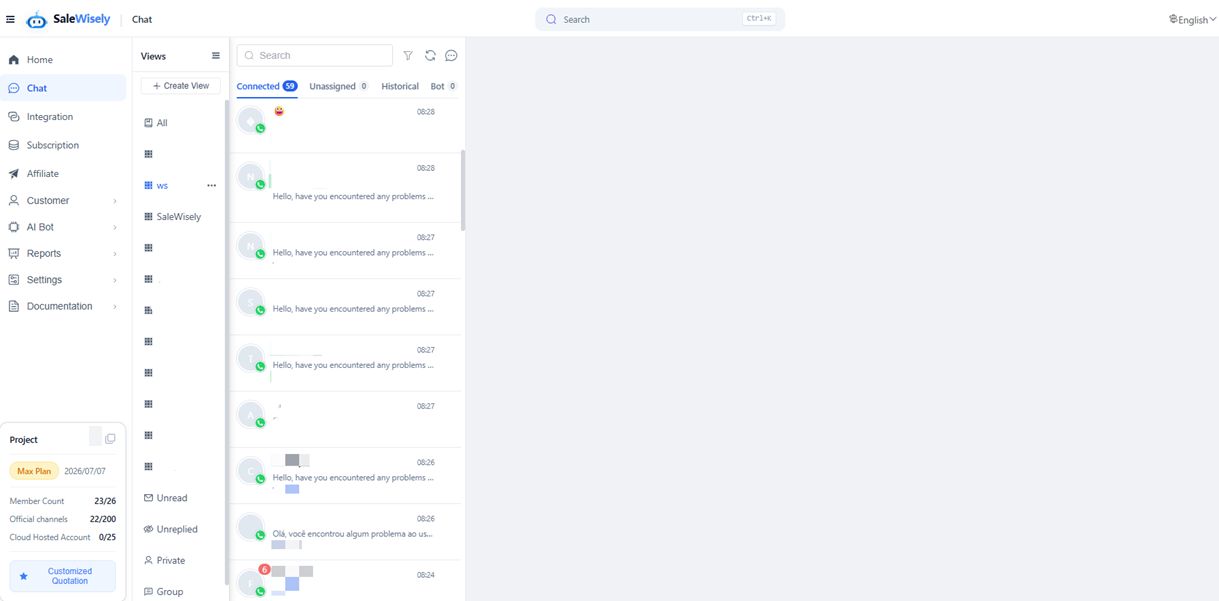
AI-powered responses & CRM integration
Built-in AI answers common questions, while CRM integration maintains complete customer profiles. Open Webhooks and APIs connect WhatsApp communication directly to business systems.Role-based team management for secure and efficient WhatsApp sales
SaleWisely offers comprehensive team management that keeps your WhatsApp sales operations secure, compliant, and efficient. All WhatsApp accounts remain under the company, ensuring no customer data is lost. Role-based permissions protect sensitive customer information and maintain compliance with privacy regulations, while detailed QA and performance reports allow managers to monitor staff activity, analyze response quality, and optimize team efficiency. This ensures consistent, high-quality customer service while enabling businesses to scale WhatsApp sales safely.Multi-language support and template responses for faster customer engagement
SaleWisely enables businesses to respond to customers quickly and efficiently through multilingual translation and predefined template replies. Auto-translation allows your team to communicate with customers in their preferred language, breaking language barriers and improving engagement. Meanwhile, the script library handles frequently asked questions, order updates, and promotions instantly, reducing response time and ensuring that every customer receives timely, consistent communication.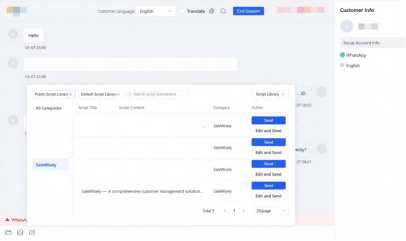
FAQs
Is it possible to make money through WhatsApp?
Yes. Businesses can use WhatsApp to sell products and services directly to customers, provide personalized support, and run promotional campaigns, turning conversations into revenue.
How to do sales on WhatsApp?
Start by creating a business profile, choose the right solution (WhatsApp Business App or WhatsApp API), manage incoming chats efficiently, and use automation, templates, and CRM integration to engage and convert customers.
Should I use WhatsApp Business App or WhatsApp API for sales?
Use WhatsApp Business App for small businesses, startups or solo entrepreneurs with low message volume. Choose WhatsApp API for medium to large businesses needing multi-agent support, automation, and CRM integration.
Is it legal to use WhatsApp for sales?
Yes. Using WhatsApp for business communication is legal, as long as you follow WhatsApp's policies, obtain customer consent for messages, and comply with local data protection regulations.