Key Takeaways
WhatsApp Business Directory helps users discover and connect with businesses directly inside WhatsApp, similar to a digital Yellow Pages.
For businesses, WhatsApp Business Directory creates opportunities to increase visibility, reach potential customers, and generate more conversations to get higher conversion.
Businesses can apply for Business Directory after setting up a WhatsApp Business account, completing business profile, and following WhatsApp's eligibility requirements.
Users can search for businesses inside WhatsApp by typing keywords or adapting filters such as business name, category, location, distance.
To maximize conversion on Business Directory, businesses should keep consistent presence, showcase products with catalog clearly, and respond quickly to customer inquiries with the right tool.
What is WhatsApp Business Directory?
WhatsApp Business Directory is a business discovery feature that helps users find and connect with registered businesses directly within WhatsApp. Similar to Yellow Pages, it provides a fast, safe, and convenient way for customers to search for businesses by filters like category, distance, business hours etc, view basic business information, and start conversations without leaving the app.
For businesses, WhatsApp Business Directory creates opportunities to share information through business profiles, improve visibility and reach potential or existing customers to expand business.
To be eligible for WhatsApp Business Directory, businesses are required to:
Use a WhatsApp Business account
Operate in a region where WhatsApp Business Directory is available (Brazil, Indonesia, Mexico, Colombia and the UK)
Be part of a supported business category
How does WhatsApp Business Directory Work for Businesses in 2026?
Free and accessible for businesses of all sizes
One of the biggest advantages of WhatsApp Business Directory is the cost effectiveness. Businesses can build a presence on WhatsApp and connect with customers without the need for a large advertising budget, making it especially valuable for small businesses, local stores, and startups that may have limited marketing resources. While large-scale companies can also use it to expand customer reach and maintain brand identity on WhatsApp.Increase visibility and reach new customers
WhatsApp Business Directory provides businesses with an additional channel to be discovered by potential customers. They can appear when customers are actively looking for relevant services or products on WhatsApp. Combined with business information (e.g. name, category, address and description) shown in profile and features like WhatsApp Business Catalog, businesses can better showcase their products or services, allowing customers to understand their offerings before starting a conversation.Higher conversion for in-chatting marketing
Except for providing basic information as yellow pages, WhatsApp Business Directory connects discovery directly with conversation. After finding a business, customers can start a WhatsApp chat instantly to ask questions, request information, or make inquiries. This straightforward path from discovery to conversation helps businesses reduce customer friction and create more opportunities for engagement and conversion.Access high-intent local customers
WhatsApp Business Directory makes it easier for customers to discover businesses based on factors such as name, category and location. By reaching users with specific intent, businesses can attract more relevant inquiries instead of relying only on broad marketing campaigns. This is especially crucial for local businesses, restaurants, retailers, and service providers that rely on nearby customers.
How to Get Listed on WhatsApp Business Directory?
Now that we understand how WhatsApp Business Directory helps businesses build presences and engage with customers, let's explore how to get your business listed and make it easier for potential customers to find you.
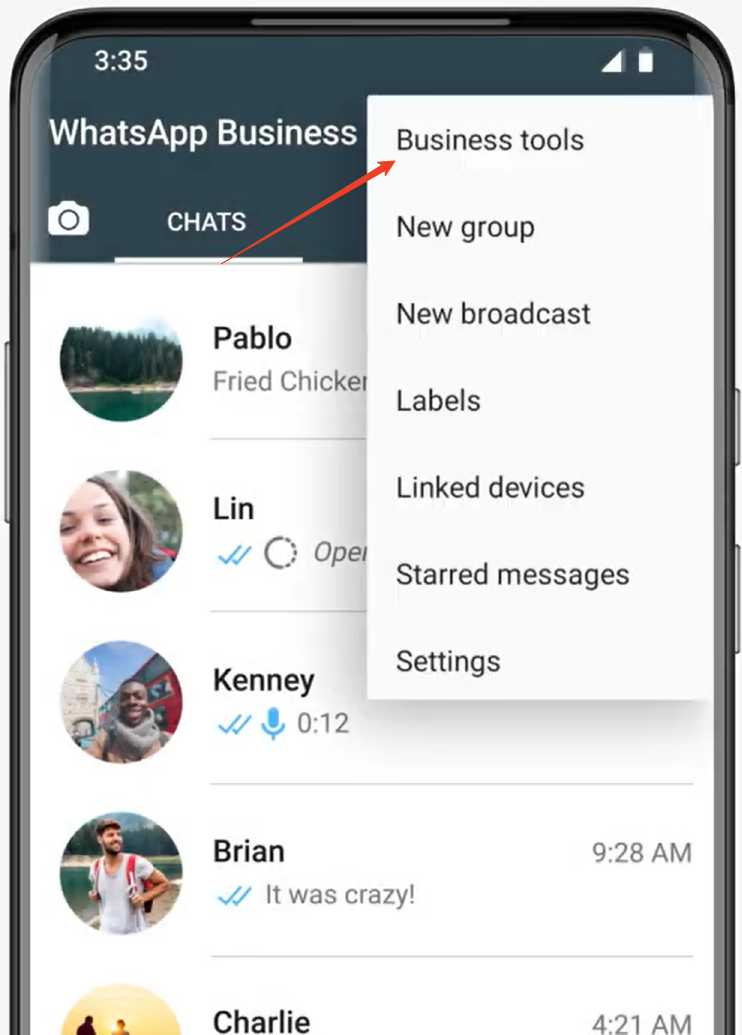
Step 1: Tap the ⋮ icon on the top right corner from the Chats tab, and click the 'Business tools'
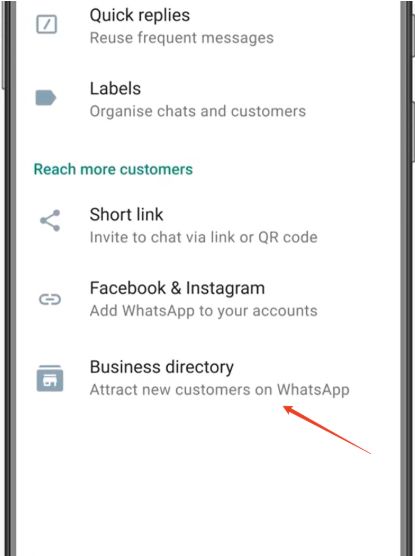
Step 2: Scroll down and find the 'Business directory'
Step 3: Tap 'Get started' and check the instruction on 'How to apply', complete required information and go Next.
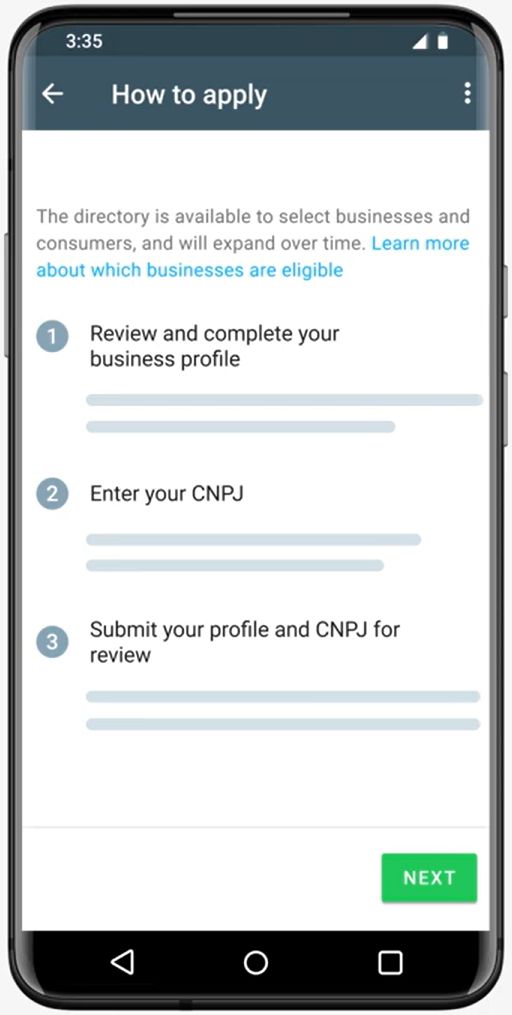
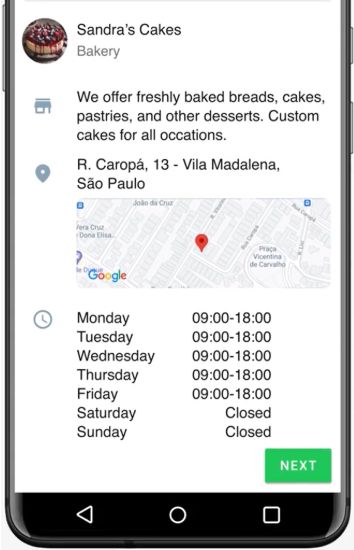
Review and complete eligible business information: Business name, category, profile photo, description, full address, location and business hours.
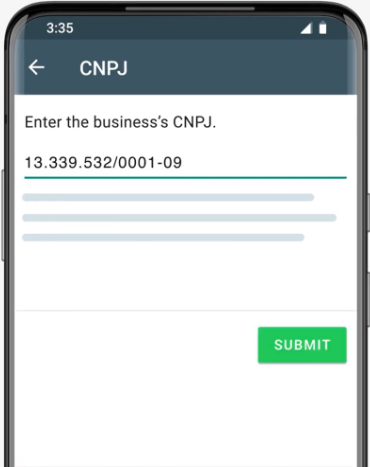
Enter a valid National Registry of Legal Entities (e.g. CNPJ in BR region) for your business.
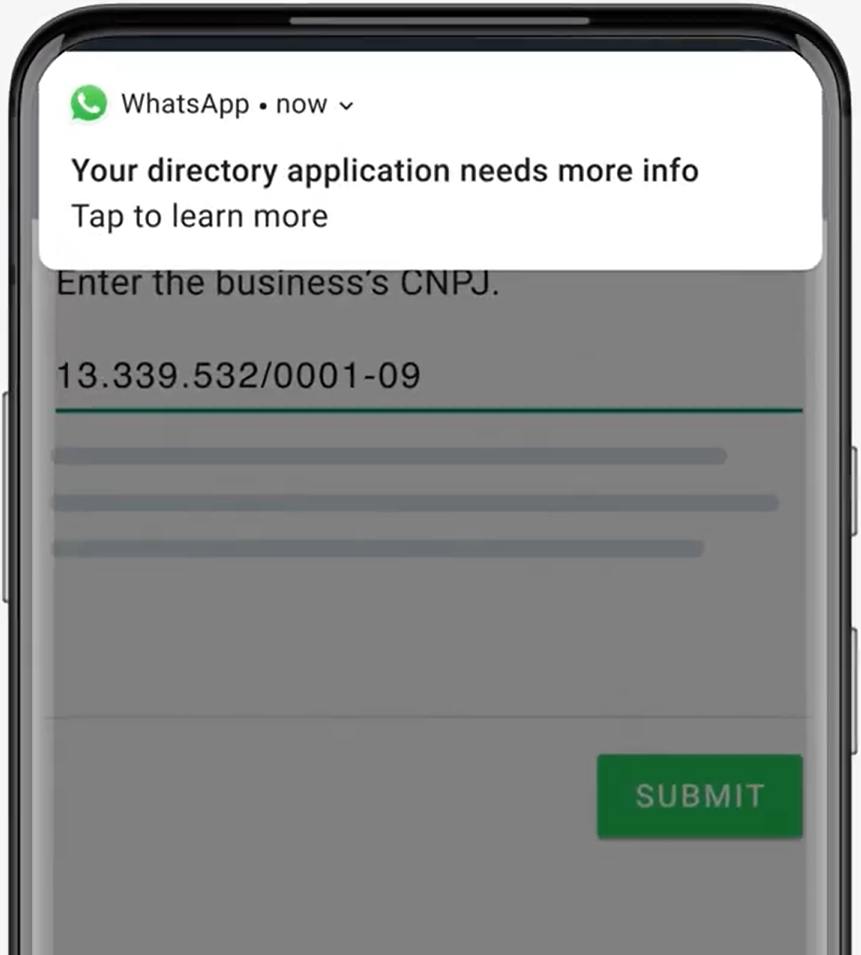
Step 5: Click 'Submit' and you will see a pop-up, tap it and wait for approval from WhatsApp.
How can Users Search for Business inside WhatsApp?
After businesses are listed on WhatsApp Business Directory, the next question comes to how customers can find and interact with them? Next, we walk you through the step-by-step guide to search for business in WhatsApp:
Step 1: Launch WhatsApp,tap the 'New Chat' icon and find 'Businesses'.
Step 2: Select your location sharing preference
To find nearby businesses, users can allow WhatsApp to access current location by tapping Continue > 'Use current location'. (Location permission should be enabled for WhatsApp in Settings.)
Alternatively, tap continue and pick a location on the map if you want to process this manually/to use your phone number to see business within your region
Step 3: Type a specific business name (e.g., "Food Republic") or category (e.g., "Restaurants"). Use the filter chips (category, distance, open status or catalog ) at the top of the screen to narrow down your results.
Step 4: Tap a business to view their business profile.
Step 5: Click 'Chat' to start conversation with business.
Best Practice to Grow Your Business on the WhatsApp Business Directory
Getting listed on WhatsApp Business Directory helps customers discover your business, but visibility alone does not guarantee conversions. To make the most of this channel, businesses need to optimize their profile, provide accurate information, and create a smooth experience from the first interaction to the final purchase.
1. Optimize your WhatsApp Business profile
Your business profile is the first impression customers have when they discover your business on WhatsApp. A complete and professional profile helps build trust and gives customers the information they need before starting a conversation.
Make sure your profile includes:
Business name and logo
Clear business description
Business category
Address or service area
Location on the map (if applicable)
Business hours
Website and social media links
Updated product or service catalog
Keeping your profile information accurate and up to date helps customers quickly understand your business and increases the chance of engagement.
2. Showcase products and services with a catalog
A WhatsApp Catalog works like a digital storefront, allowing customers to browse your products or services directly from your business profile. A well-organized catalog helps customers make faster decisions and reduces repetitive questions during conversations.
3. Manage customer conversations efficiently
As your business gains more visibility through WhatsApp Business Directory, the volume of customer inquiries may increase. Without an efficient tool, it can become overwhelming to respond quickly and maintain consistent service quality. Businesses can use conversational cx platforms to organize WhatsApp conversations, manage customer inquiries, and improve follow-up efficiency. Streamline in-chat marketing with shared inbox, customer organization, and automated workflows while maintaining personalized communication.
4. Build trust and maintain a professional presence
Trust plays an important role in converting directory visitors into customers. Businesses should maintain a consistent and reliable presence and always follow WhatsApp's guidelines to turn new discoveries into long-term customer relationships.
FAQs
What is WhatsApp Business Directory?
WhatsApp Business Directory is a feature that helps users discover and connect with businesses directly within WhatsApp.
Is WhatsApp Business Directory free for businesses?
Yes. WhatsApp Business Directory is designed to help businesses improve visibility without additional listing fees.
How to apply for the WhatsApp business directory?
Businesses need to use a WhatsApp Business account, complete their business profile with accurate information, and meet WhatsApp's eligibility requirements in supported regions.
How can I search for a business inside WhatsApp?
You can find businesses in WhatsApp by entering a business name or using filters such as category, location, distance, and business hours.