Finding customer service software is easy. Finding one you can keep using for free is harder.
Many platforms offer a free trial or a free plan with limits on users, conversations, channels, history, automation, or AI. Those limits may be fine when you are starting out. They can become a problem as your team grows or customers start contacting you on WhatsApp, Instagram, TikTok, email, and other channels.
So, what is the best free customer service software in 2026?
There is no single answer for every business. A small IT team may need a simple help desk. An ecommerce store may care more about live chat. A growing sales or support team may need multiple messaging channels without paying for every new agent.
This guide compares 13 free customer service software options based on their current free plans, main features, limits, and best use cases. It includes commercial SaaS products, free chat tools, IT help desks, and open-source options.
What Does “Free Customer Service Software” Mean?
Not every $0 plan works the same way.
Free Forever
A free plan that does not expire. You can keep using it without paying, although limits may still apply.
Common limits include seats, conversations, channels, history, automation, or AI usage.
Free Trial
A temporary period of paid features, usually lasting a few days or weeks. When the trial ends, you normally need to upgrade or move to a free plan with fewer features.
Free but Limited
A permanent free plan with strict limits. It can work well for a small team, but you may outgrow it quickly.
The useful question is not simply:
“Does this software have a free plan?”
The better question is:
“How much of the product can I actually use without paying, and when will I need to upgrade?”
How We Compared Free Customer Service Software
We looked at each platform across the areas that matter most to small and growing teams:
1. Free-plan limits — How many users, agents, contacts, or conversations can you handle?
2. Channels — Does the free plan cover email, live chat, WhatsApp, Instagram, Facebook, TikTok, or other channels you use?
3. Shared inbox — Can multiple people assign, manage, and reply to customer conversations?
4. Customer context — Can agents see customer history, notes, tags, or other useful information?
5. Automation — Are routing, assignment, notifications, or basic workflows included?
6. AI — What AI features are free, and what requires paid usage?
7. Knowledge base — Can customers find answers without contacting an agent?
8. Room to grow — What happens when your team or customer volume increases?
Free plans change often, so always check the vendor's current pricing and plan details before making a decision.
Best Free Customer Service Software in 2026
The tools below are grouped by their main strengths rather than placed in a single ranking.
1. SaleWisely — Best for Omnichannel Messaging and Unlimited Seats
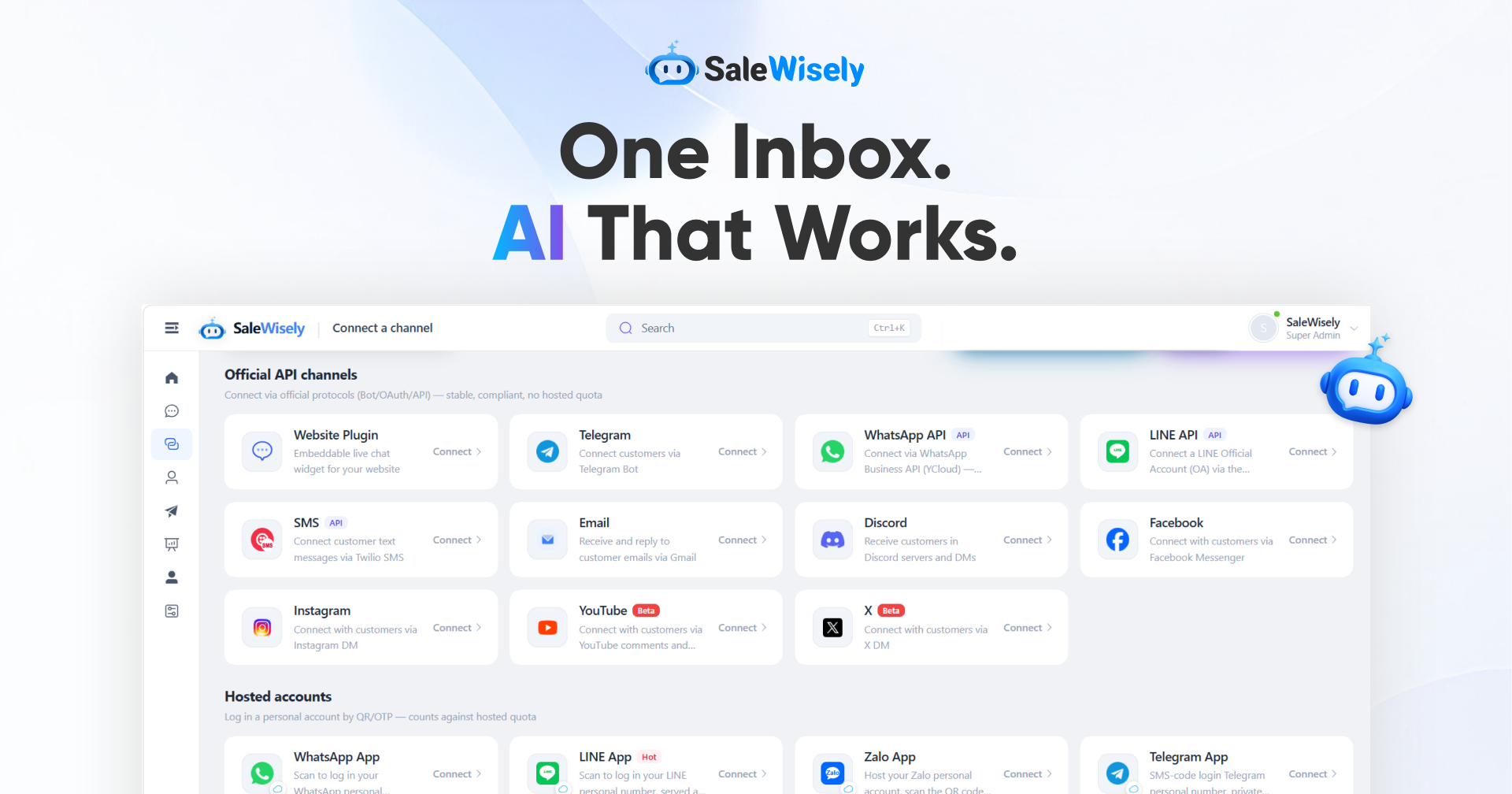
SaleWisely is designed for teams that manage customer conversations across messaging and social channels.
Free plan highlights:
l Free forever
l Unlimited seats
l Unlimited channels
l Shared inbox
l CRM
l Automation
l Real-time translation
l Optional AI usage through credits
SaleWisely brings WhatsApp, Instagram, TikTok, Facebook, Telegram, website chat, and other customer messaging channels into one workspace.
This makes it a strong fit for social commerce, messaging-first sales and support, and teams that do not want per-seat pricing to become a problem as they grow.
Best for: Small and growing businesses, social commerce teams, and teams that manage customers across multiple messaging channels.
Watch out for: SaleWisely focuses on customer conversations and sales-oriented communication. Teams that need specialized IT service management, asset tracking, or complex internal service catalogs may be better served by a dedicated IT help desk.
2. HubSpot — Best for CRM-Centered Teams
HubSpot is a strong choice if customer service needs to work closely with sales and marketing.
Its free CRM includes contact, deal, and task management, email tools, meeting scheduling, live chat, and other basic CRM features.
Free plan limits: Up to 2 users and 1,000 contacts. The free CRM does not expire.
The main advantage is customer context. Support and sales teams can work from the same customer records instead of keeping information in separate systems.
Best for: Small teams that already use HubSpot or want customer support data connected to their CRM.
Watch out for: The 2-user limit can become restrictive quickly. More advanced features, automation, and AI are available in paid products.
3. Zoho Desk — Best Traditional Help Desk for Small Teams
Zoho Desk is a good fit for businesses that prefer classic ticket-based support.
Its free edition supports core help desk features such as ticket management, email support, a help center, and a knowledge base.
Free plan limits: 3 agents.
It also works well with the wider Zoho ecosystem, including Zoho CRM and other business tools.
Best for: Small support teams that want traditional ticketing and already use Zoho products.
Watch out for: The free plan is limited to three agents, so larger support teams will need a paid plan.
4. Jira Service Management — Best for IT and Internal Support
Jira Service Management is built more for service requests and internal support than for social customer conversations.
Free plan limits: Up to 3 agents.
The free plan includes a customer portal, email and chat support, customizable forms and workflows, automation, and a knowledge base.
Best for: IT teams, internal support, and technical service requests.
Watch out for: It is not designed primarily for teams that need to manage large volumes of WhatsApp, Instagram, or social commerce conversations.
5. tawk.to — Best for Unlimited Free Live Chat
tawk.to is one of the most generous free options for website live chat.
The core product is free, with no limit on the number of agents, chat volume, or websites where you can add the chat widget.
Best for: Websites and small teams that mainly need live chat.
Watch out for: tawk.to is chat-first. It is not a full omnichannel customer service platform. Some services and add-ons are paid.
6. Tidio — Best for Small Ecommerce Live Chat
Tidio focuses on live chat, ticketing, and customer conversations for websites and ecommerce stores.
Free plan limits:
l 50 billable conversations per month
l 100 unique monthly visitors for Flows
The free plan is useful for smaller websites, but the conversation limit can become a problem as traffic grows.
Best for: Small ecommerce stores and websites with modest support volume.
Watch out for: Advanced AI, automation, and higher usage limits require paid plans.
7. LiveAgent — Best for Small Multi-Channel Teams
LiveAgent offers ticketing, live chat, email integration, and a knowledge base on its free plan.
The important catch is that the free plan has several limits.
Free plan limits:
l Unlimited agents
l One email support channel
l Basic reporting
l No integrations
l No automation
The unlimited agent count looks attractive, but the short ticket history is a major trade-off.
Best for: Very small teams that want email, chat, and phone support without paying per agent.
Watch out for: The 7-day ticket history may be too restrictive for teams that need long-term customer history.
8. Freshdesk — Best for Traditional Ticket-Based Support
Freshdesk is a well-known option for traditional customer support and ticket management.
Freshworks has offered free options for small teams, but free-plan availability and terms have changed over time.
Best for: Small teams that want a familiar ticket-based help desk.
Watch out for: Check the current Freshworks pricing page before choosing it. Free-plan availability, eligibility, and limits can change.
9. Help Scout — Best for a Simple Shared Email Inbox
Help Scout is designed around a simple shared inbox rather than a large IT service management system.
Its current free plan includes one shared inbox for up to 5 users and supports up to 100 contacts per month.
It also includes basic reporting and a limited self-service experience.
Best for: Small teams whose customers mainly contact them by email.
Watch out for: The 100-contact monthly limit can become restrictive as support volume grows.
10. Featurebase — Best for Product-Led Support and Feedback
Featurebase combines customer support, a help center, product feedback, and related customer-facing tools.
Its current free plan includes one full seat, while support conversations and end users are not capped in the same way as the seat limit.
Best for: Solo founders and very small product teams that want support and product feedback in one place.
Watch out for: The free plan includes only one full seat. Additional full seats are paid.
11. Spiceworks Cloud Help Desk — Best for Small Internal IT Teams
Spiceworks Cloud Help Desk is designed for internal IT support rather than customer-facing sales or social messaging.
It is a useful option for small IT teams that want a cloud-based help desk without a traditional software subscription.
Best for: Internal IT teams that need ticketing and IT-related features.
Watch out for: It is ad-supported and is not designed for modern social and messaging-based customer support.
12. Open-Source Customer Service Software — Best for Full Control
If you have technical resources, open-source help desk software can remove recurring software license fees.
Popular options include:
l osTicket — A mature, traditional ticketing system.
l FreeScout — A lightweight shared-inbox style help desk.
l GLPI — Useful for IT support and asset management.
l Zammad — A more feature-rich open-source help desk.
l HESK — A lightweight ticketing option.
These tools can give you more control over your data and setup.
But free software does not mean zero cost.
You still need to pay for hosting, maintenance, updates, backups, and technical support if you cannot handle those tasks yourself.
Best for: Technical teams that want control and want to avoid recurring software license fees.
Watch out for: Self-hosting requires technical work and ongoing maintenance.
13. Zendesk — Strong Platform, but Not Free Forever
Zendesk is a mature customer service platform with advanced support features.
However, it is not a free-forever solution. Free access is mainly available through trials.
That does not make Zendesk a bad choice. It simply means it belongs in a different category from the free tools above.
Best for: Larger or more complex support operations with a budget for paid customer service software.
Watch out for: If your main requirement is a permanent $0 plan, Zendesk is not the right choice.
Free Customer Service Software Comparison
Platform | Free Forever | Free Seats | Channels | Key Limits | Best For |
SaleWisely | Yes | Unlimited | Omnichannel messaging | AI uses optional credits | Messaging and social customer communication |
HubSpot | Yes | 2 users | CRM, chat, email tools | 1,000 contacts | CRM-centered teams |
Zoho Desk | Yes | 3 agents | Email, web, help center | Advanced features paid | Small support teams |
Jira Service Management | Yes | 3 agents | Portal, email, chat | Internal-service focused | IT and internal support |
tawk.to | Yes | Unlimited | Live chat | Chat-first | Website live chat |
Tidio | Yes | 10 operators | Live chat, ticketing | 50 conversations/month | Small ecommerce stores |
LiveAgent | Yes | Unlimited | Email, chat, phone | 7-day ticket history | Small multi-channel teams |
Freshdesk | Varies | Varies | Ticket-based support | Check current terms | Traditional help desk |
Help Scout | Yes | 5 users | Shared inbox | 100 contacts/month | Email-first support |
Featurebase | Yes | 1 full seat | Support and feedback | Additional full seats paid | Product-led teams |
Spiceworks Cloud | Yes | Unlimited | IT help desk | Ad-supported | Internal IT |
Open-source tools | Yes | Unlimited* | Depends on product | Self-hosting required | Technical teams |
Zendesk | No | — | Omnichannel | Trial-based access | Complex paid operations |
*Open-source products do not charge a software subscription fee for the core product, but hosting and maintenance still have costs.
Plans change frequently. Always verify current limits and eligibility on the vendor's website before making a purchase or migration decision.
Which Free Customer Service Software Is Best for You?
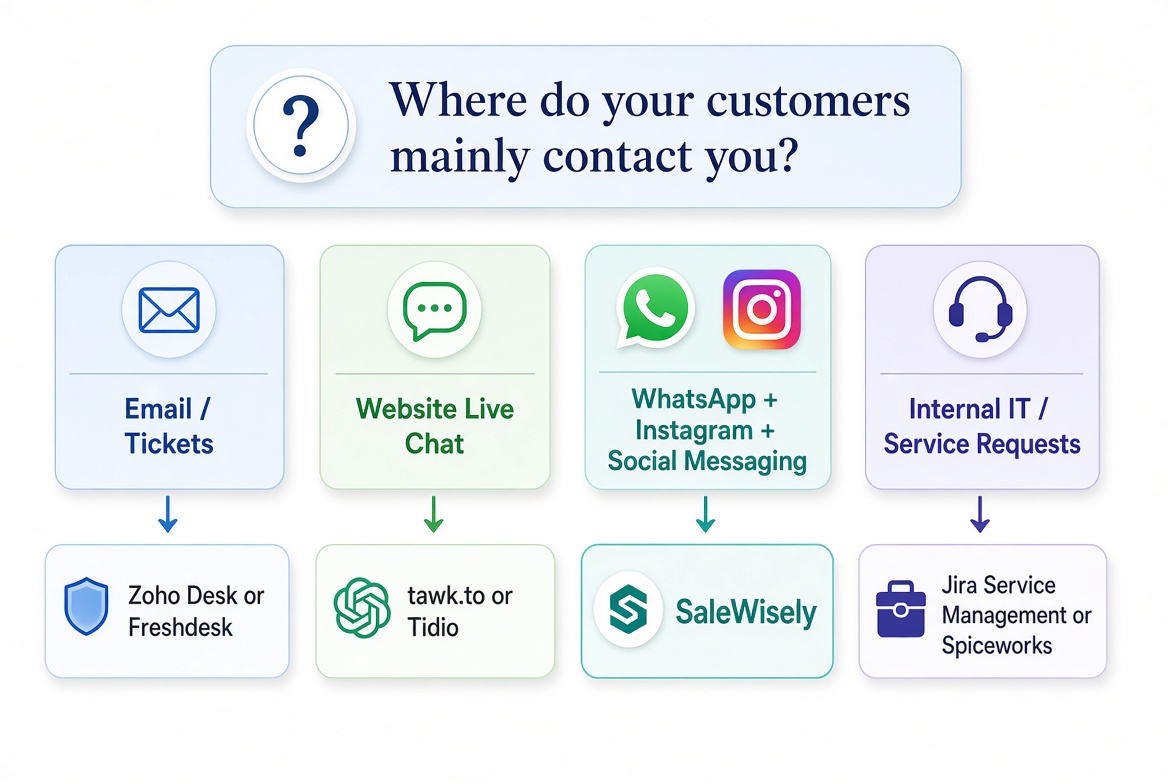
The best option depends on what your team needs.
Best for Omnichannel Messaging
SaleWisely
A strong fit for teams that need multiple messaging and social channels without paying for every additional seat.
Best for CRM + Customer Support
HubSpot
A good choice when sales, marketing, and customer support need to share the same customer records.
Best Traditional Ticketing
Zoho Desk or Freshdesk
Both are better suited to teams that think in terms of tickets, queues, and traditional help desk workflows.
Best for IT and Internal Support
Jira Service Management or Spiceworks Cloud Help Desk
These tools are better suited to internal service requests and IT support.
Best Unlimited Free Live Chat
tawk.to
A strong choice if your main need is website live chat and you want unlimited agents.
Best for Small Ecommerce Chat
Tidio
A good fit for smaller ecommerce stores with relatively low conversation volume.
Best Simple Shared Inbox
Help Scout
Useful for teams that mainly handle support through email.
Best Product + Support Combination
Featurebase
A good option for product teams that want support and customer feedback in one system.
Best for Full Control
Open-source tools such as osTicket, FreeScout, GLPI, or Zammad
Best when your team has the technical resources to host and maintain the software.
Best for Larger Support Operations
Zendesk
A mature paid option for teams that need more advanced support operations and are ready to pay for them.
What Is the Best Free Customer Service Software for Small Businesses?
For small businesses, the biggest mistake is choosing a tool based only on the word “free.”
Instead, ask:
1. Will it still work when my team grows?
2. Are the free channels the same ones my customers use?
3. How many customers or conversations can I handle?
4. Can more than one person work on the same inbox?
5. How much history will I keep?
6. What happens when I reach the free-plan limit?
For a small business, team size and customer channels often matter more than the number of features on a pricing page.
A business with three agents may get more value from unlimited seats than from an advanced reporting dashboard that nobody uses.
A business that gets most of its inquiries through WhatsApp and Instagram may also be better served by an omnichannel platform than by an email-first help desk.
When Is Free Customer Service Software Enough?
A free plan is often enough when:
l Your team is small.
l Customer volume is manageable.
l You mainly need basic ticketing, chat, or a shared inbox.
l You are still building your support process.
l You do not need advanced reporting or complex automation.
Paid software starts to make more sense when you need:
l Larger teams
l Higher conversation or ticket volume
l Advanced reporting
l More automation
l More AI usage
l More integrations
l Advanced permissions and security
l Enterprise support features
The important thing is to understand what triggers the upgrade.
Common Limits of Free Customer Service Software
Free plans usually have trade-offs.
Limited Seats
Per-user pricing can become expensive as your support team grows.
Conversation or Ticket Caps
Live chat and customer messaging tools often limit how many conversations you can handle each month.
Limited Channels
Some free plans focus on email or website chat while keeping social and messaging channels for paid users.
Short History
A short history window can make it difficult to understand a customer's previous conversations.
Limited AI and Automation
AI replies, AI agents, advanced workflows, and automation are often limited or paid.
Branding or Ads
Some free products show their branding or ads to your customers.
Self-Hosting
Open-source tools can remove software subscription fees, but they shift the work to your own team.
Frequently Asked Questions
What is the best free customer service software overall?
There is no single best tool for every business.
For omnichannel messaging and unlimited seats, SaleWisely is a strong fit. HubSpot works well for CRM-centered teams. Zoho Desk is a good traditional help desk option. tawk.to is a strong choice for unlimited website live chat. Open-source tools are useful when you want more control and can handle self-hosting.
Is there any truly free customer service software?
Yes.
tawk.to is free for its core live chat product. Spiceworks offers a free cloud help desk for internal IT use. Open-source tools such as osTicket, FreeScout, GLPI, Zammad, and HESK can also be used without a software subscription fee.
However, open-source software still has hosting and maintenance costs.
Can free customer service software support multiple agents?
Yes, but the limits vary.
Some free plans allow only two or three users. Others allow more agents or unlimited agents.
The seat limit is one of the first things to check before choosing a platform.
Does free customer service software include AI?
Some free tools include limited AI features. Others charge for AI usage or make advanced AI features available only on paid plans.
If AI is important to your team, check whether the free plan includes AI and whether usage is capped.
Can I manage WhatsApp and Instagram with free customer service software?
Sometimes.
Many traditional help desks focus on email and web-based support. Messaging-focused platforms are more likely to support channels such as WhatsApp, Instagram, Facebook, and TikTok.
Always check the exact channels included in the free plan.
Should I choose a free help desk or an omnichannel platform?
Choose a help desk if your support process is mainly ticket-based and email-driven.
Choose an omnichannel platform if customers contact you through several messaging and social channels and your team needs to manage those conversations in one place.
Final Verdict
There is no universal best free customer service software in 2026.
The right choice depends on your team, customer volume, and support channels.
l Email and ticket-based support: Zoho Desk or Freshdesk
l CRM-centered support: HubSpot
l Internal IT: Jira Service Management or Spiceworks
l Website live chat: tawk.to
l Small ecommerce chat: Tidio
l Product-led support: Featurebase
l Full control and no software license fee: Open-source tools
l Complex paid support operations: Zendesk
l Omnichannel messaging with unlimited seats: SaleWisely
The equation changes when your customers are spread across WhatsApp, Instagram, TikTok, Facebook, and other messaging channels.
For those teams, SaleWisely is a strong option because its free plan includes unlimited seats and unlimited channels, along with shared conversations, CRM, automation, real-time translation, and optional AI usage.
The best free customer service software is not simply the one with the longest feature list.
It is the one that solves your current support needs without creating a new problem when your business grows.
Start with the tool that fits your team and channels today. Then check its current free-plan limits before you build your support workflow around it.