Key Takeaways:
Facebook Messenger widget is a direct customer communication channel embedded on a website, allowing visitors to start conversations without searching for your Facebook Page.
Meta discontinued its native Messenger Chat Plugin in May 2024, but businesses can still connect Messenger to their websites through alternatives.
An m.me link or button takes visitors directly to the Messenger chatbox with click. It's easy-to-use, free, and requires no external service, but comes with limited customization and interrupted conversation experience.
Third-party chat widgets provide more integrated and customizable chat experience on the website, but relies on an external provider and typically comes with subscription costs.
Customer conversation management software is a good fit to bring omnichannel chats into one workplace, streamline the repeats with AI-powered automation, assign human touch in granular, and track the customer journey with CRM integration.
What is a Facebook Messenger Widget?
A Facebook Messenger Widget is a website-based chat interface that allows visitors to start a conversation with businesses through Facebook Messenger. It typically appears as a chat button or floating window on a webpage, giving visitors a direct entry point to Messenger without manually searching for the business on Facebook. The widget can be placed on different areas of a website, such as the homepage, product pages, landing pages, or support pages, depending on where businesses want to make Messenger accessible to visitors.
Once integrated, the widget acts as the bridge between the website experience and Messenger conversation. Visitors can click the chat button, send a message, and continue the conversation from the website.
Why Use Facebook Messenger for Business?
Facebook Messenger is part of Meta's broader communication ecosystem. According to Meta, nearly 80% of people globally message with a business at least once a week, while WhatsApp, Messenger, and Instagram Direct account for around 600 million conversations between people and businesses every day.
For businesses with an active presence on Facebook, Messenger can be a natural extension of their customer communication strategy. Instead of treating Facebook and business websites as completely separate touchpoints, it can serve as a direct conversation channel across both.
Shorten the path to customer conversations
Every extra step between a customer having a question and finding a way to contact you creates another opportunity for them to leave. A Messenger widget puts a direct chat option on the page, enabling smoother website experience without jumping to a separate contact page.
Whether visitors want to check product availability, ask about pricing, or look for more information before purchasing, they can start a conversation directly from the page they're viewing.
Drive meaningful engagement in real time
A website visit doesn't always end with a purchase. Visitors may be interested in what you offer but still need an answer before taking the next step. Facebook Messenger widget paves the path for real-time communication between audiences and businesses. Instead of ending with a page view, a visit can become an actual conversation, and then conversion with your business.
Meet customers in a familiar environment
People tend to feel more comfortable with communication tools they already know. For visitors who regularly use Facebook Messenger, starting a conversation through Messenger feels more natural than filling out a traditional contact form or sending an e-mail.
Can You Still Add the Facebook Messenger Chat Plugin to a Website?
If you're looking for ways to add Facebook Messenger to your website, you may come across tutorials featuring Facebook Messenger chat plugin. However, Meta discontinued its native chat plugin on May 9, 2024, which means the original plugin is no longer available for embedding a Messenger chat window directly on your website.
The good news is that the end of the native chat plugin doesn't mean you have to leave Messenger behind. Facebook Messenger can still be integrated with your website through other solutions, allowing visitors to connect with your business through Messenger. In the next section, we'll walk through how to add Messenger to your website today.
How to Add Facebook Messenger to Your Website?
Before the start: What should you know?
Adding Facebook Messenger to a website usually requires a few basic things to be in place:
A Facebook Page: A business Messenger experience is generally associated with a Facebook Page rather than a personal Facebook profile.
Access to the Facebook Page: You need the appropriate permissions to manage the Page and, where required, connect it to other services.
A website you can edit: If you want to add a Messenger link, button, or chat widget, you'll need access to the relevant website settings, CMS, or page code.
Method 1: Add an m.me Link or Button
An m.me link is a short Messenger URL (m.me/username) that can direct visitors to a conversation with your Facebook Page. You can also add the link to a CTA button to guide visitors to start a conversation with a click.
How to set it up?
Step 1: Open your Facebook Page and make sure Messenger is available for the Page.
Step 2: Find the username on the page (e.g. @SaleWisely), and build your link as m.me/SaleWisely
Step 3: Add the link to a button, CTA header, footer, image, or other clickable element on your website.
Your button could say:
Message Us on Facebook
Chat With Us on Messenger
Send Us a Message
Talk to Us on Facebook
Have a Question? Message Us Now
Step 4: Publish the changes and test the link on both desktop and mobile to make sure it runs well.
Pros:
No third-party platform or widget is required. Best for small businesses that want a simple and lightweight way to let website visitors contact them through Facebook Messenger.
Cons:
The trade-off is that visitors will be redirected to Messenger and need to log in rather than chatting through an interface directly on your website.
Method 2: Third-party chat widget
A third-party chat widget adds a floating chat button or window to your website, giving visitors a convenient way to contact your business without searching for a contact page. Most widgets can be customized to match your website, including the button style, position, welcome message, and when the chat window appears. Once configured, the provider typically gives you a snippet or installation option that can be added to your website.
How to set it up on SaleWisely?
Step 1: Navigate to the Integration page and find Website Plugin.
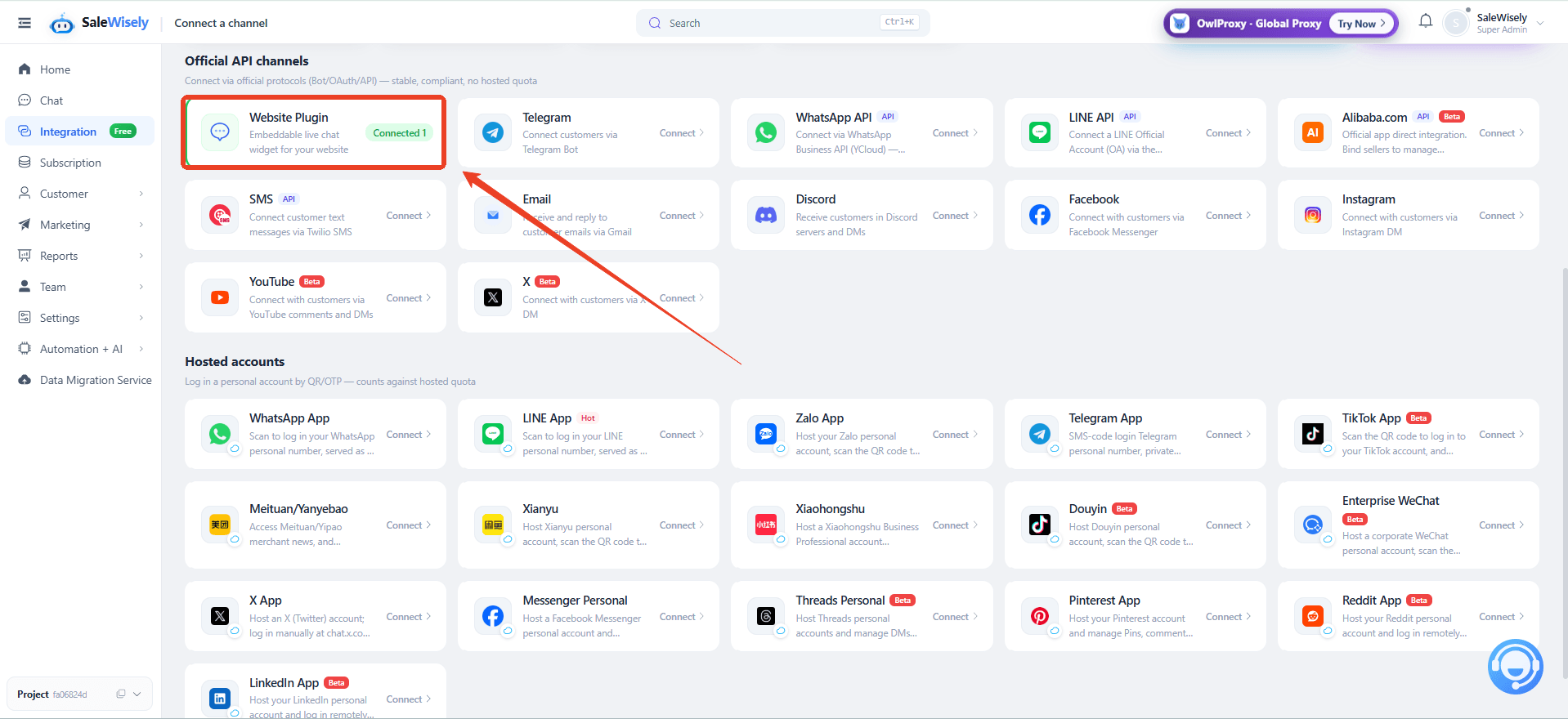
Step 2: Click Add plugin and configure basic settings: plugin name, theme, chat window style, welcome messages, etc.
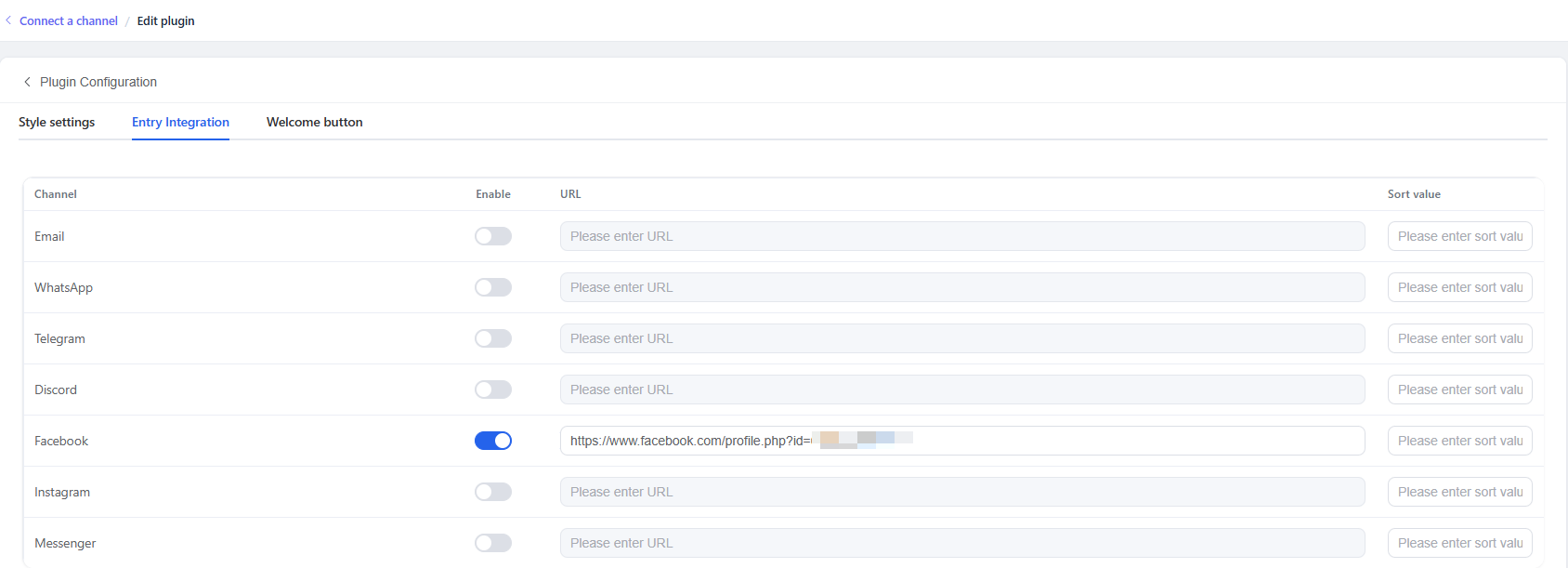
Step 3: Enable Facebook on the Entry Integration page and enter the URL of your page and save it.

Step 4: Integrate the chat plugin to your website.
Copy the code and follow the instructions to integrate the plugin to your website quickly.
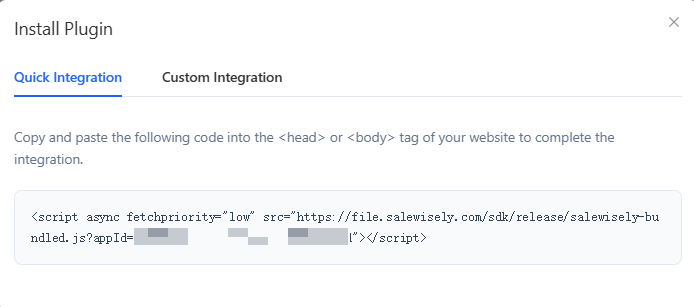
Or find Custom Integration and make more advanced configuration via the SDK.
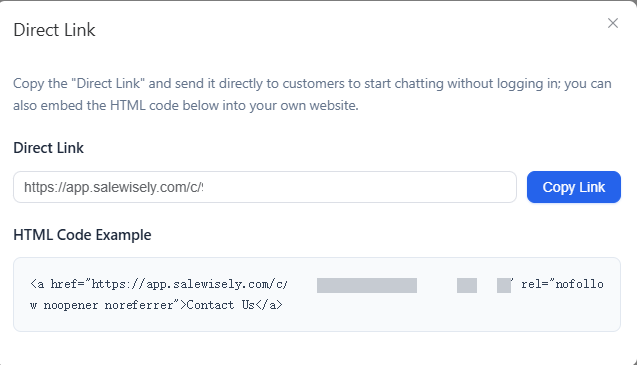
Direct link provides another way to connect with customers. Businesses can simply send it to customers or add the link to the website as a button for conversation without requiring visitors to log in.
Pros:
More prominent, customizable and integrated web chat experience, enabling ongoing real-time conversation without leaving the webpage.
Cons:
This method relies on an external service. Integration capabilities and customization level can vary among providers and most providers require paid subscription to unblock advanced functions.
Quick comparison: m.me link/button vs. SaleWisely chat widget
Best Practice to Bring Messenger and Multi-channel Chat to One Inbox
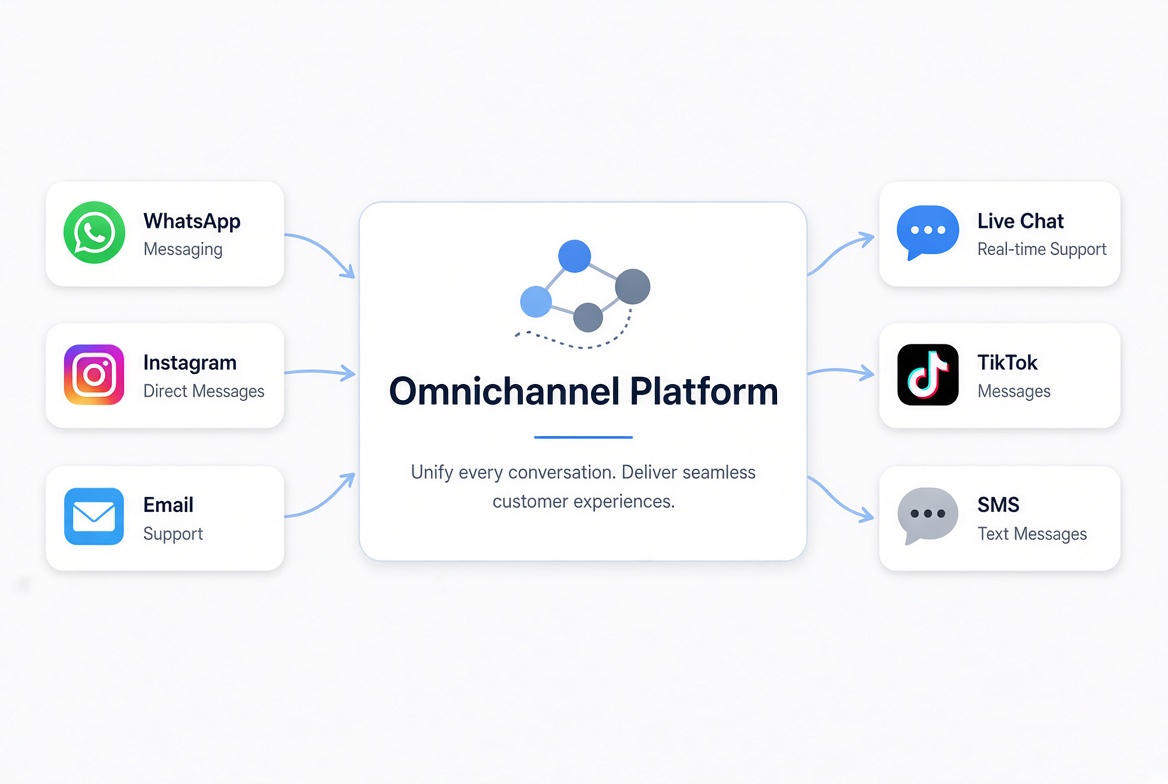
As businesses expand more channels to connect audiences, conversations can quickly become scattered across different platforms. A message might arrive through Facebook Messenger, another through website chat, while others come through WhatsApp, Instagram, or email. Keeping track of all these messages separately can make it harder for teams to respond in time and keep customer context in view.
When conversations start piling up across different channels, businesses need a more structured way to keep every conversation moving forward. Customer conversation management tool is a good fit to gather and manage omnichannel chats in a centralized workplace, helping teams catch up every inquiry, respond at the right time, and avoid letting valuable conversations slip through the cracks.
Bring every channel into one multi-agent Inbox
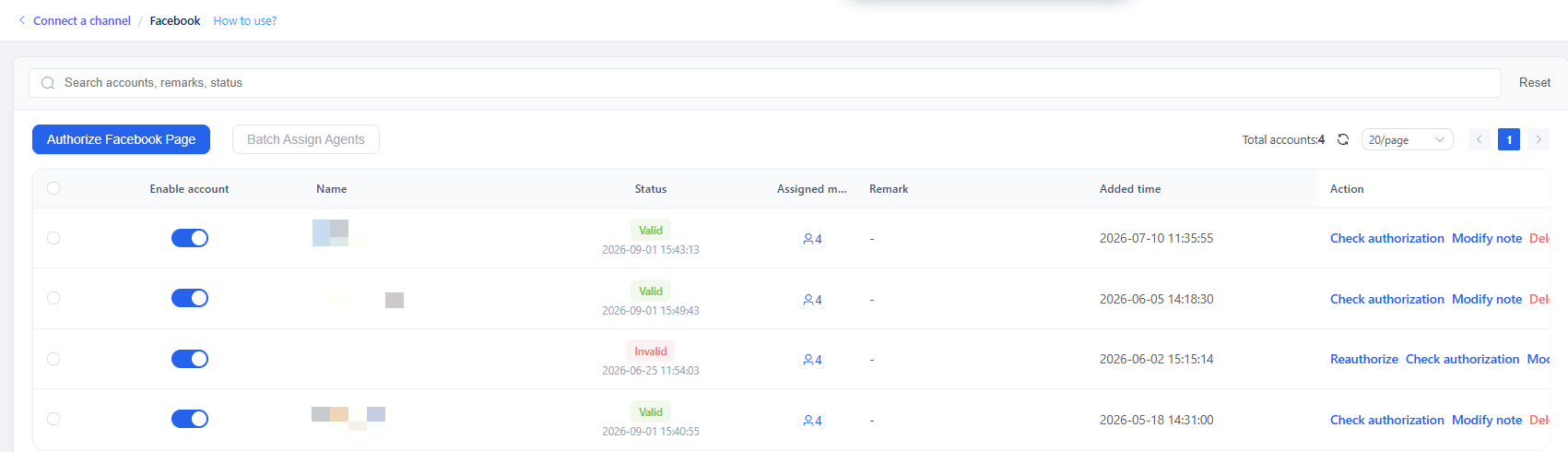
When conversations pile up across different platforms, switching between chat windows can quickly become a bottleneck for support teams. A unified multi-agent inbox centralizes customer messages into one place, enabling businesses to handle website chats, Messenger dms, comments and conversations from other platforms without jumping from one to another.
With granular team collaboration, conversations can be assigned to the right team members while keeping everyone on the same page, making it easier to feed customer satisfaction and coordinate support efficiency.
Let AI handle the repeats for you
Not every customer question needs a manual reply. Automation can handle repetitive inquiries, routine requests and FAQs, supporting timely responses while releasing heavy manual workload. This allows team focus on conversations that require more human touch—whether that's helping a customer make a purchase decision, resolving a complex issue, or following up with a high-value lead.Track the customer journey with CRM
A conversation doesn't exist in isolation. To understand where a customer stands, teams need insights into the journey behind each interaction. With CRM integration, customer conversations can be connected with customer data and journey stages, making it easier to track interactions from the first inquiry through follow-up and conversion.Access advanced features without extra cost
Cost is naturally part of the decision when choosing a customer conversation management tool. Recurring subscription and additional cost for advanced features will make businesses, especially smaller teams or growing brands think twice before starting or switching their customer service setup. SaleWisely removes the concern of stretching the budget and allows businesses to organize omnichannel customer conversations with advanced features such as shared inbox, AI-powered automation, CRM integration, and team collaboration without subscription expense.
FAQs
What is the point of a Facebook Messenger widget?
A Facebook Messenger widget gives website visitors a quick way to contact your business through Messenger without searching for your Facebook Page.
How do I link Facebook to my website?
You can link Facebook Page to your website by adding an m.me link or button. For a more integrated chat experience, you can also use a third-party chat widget to connect with customers without leaving the webpage.
How to get the Messenger link of a page?
Facebook page URL follows the format: m.me/Username. Replace Username with your Facebook Page's username(or page id if you didn't set the username) to create the link.
Can I add a Facebook Messenger widget to the website for free?
Yes. You can add a simple Messenger link or button without extra cost. Or use SaleWisely for more integrated experience and advanced features free of charge.