Customers rarely stick to one channel when they talk to a business.
A customer might discover a product on Instagram, ask a question on WhatsApp, receive an email about the order, and later contact support through website chat. If each channel is handled separately, the customer may have to explain the same problem again.
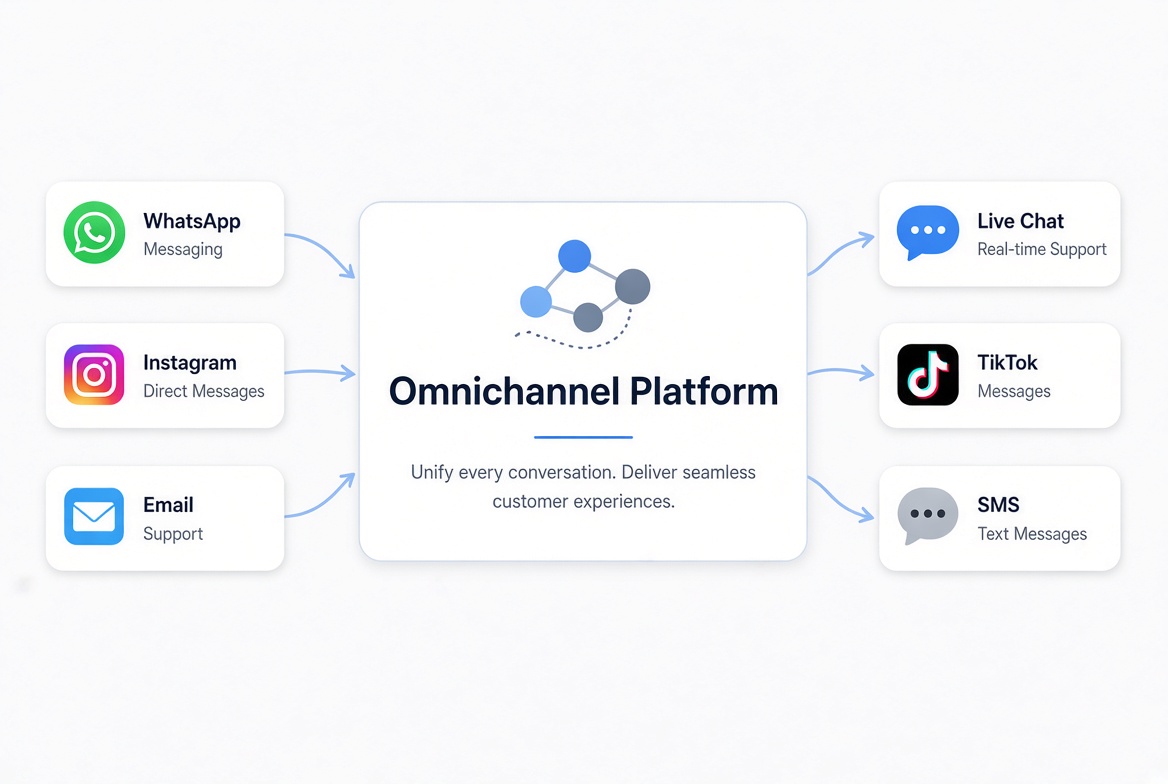
An omnichannel platform is a system that connects multiple customer communication channels and brings conversations, customer data, and workflows together in one place.
The idea is simple: customers should be able to switch channels without feeling like they are starting a new conversation every time.
What Does “Omnichannel” Mean?
Omnichannel means that different communication channels work together as part of the same customer journey.
Those channels might include:
l WhatsApp
l Instagram
l Facebook Messenger
l TikTok
l Email
l Website chat
l SMS
l LINE
l Other messaging and social platforms
Not every business needs all of them. A local service business may rely mainly on phone, email, and website chat, while an ecommerce brand may get most of its customer conversations through social media and messaging apps.
What matters is not the number of channels. It is how well they work together.
For example, a customer may first message a business on Instagram and later continue the conversation on WhatsApp. In a connected setup, relevant customer information and conversation history can follow that customer instead of leaving the support team with two unrelated conversations.
That connection is what makes omnichannel different from simply being available on several platforms.
What Does an Omnichannel Platform Do?
An omnichannel platform brings several parts of customer communication into one system.
Connect multiple channels
Businesses can connect the messaging, social, email, and chat channels they actually use.
Centralize conversations
Messages from different channels can be handled from a shared workspace instead of separate inboxes.
This is especially useful for teams that would otherwise spend their day switching between different apps.
Keep customer context
Customer profiles can contain contact details, previous conversations, and interaction history.
When a customer can be reliably identified across channels, those interactions can be associated with the same profile. This gives agents more context before they reply.
Automate repetitive work
Common tasks such as answering frequently asked questions, routing conversations, qualifying leads, and sending follow-ups can often be automated.
Track customer interactions
The platform can also help teams understand where conversations come from and how customers interact with the business over time.
The important part is that these functions work together rather than operating as isolated tools.
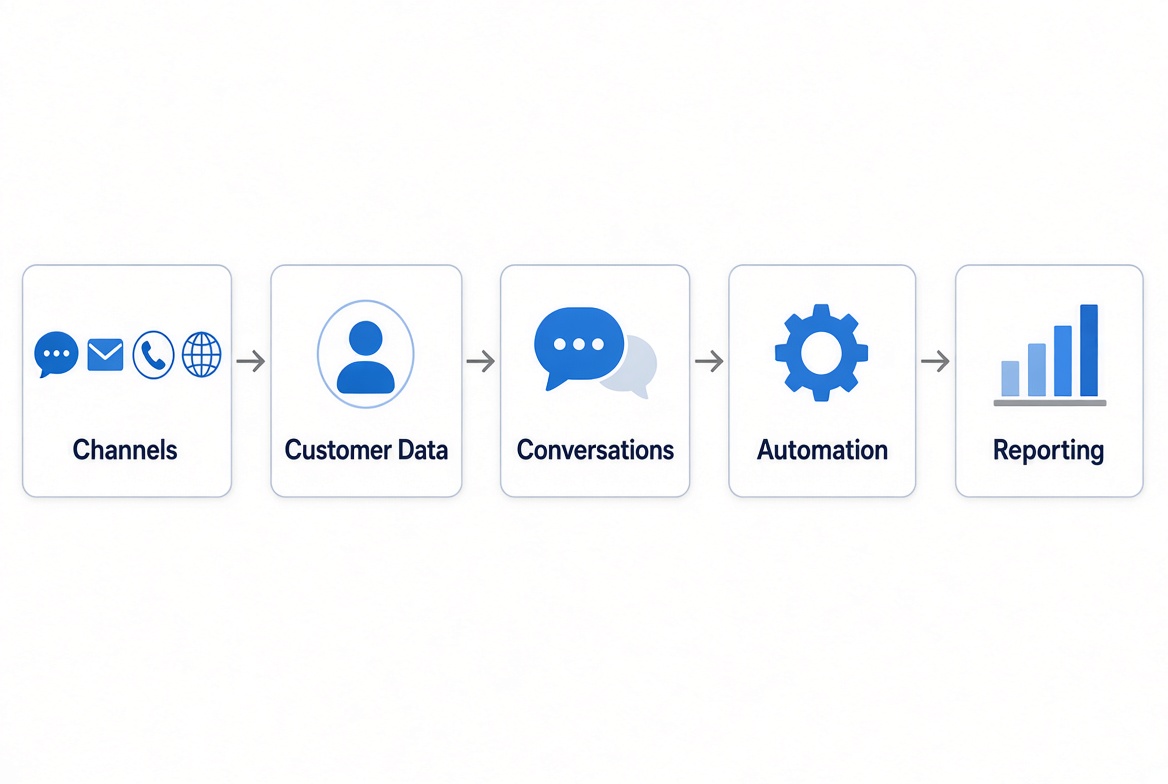
How Does an Omnichannel Platform Work?
The technology varies from one platform to another, but the basic process is fairly straightforward.
1. Connect the channels your customers use
Start with the channels that already generate customer conversations.
For example, an ecommerce business might connect Instagram, TikTok, WhatsApp, email, and website chat.
There is little benefit in connecting a channel simply because it is available if your customers rarely use it.
2. Bring conversations into one place
Messages from connected channels are brought into a shared workspace.
Sales and support teams can then manage conversations without constantly checking different inboxes.
3. Build customer profiles
The platform stores customer information and interaction history.
Where the available integrations support reliable identification, conversations can be linked to the same customer profile.
4. Automate routine interactions
Automation can handle repetitive work such as:
l Answering common questions
l Collecting customer information
l Routing conversations
l Qualifying leads
l Sending follow-up messages
AI can add another layer by answering questions, translating messages, summarizing conversations, or helping agents draft replies.
5. Review the customer journey
Once conversations and channel data are connected, teams can look for patterns.
Which channels bring in the most conversations? Where do customers tend to ask the same questions? How quickly are requests being handled?
These insights can help teams improve both their workflows and the customer experience.
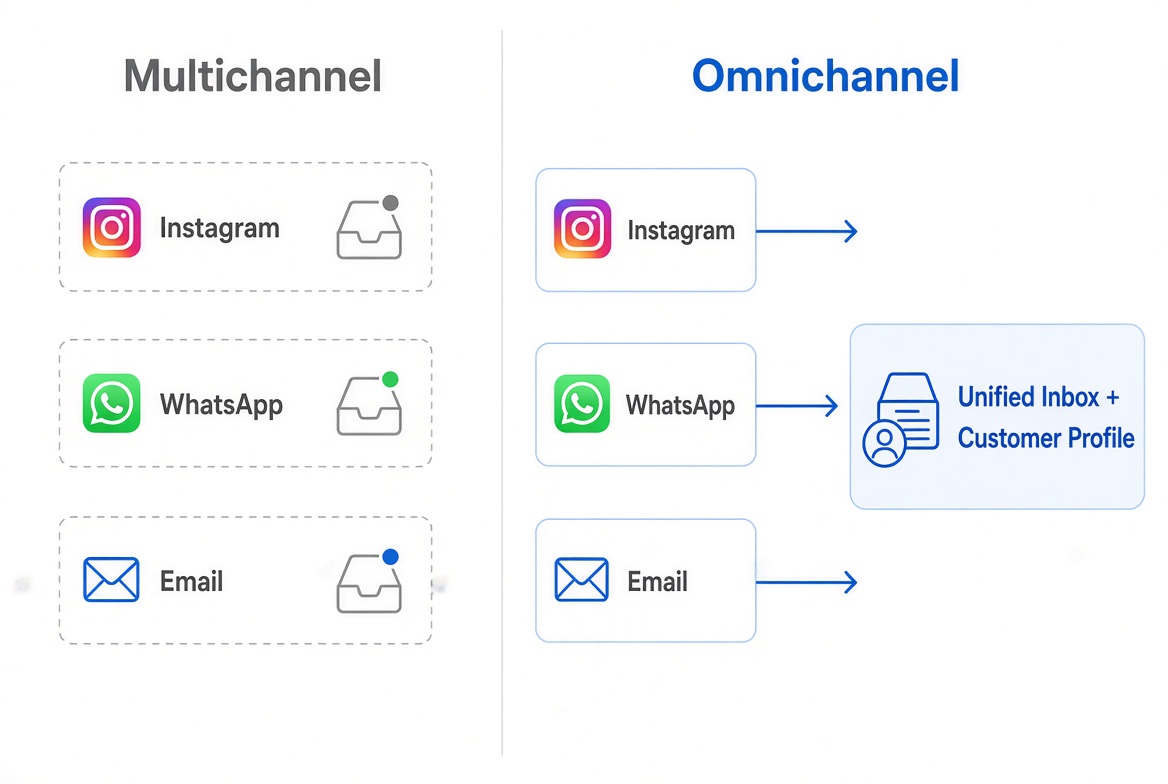
Omnichannel vs. Multichannel: What's the Difference?
Both approaches involve multiple communication channels. The important difference is whether those channels are connected.
Feature | Multichannel | Omnichannel |
Multiple channels | Yes | Yes |
Channels connected | Not necessarily | Yes |
Shared customer context | Often limited or separate | More connected |
Conversation history | Usually separated | Can be shared across channels |
Customer journey view | Limited | More connected |
Main focus | Being available on more channels | Connecting the customer experience |
A simple way to remember it:
Multichannel means “we are on many channels.”
Omnichannel means “our channels work together.”
A business can have Instagram, WhatsApp, email, and website chat and still operate in a multichannel way. If every channel has its own inbox, customer data, and workflow, switching channels may still create friction.
Having more channels does not automatically create a better customer experience. The value comes from connecting the channels customers actually use.
What Is an Omnichannel Customer Experience?
An omnichannel customer experience is what customers experience when the different touchpoints they use with a business feel connected.
Consider a simple ecommerce example:
TikTok → WhatsApp → Email
A customer discovers a product through TikTok and sends a question. They continue the conversation on WhatsApp to ask about delivery. Later, they receive an order-related email.
From the customer's perspective, this is one interaction with the same business. Your systems may treat these as separate channels, but the experience should not feel unnecessarily fragmented.
A good omnichannel experience should feel consistent when customers move between channels. The business should have enough context to understand previous interactions, and customers should be free to use the channel that works best for them.
That does not mean every channel needs to offer exactly the same experience. Email, messaging, and social media serve different purposes. The goal is to make the overall journey feel connected.
How Does an Omnichannel Platform Improve Customer Experience?
The biggest benefit is not simply having more channels. It is reducing the friction caused by disconnected ones.
Customers spend less time repeating themselves
When relevant customer information and conversation history are available, customers are less likely to explain the same issue multiple times.
Customers can use the channel they prefer
Some customers prefer WhatsApp. Others prefer email, social media, or website chat.
Giving customers options is useful, but those options become much more valuable when the business can manage them consistently.
Support teams can respond more efficiently
Agents can spend less time switching between tools or searching for previous conversations.
Communication is easier to keep consistent
When teams work from shared customer information, it is easier to avoid conflicting answers across different channels.
Teams get more context
Instead of seeing individual messages in isolation, sales and support teams can understand more of the customer's interaction with the business.
How to Achieve Omnichannel Customer Service
You do not need to connect every possible channel on day one.
Start with the channels your customers already use, then build from there.
1. Find where customers contact you
Review your current customer conversations.
Which channels generate the most questions, leads, and support requests?
Those are the channels worth prioritizing.
2. Connect the important channels
Choose a platform that supports the channels that matter to your business.
For a social-commerce business, that might mean Instagram, TikTok, WhatsApp, and website chat.
3. Centralize conversations
Give your team a shared workspace for customer conversations.
This makes it easier to see who is handling a conversation and reduces the need to manage separate inboxes.
4. Build customer profiles
Connect conversations with customer information whenever the available integrations support reliable identification.
The goal is to give agents useful context without making them search through multiple systems.
5. Automate repetitive tasks
Use automation for routine work such as:
l Frequently asked questions
l Lead qualification
l Conversation routing
l Follow-up messages
l Appointment or order updates
l Basic customer information collection
Automation is most useful when it removes repetitive work rather than adding another complicated workflow.
6. Give agents the right context
Automation does not mean every conversation should be handled by a bot.
Agents still need to step in when a request is complicated, unusual, or requires human judgment. Giving them the right customer context makes that handoff much easier.
7. Measure the customer journey
Track metrics that help you understand whether the setup is actually improving your operation.
Useful metrics may include:
l Response time
l Resolution time
l Conversation volume
l Lead conversion
l Customer satisfaction
l Channel performance
l Repeat contacts
The objective is not to collect more channels. It is to make customer communication easier to manage.
What Are the Benefits of an Omnichannel Platform?
The benefits depend on how a business uses the platform, but several tend to matter most.
Better customer service
Agents can work with more context and manage conversations across multiple channels from one workspace.
More efficient teams
A shared workspace can reduce the time spent switching between communication tools.
Better customer data
Connected interactions can provide a broader view of customer needs and behavior.
More consistent communication
Shared information and workflows make it easier for different team members to stay aligned.
Easier automation
Routine conversations and workflows can be automated across the channels where they happen.
Better sales follow-up
Sales teams can follow up with leads through the channels customers actually use instead of forcing them into a single communication method.
A smoother customer journey
When channels are connected, customers can move between them with less friction.
How Does AI Work With an Omnichannel Platform?
AI and omnichannel are related, but they solve different problems.
Omnichannel connects the channels. AI helps automate and manage what happens within those channels.
Depending on the platform, AI can help with:
AI-powered customer service
AI can answer common questions and handle routine conversations.
AI-powered personalization
AI can use available customer and conversation context to help generate more relevant responses.
AI-powered translation
For international businesses, AI can help translate conversations between customers and teams who speak different languages.
AI-assisted agents
AI can summarize conversations, suggest replies, retrieve information from a knowledge base, and help agents handle requests more efficiently.
AI is useful, but it is not what makes a platform omnichannel. A platform can connect multiple channels without AI, while an AI-powered tool is not automatically omnichannel.
In many cases, the most practical approach is to let AI handle routine requests and bring in a human when the conversation needs more judgment or personal attention.
What Are the Best Omnichannel Platforms?
There is no single platform that is best for every business.
The right choice depends on the channels you need, how your team works, the amount of automation you want, your CRM requirements, and your budget.
Before comparing specific platforms, look at these areas:
Criteria | What to check |
Channels | Does it support the channels your customers use? |
Unified inbox | Can your team manage conversations from one workspace? |
Customer profiles | Can customer information and interaction history be connected? |
CRM | Does it include CRM features or integrate with your existing CRM? |
Automation | Can you automate repetitive conversations and workflows? |
AI | Does it offer AI features that fit your use case? |
Translation | Does it support multilingual communication and translation? |
Team management | Can multiple agents collaborate effectively? |
Analytics | Can you measure channel and conversation performance? |
Pricing | Does the pricing model fit your expected usage and growth? |
Here are several well-known options with different areas of focus:
Platform | Main focus | Typical use |
SaleWisely | Omnichannel messaging, CRM, automation, and AI | Businesses that want customer communication, sales, and support tools in one platform |
Zendesk | Customer service and support | Teams that need helpdesk, ticketing, and service operations |
Intercom | Conversational support | Businesses focused on customer messaging, support, automation, and AI |
Salesforce | CRM, sales, and service | Organizations that need a broad CRM and enterprise sales/service platform |
Respond.io | Messaging and customer communication | Businesses that rely heavily on messaging channels and conversation automation |
SleekFlow | Conversational sales and engagement | Businesses using social and messaging channels for sales and customer engagement |
These platforms are not direct substitutes in every situation. Their strengths, pricing models, integrations, and target customers differ, so it is worth checking the current details before making a decision.
Which Omnichannel Platform Is Right for You?
Start with the problem you are trying to solve:
If you need... | Consider |
Helpdesk and ticketing | Zendesk |
Conversational support | Intercom |
CRM, sales, and service | Salesforce |
Messaging-focused communication | Respond.io or SleekFlow |
Free-forever omnichannel tools | SaleWisely |
This is only a starting point. Your actual channel mix and workflow should drive the final choice.
A platform with dozens of features is not necessarily a better fit. If your team mainly needs WhatsApp, Instagram, and a shared inbox, paying for a large enterprise suite may add complexity without solving the main problem.
Who Should Use an Omnichannel Platform?
An omnichannel platform is most useful when customers already communicate with a business through several channels.
Small and growing businesses
A business may start with one or two channels and add more as customer communication grows.
A shared system can make that transition easier without forcing the team to manage every channel separately.
Ecommerce businesses
Online stores often receive product questions, order inquiries, and support requests through social media, messaging apps, email, and website chat.
Connecting these conversations can make customer service easier to manage.
Cross-border businesses
International businesses often deal with different languages, time zones, and communication preferences.
Multiple messaging channels and translation capabilities can be especially useful in this situation.
SaaS companies
SaaS businesses may communicate with prospects and customers through website chat, email, social media, and messaging platforms.
Connecting sales and support interactions can give teams a clearer view of the customer relationship.
Sales and customer support teams
When different team members handle conversations across several channels, a shared customer view can make collaboration much easier.
Omnichannel Platform Use Cases
The same platform can support different workflows depending on the business.
Customer support
Customers can contact a business through their preferred channel while support teams manage conversations from a central workspace.
Lead generation
Businesses can capture leads from social media, messaging apps, website chat, and other channels.
Lead qualification
Automation can collect basic information and route qualified leads to the appropriate salesperson.
Social commerce
Businesses can answer product questions, recommend products, and follow up with customers through social and messaging channels.
Ecommerce customer service
Teams can manage product questions, order-related conversations, and post-purchase support across multiple channels.
International communication
Businesses serving customers in different countries can combine multiple communication channels with translation tools.
AI-assisted support
AI can handle routine questions and help human agents with more complex conversations.
Team collaboration
Sales, support, and other teams can work from shared customer information instead of maintaining separate conversation histories.
Frequently Asked Questions
What is an omnichannel platform?
An omnichannel platform connects multiple customer communication channels and brings conversations, customer information, and workflows together in one system.
What is the difference between omnichannel and multichannel?
Multichannel means a business uses multiple channels. Omnichannel connects those channels to create a more connected customer experience.
What is an example of an omnichannel platform?
An omnichannel platform might connect WhatsApp, Instagram, TikTok, email, and website chat so a business can manage conversations and customer information across these channels.
What is an omnichannel platform used for?
Common uses include customer support, sales, lead generation, social commerce, automation, customer data management, and team collaboration.
How does an omnichannel platform improve customer experience?
It can make it easier for customers to switch channels without repeating information, while giving teams more context when handling conversations.
How do I achieve omnichannel customer service?
Start with the channels your customers use most. Then connect those channels, centralize conversations, build customer profiles, automate repetitive tasks, and measure the customer journey.
Can AI do customer service?
AI can handle many routine customer service tasks, such as answering common questions and providing basic information. Human agents are still important for complex, sensitive, or unusual requests.
What channels can an omnichannel platform connect?
Depending on the platform, channels can include WhatsApp, Instagram, Facebook Messenger, TikTok, email, SMS, website chat, LINE, and other messaging or social platforms.
Is an omnichannel platform the same as a CRM?
Not exactly.
A CRM mainly focuses on managing customer and sales information. An omnichannel platform focuses on connecting customer interactions across multiple channels. Many modern platforms combine both functions.
Is an omnichannel platform the same as a unified inbox?
A unified inbox brings messages from different channels into one place. An omnichannel platform usually goes further by connecting conversations with customer data, workflows, automation, and other business functions.
What should I look for in an omnichannel platform?
Start with the channels your customers use. Then evaluate unified inbox capabilities, customer profiles, CRM, automation, AI, translation, team collaboration, analytics, integrations, and pricing.
How much does an omnichannel platform cost?
Pricing varies widely.
Some platforms charge based on users, contacts, conversations, features, or usage. Others offer free plans or free-forever core features with paid add-ons.
Look beyond the headline monthly price. A pricing model that works for a small team may become expensive as conversation volume, contacts, or users grow.
Conclusion
An omnichannel platform connects the channels a business uses to communicate with customers and brings conversations, customer information, and workflows together.
The goal is not to be on every channel. It is to make the channels your customers already use work better together. Start there, then choose a platform that fits your team's workflow, customer needs, and budget.