Key Takeaways
A WhatsApp AI Agent is an AI-powered conversation system that helps businesses streamline customer interactions and provide real-time support on WhatsApp.
WhatsApp chatbots are effective for structured and predictable interactions, while AI Agents are designed for more dynamic conversations.
Businesses can build a WhatsApp AI Agent through Meta Business Agent or conversation management platform like SaleWisely
SaleWisely simplifies WhatsApp conversations and converts more customers with no-coding AI Agent, shared multi-agent inbox and CRM integration.
What is a WhatsApp AI Agent?
WhatsApp AI Agent is an AI-powered conversational system designed to help businesses manage customer interactions on WhatsApp. Built on WhatsApp Business Platform ecosystem, it can understand customer requests, process conversation context, and provide relevant responses based on business information and customer data.
Unlike traditional chatbots that depend on predefined menus, fixed scripts, or keyword matching, WhatsApp AI Agents can handle more flexible and natural conversations. They are able to understand open-ended questions, maintain context throughout conversations, and adapt responses based on customer needs.
WhatsApp AI Agent can support businesses in various scenarios, including:
Answering customer questions
Providing product or service information
Assisting sales conversations
Qualifying leads
Supporting customer service interactions
WhatsApp AI Agent vs. WhatsApp Chatbot: Key differences
While both WhatsApp AI Agents and chatbots can support customer communication, their capabilities and use cases are different. Understanding these differences can help businesses choose the right solution for their needs.
Why Does a WhatsApp AI Agent Matter for Your Business?
AI Is transforming customer service
As Gartner stated, 91% of customer service and support leaders reported pressure from executives to implement AI in 2026, highlighting the increasing importance of AI adoption in customer service operations.Faster and more responsive customer communication
As customer inquiries become more frequent and expectations for instant support continue to increase, WhatsApp AI agents provide businesses with a way to handle conversations more efficiently while maintaining personalized interactions. This helps businesses provide better customer experiences and reduce the chances of losing potential opportunities due to delayed response.More efficient conversation management
As customer inquiries grow, managing every WhatsApp conversation manually can become challenging for sales and support teams. A WhatsApp AI Agent can assist with routine interactions, handle common questions and hand over to CS agents in time. support different stages of customer communication. This allows teams to spend more time on complex customer needs while maintaining efficient conversation management as the business grows.Better sales engagement and lead management
According to Salesforce State of Messaging 2026, businesses that combine WhatsApp with AI marketing see a 34% higher engagement rate through automated personalization and smart send-time optimization. A WhatsApp AI Agent can help businesses understand customer needs, provide relevant information, and support customers throughout the decision-making process. When connected with CRM systems, customer conversations can become valuable insights that help businesses track interactions, improve follow-ups, and create more personalized engagement experiences.
What Should Businesses Consider Before Using a WhatsApp AI Agent?
A WhatsApp AI Agent can help businesses improve customer communication, but successful implementation requires more than simply connecting an AI tool. Businesses may also consider factors as below to create effective AI-powered interactions.
Training AI agents with accurate business information
The quality of AI conversations depends heavily on the information available to the AI Agent. Businesses should prepare accurate and up-to-date resources, including product details, frequently asked questions, service policies, and brand guidelines. A well-structured knowledge base allows AI agents to design more relevant conversations to support actual business needs rather than simply responding to messages.Integrate customer insights with CRM system
Customer conversations often contain valuable information about preferences, needs, and purchase intent. Without proper data management, businesses may miss opportunities to better understand and engage customers. Integrating AI conversations with CRM features helps businesses organize customer information, track interaction history, and provide more personalized communication throughout the customer journey.Balance AI support with human assistance
Although AI Agents can handle many customer interactions, some situations still require human support, especially for complex questions, sensitive issues, or high-value customers. Businesses should consider solutions that allow smooth transitions between AI and human agents.Scalability and team collaboration
As businesses grow, customer conversation volumes and team requirements may increase. A suitable WhatsApp AI Agent solution should not only support current needs but also provide flexibility for future growth. Unified inbox and multi-agent support help businesses manage conversations across teams while maintaining efficient communication.
How to Set Up a WhatsApp AI Agent Step by Step?
Set up a WhatsApp AI Agent with Meta Business Agent
For businesses looking for a simple way to add AI-powered customer interactions to WhatsApp, Meta Business Agent provides a native solution within the WhatsApp Business ecosystem. It allows businesses to configure an AI Agent based on their business information and use it to answer customer questions, provide product recommendations, qualify leads, and support customer conversations.
Step 1: Access Meta Business Agent through WhatsApp Business
Businesses need a verified WhatsApp Business account to access WhatsApp Business API.
Launch WhatsApp Business app, go to Tools and select AI Agent, authenticate, link your account if prompted, and tap Confirm.
Step 2: From the Tools tab, click Your AI agent to teach it about your business
Click Share business information to teach the AI Agent about your business.
Click Recommend bestsellers to teach the AI Agent about your bestselling products.
Click Share purchasing information to teach the AI Agent how customers can purchase your products.
Click Respond to customer questions → Add another example response to demonstrate the kind of response that AI Agent should give to certain customer questions.
Click Plus (+) → Add documents/images → upload documents or images from your device.
Alternatively click Knowledge from Your AI agent.
By Example responses, click Add to add an example response to demonstrate the kind of response that Meta Business Agent should give to certain customer questions. You can also include important business information in the responses, such as shipping information or business hours.
By Files and links, click Add to add documents, images and photos to teach AI about your products, prices, policies, or other topics.
Step 3: Customize AI conversation settings
Businesses can adjust when and where the AI Agent should reply to customers, Tools tab → Your AI Agent → AI replies and choose from:
All new 1-1 chats: Meta Business Agent will respond in all new chats between your business and one other person.
1-1 chats except with contacts: Meta Business Agent will respond in all chats between your business and one other person unless that person is a contact.
1-1 chats from ads: Meta Business Agent will respond in all chats created when a customer engages with one of your business's Facebook or Instagram ads.
Paused for new chats but learning: Meta Business Agent will be paused from automatically responding to new chats. While paused, it will continue to collect data from new chats to learn how to respond to customers.
Step 4: Test and Activate the AI Agent
Before putting in actual use, businesses should review responses and optimize the provided information to ensure a consistent customer experience. Businesses can also manage and update settings anytime within Tools — adjusting replies and adding more information to train the agent whenever they want.
SaleWisely: Your AI-Powered solution for smarter WhatsApp conversations
For businesses that need more advanced conversation management and in-chat marketing capabilities, SaleWisely provides additional tools beyond basic AI responses, helping businesses manage conversations at scale effortlessly and convert more customers effectively.
Step 1: Go to Integration and connect your WhatsApp account to SaleWisely.
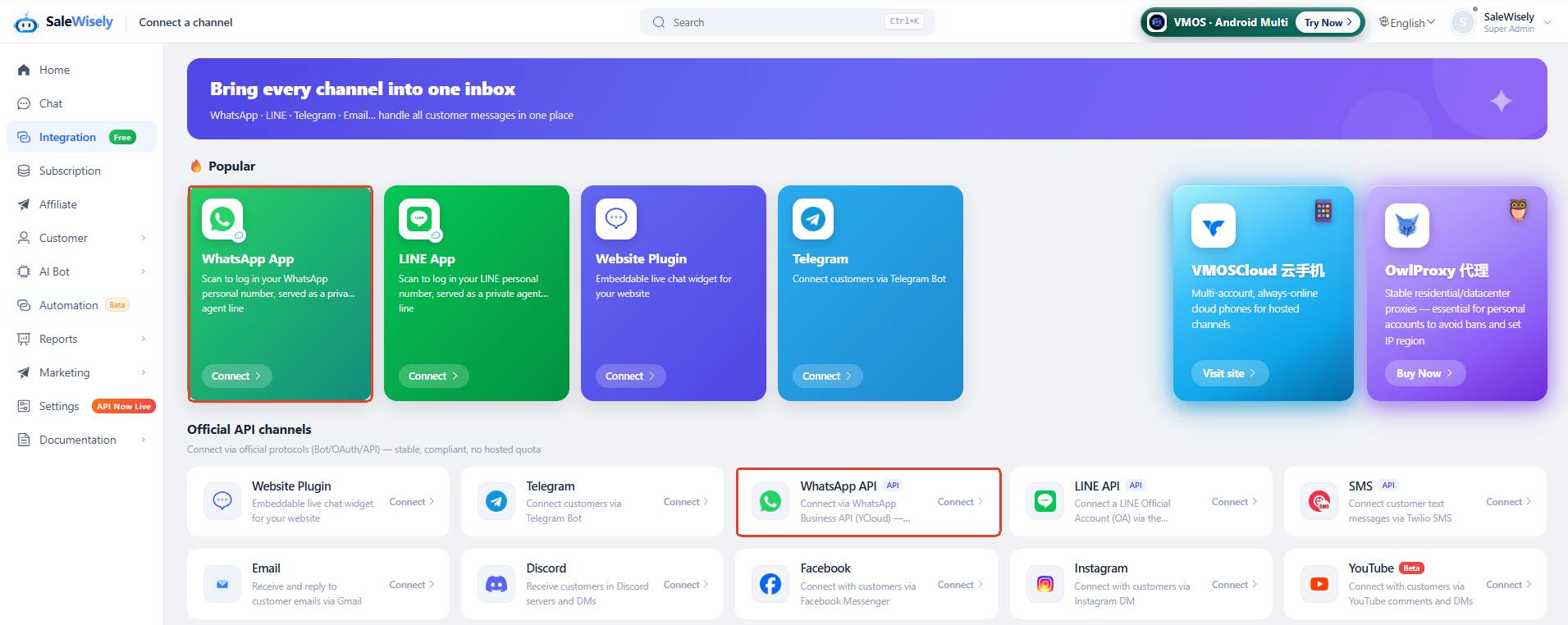
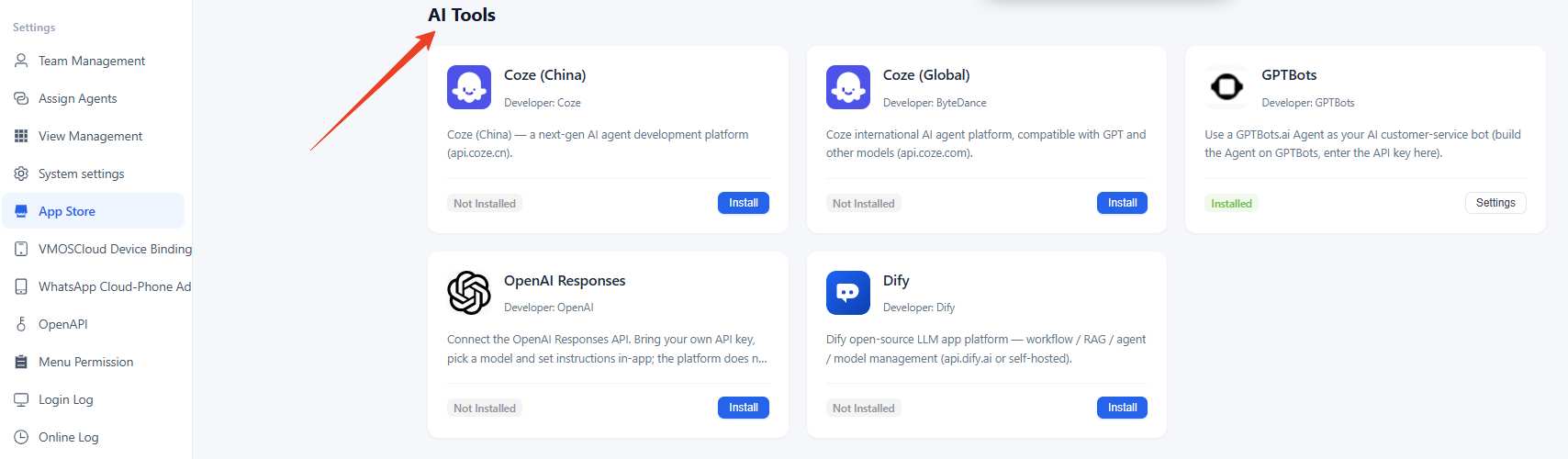
Step 2: Navigate to App Store and install the AI agent as per need (GPTBots, Coze, OpenAI Responses, Dify supported)
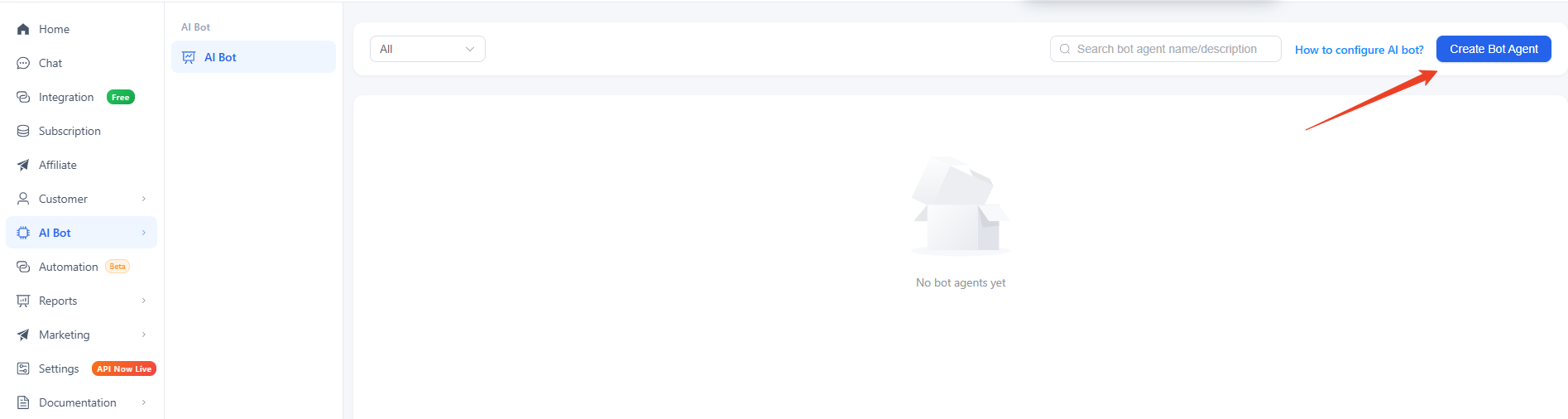
Step 3: Find AI Bot from the left side bar and click Create Bot Agent
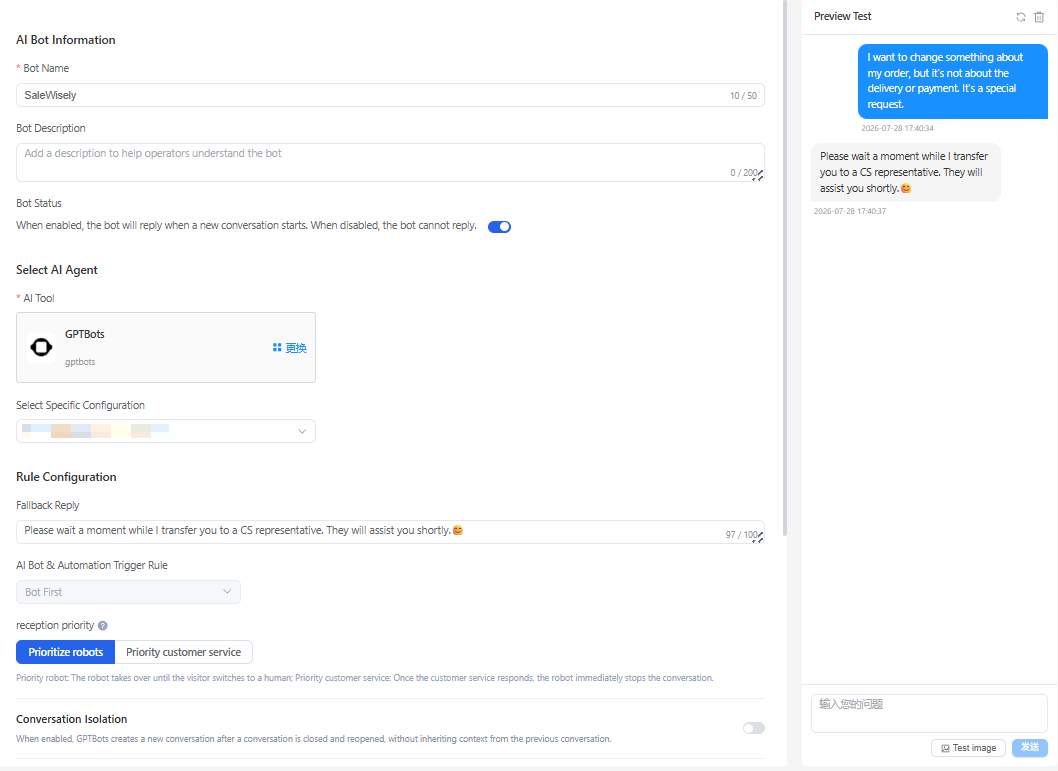
Step 4: Configure your AI Agent with name, description, AI tool etc. Save the configuration and do the Preview Test.
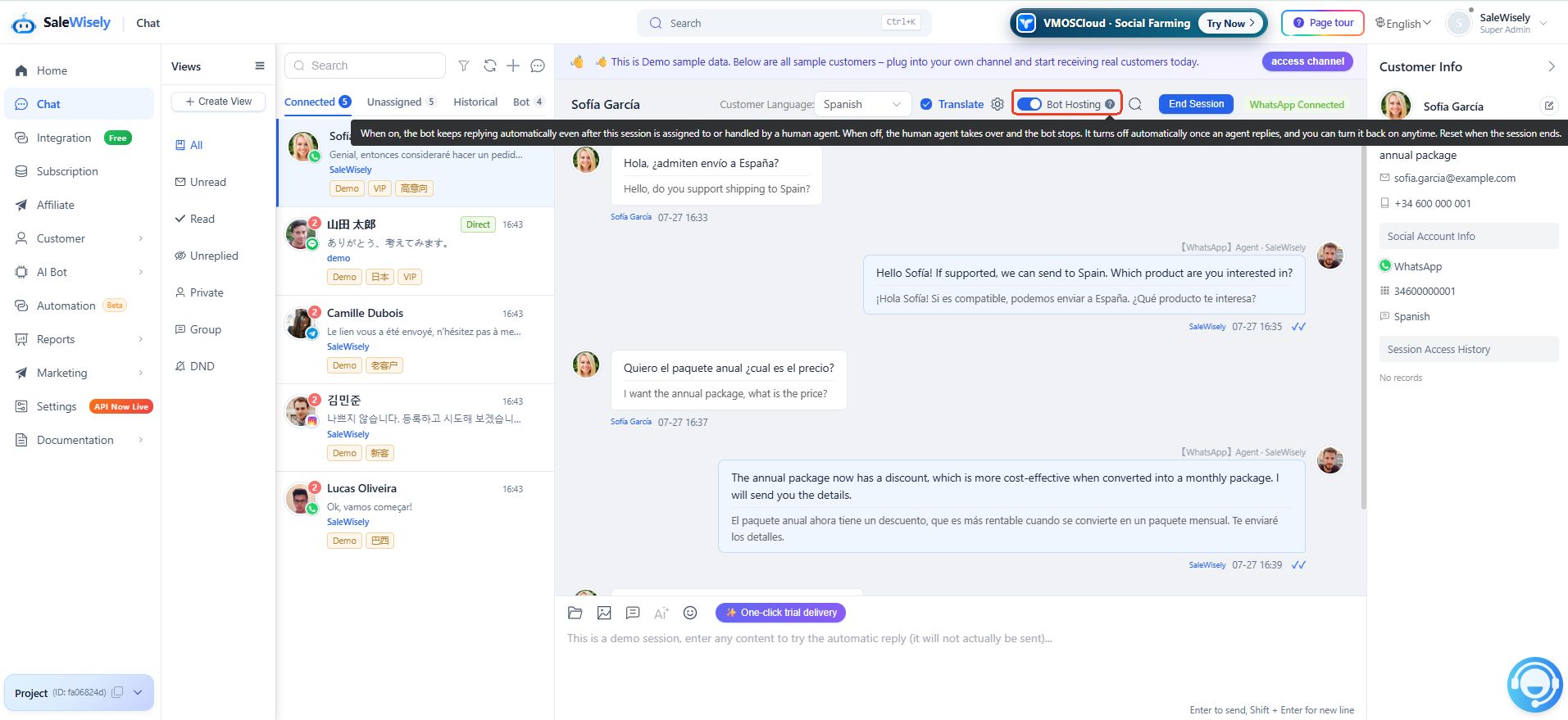
Step 5: Let the AI Agent handle real customer conversations for you.
FAQs
How can I build an AI Agent for WhatsApp?
You can build a WhatsApp AI Agent through Meta Business Agent or SaleWisely to help businesses integrate AI responses, workflows, and customer management features.
Do I need coding skills to set up a WhatsApp AI Agent?
No. You can set up WhatsApp AI Agent through WhatsApp Business app or customer conversation management software like SaleWisely easily without complex coding.
Can I customize how the AI Agent responds?
Yes. Businesses can customize what the AI Agent says by training. Keep knowledge bases updated and let AI agents keep learning during conversations.