This article answers the billing questions teams ask about AI credits: where charges come from, how to read and verify them, how credit expiry works, and what to do when a charge looks wrong. For the full metering rules, see AI Credits Consumption Rules.
Tags: billing, ai credits, daily consumption, charge verification, expiry
Prerequisites
- Access to Subscription in the left sidebar (admin access for order details).
1. Where can I see what was charged?
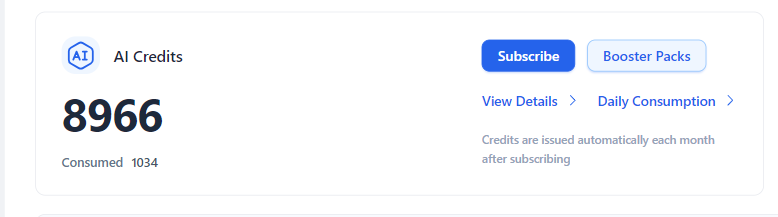
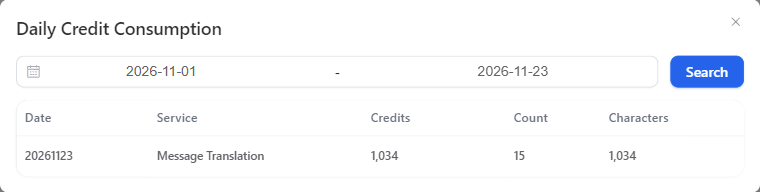
Open Subscription → My plan → Daily Consumption, pick a date range, and click Search. The table lists Date, Service, Credits, Count, Characters.
- Credits is what was deducted for that service that day.
- Count is the recorded usage count of the service — a count of 20 does not mean one message was charged 20 times.
- Characters is the text volume processed.
2. Can I see the charge of every single operation?
No. Daily Consumption shows summarized data only — it cannot be expanded into per-operation records. "AI Consumption" is itself a summary category that may include AI replies, intent recognition, suggested replies, risk analysis, and more, so the service name alone does not tell you which feature produced the charge.
3. Why does the balance drop when I am not using anything?
Three normal causes:
- Automatic features run in the background. Auto-translation, automatic summaries, and AI replies consume credits when enabled — including on messages your team never touches. Turn off automatic features you do not need.
- Credit expiry. Different credit sources have different validity periods. Expired credits are removed from the available balance, so a decreasing balance is not always caused by usage.
- Asynchronous settlement. Some services settle a short while after use, so charges can appear later. Refresh and check again.
4. Which credits are consumed first?
Normally plan credits first, then booster-pack credits. Within credits of the same type, earlier-expiring batches are consumed first. Check the expiry time of each batch in your credit account.
5. How do I verify a charge I do not recognize?
- Open Daily Consumption and note the date, service, credits, count, and characters.
- Check what the team did that day — new AI features enabled, large documents translated (including historical-message translation, which can consume many credits), long voice messages, or automation flows that reply automatically.
- If it still looks wrong, contact support with the project name, time, feature, and related screenshots.
6. How do I check a payment or order?
Open Subscription → My plan → Order Details, filter by date range and status, and check the Order Status column. Payment methods, taxes, and currency are shown at checkout and vary by region. If a payment did not credit your account, contact support with the order number.
7. Tips to keep billing predictable
- Turn on automatic translation and AI features only when you actually need them.
- Pick translation engines and AI models deliberately — rates differ.
- Watch out for long texts, long audio, and AI tasks with heavy context.
- Review Daily Consumption weekly to see which services cost the most.
- Track credit validity periods and top up before they lapse.