When you use translation, voice, and AI features in SaleWisely, the system deducts AI credits based on actual usage. Different features are metered in different ways, so one action does not equal a fixed number of credits. This article explains what consumes credits and how to read your consumption records.
Prerequisites
- A registered SaleWisely account (Free or paid plan)
- Free credits are granted once at registration; paid plans grant credits monthly
1. Which features consume AI credits?
|
Service |
Common use cases |
What determines the charge |
|---|---|---|
|
Message Translation *(verified in product UI)* |
Incoming message translation, outgoing message translation, manual translation |
Character count of the source text and the rate of the translation engine used |
|
AI Message Translation |
Translating messages with an AI model |
Actual input/output tokens processed by the model and the model rate |
|
Speech Recognition |
Converting customer voice messages to text |
Audio duration, when using the platform's default engine |
|
Text-to-Speech |
Generating speech from text |
Billable characters returned by the service and its rate |
|
Personal Voice Subscription |
Creating and renewing a personal voice |
Voice subscription rules |
|
AI Consumption *(verified in product UI)* |
AI replies, intent recognition, conversation quality checks, customer tagging, summaries, suggested replies, risk analysis |
Actual usage of each feature and model |
Notes
1. Available features and billing rules depend on your project configuration.
2. Automated features can also consume credits — for example automatic translation, automatic summaries, or AI replies.
3. Credit consumption is not limited to manual clicks; some background features also incur charges.
2. Why do identical messages consume different credits?
Credits are not deducted per message at a fixed rate. The charge depends on what the system actually did behind the scenes.
Translation depends on the source text length and the engine's rate. Two messages of similar length may still differ if different engines or content volumes are involved.
AI features are metered in tokens. A token is the basic unit an AI model processes — it is not the same as a character or a word. When processing one message, the model may read:
- The message itself
- Relevant conversation history
- Knowledge base or reference material
- The generated reply
That is why two similar-looking messages can produce different token usage and different credit consumption.
3. One action may involve several services
A single user action does not always call just one service. Example: a customer sends a foreign-language voice message and wants it converted to Chinese text. This may involve:
- Speech recognition — converting audio to text in the original language
- Message translation — translating the recognized text into Chinese
- Text-to-speech — converting the translation into voice, if requested
Which services actually run depends on the features you have enabled and the processing steps performed.
4. How to view your credit consumption
- Log in to SaleWisely and open Subscription in the left-side menu.
- Switch to the My plan tab.
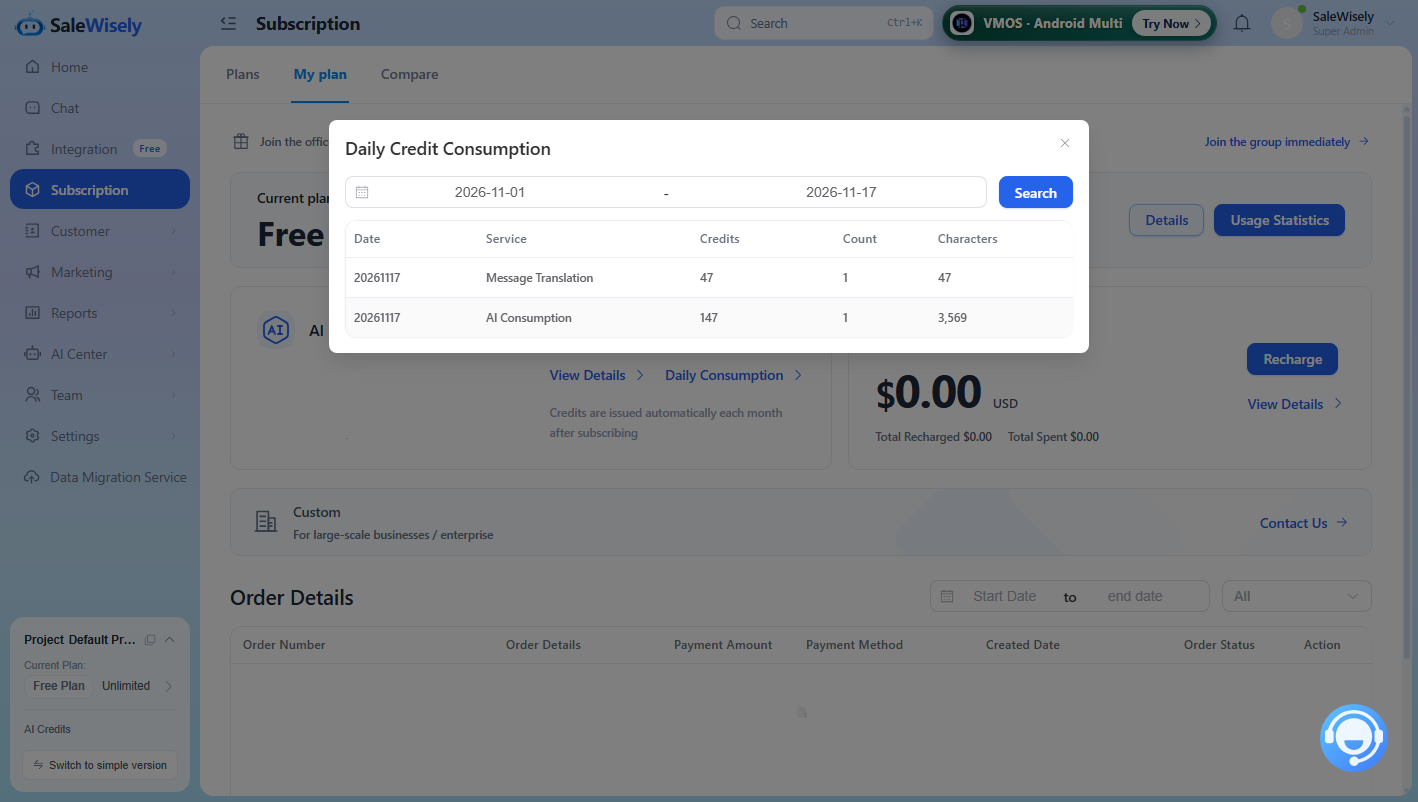
- In the AI Credits area (which shows your balance and consumed amount), click Daily Consumption.
- In the Daily Credit Consumption window, pick a date range and click Search.
- The table lists: Date, Service, Credits, Count, Characters.
Notes
- "Count" is the recorded usage count of a service that day — it does not mean one customer message was charged 20 times if it shows 20.
- Some services settle asynchronously. Your balance and consumption summary may update a short while after use. Refresh the page and check again if records appear delayed.
- To verify a specific charge, contact support with the project name, time, feature, and related screenshots.
5. FAQ
Q1: Can I see the charge of every single operation?
The Daily Credit Consumption page shows summarized data only — you cannot expand it into per-operation billing records. "AI Consumption" is itself a summary category that may include AI replies, intent recognition, suggested replies, risk analysis, and more, so the name alone does not tell you which AI feature produced the charge.
Q2: Which is used first — plan credits or booster-pack credits?
Normally the system uses available plan credits first, then booster-pack credits. Among credits of the same type, earlier-expiring batches are consumed first. Different credit sources may have different validity periods — check the expiry time in your credit account. Expired credits are removed from your available balance, so a decreasing balance is not always caused by feature usage.
Q3: Why hasn't my consumption record updated right after use?
Some services settle asynchronously. Wait a moment and refresh. If records stay missing for a long time, keep your operation time and related records and contact support.
6. Tips for using credits wisely
- Turn on automatic translation and automatic AI features only when needed, so they don't run on content you don't process.
- Choose translation engines and AI models based on your business needs.
- Watch out for long texts, long audio, and AI tasks with heavy context.
- Review Daily Consumption regularly to see which services use the most credits.
- Keep an eye on credit validity periods and top up when necessary.
Actual charges are based on the services used, model rates, and settlement records.
Verification
- Log in → Subscription → My plan → confirm AI Credits balance and Consumed values are visible.
- Click Daily Consumption → the Daily Credit Consumption window opens with a date range and Search button.