Every payment in SaleWisely — a plan subscription, a booster pack, a wallet recharge — leaves a record. This article shows where to find it, how to read the status, and what to include when you ask support to look at a charge.
Tags: orders, refunds, invoices, order status, balance
Prerequisites
- Admin access to Subscription → My plan.
1. Find an order
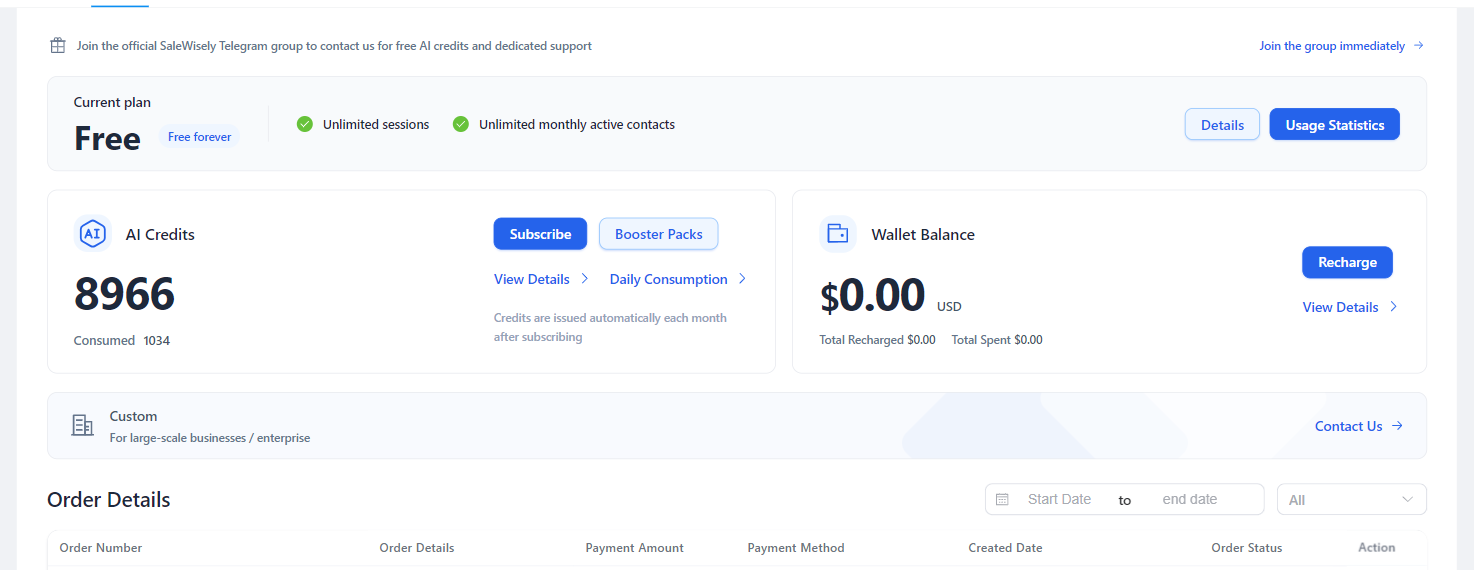
- Open Subscription in the left sidebar.
- Switch to the My plan tab. The Order table sits at the bottom of that page, below the plan card, the AI Credits card and the Wallet Balance card.
- Sort or scan by Created Date.
Each row carries Order Number, Order Details, Payment Amount, Payment Method, Created Date and Order Status. Click Details in the Action column for the full record.
Two balances sit above the table and are worth understanding before you read any order:
- AI Credits — the current balance and how much has been consumed, plus Daily Consumption. Credits are issued automatically each month after you subscribe, so a drop at the start of a cycle is normal.
- Wallet Balance — the money side: Total Recharged, Total Spent, and a Recharge action.
Credits and wallet money are separate accounts. An order can move money into the wallet without changing the credit balance, which is why both cards matter.
2. Read the order status
|
Status |
What it means |
What to do |
|---|---|---|
|
Paid |
Payment completed |
Nothing — check that credits or the plan appeared |
|
Pending |
Payment started but not confirmed |
Wait for the provider, then refresh; retry if it stays pending |
|
Cancelled |
The order was cancelled before payment |
Create the order again |
|
Refunded |
The order was refunded |
Check the Wallet Balance and AI Credits cards for the matching movement |
The statuses describe the money, not the credits. A Paid order whose credits never arrived is a support case, not a refresh problem.
3. Check the balance side
Compare three things: the order row, the AI Credits card, and the Wallet Balance card. If the order says Paid but neither balance moved, the payment and the ledger disagree — that is exactly what support needs to see, so screenshot all three before writing in.
4. Get the invoice
Click Details on an order to open the dialog with the transaction record and its invoice information. Use it for reconciliation and for accounting requests.
Payment methods, taxes and currency are shown at checkout and vary by region — keep the checkout confirmation when comparing against your statement.
5. When a charge needs review
Before you write to support, collect:
- The Order Number and the order's Created Date.
- A screenshot of the order row and of Balance Details for that day.
- What you expected to happen (credits added, plan upgraded) and what happened instead.
Send these to support — contact details are in Frequently Asked Questions.
6. Refunds
SaleWisely sells prepaid subscription packages, and paid services are non-refundable. All payments are final. This applies to every product type on this page — plan subscriptions, booster packs and wallet recharges alike — and it is the policy published in section 4 of the User Agreement (https://www.salewisely.com/user-agreement/).
The policy is specific about three cases that customers most often ask about:
- Partial periods. No refund or credit is given for part of a month, for the unused remainder of an active subscription, or for an account that is closed before its paid period ends.
- Upgrades and downgrades. No refund or credit is given for the price difference when you change plan.
- Digital services. Because SaleWisely provides software and cloud services, a purchase made after you enter the backend is treated as a digital service purchase. The "7-day no-reason return" rule does not apply.
Cancelling is not the same as refunding
You can stop using the service at any time, but stopping does not reverse a payment you have already made. What you can control is whether the next charge happens:
- Monthly plans are shown on the pricing page as payable for the current month and renewed manually before expiry — if you do not renew, the plan lapses at the end of the paid period.
- Yearly plans are billed once for the year up front.
- If a plan in your account is set to renew automatically and you do not want the next charge, contact support before the current period ends. There is no self-service cancel button on Subscription → My plan, so this has to go through support.
Asking support to review a charge
The User Agreement asks customers with a question or complaint about an order to contact online customer service or email support@salewisely.com first. Include:
- The Order Number and Created Date from the Order table.
- A screenshot of the order row and of Balance Details for that day.
- What you expected and what happened instead.
Two situations are genuinely worth escalating even though the default policy is no refund: a duplicate charge for the same order, and a Paid order where neither the AI Credits nor the Wallet Balance moved. Send both with the evidence above and support will trace the payment against the ledger.
Refunds are not issued automatically by the system. Nothing in the backend can reverse a payment, so any exception has to be handled by support after review.